Lesson 13 of 29
Record a transitional election for an asset owned before corporate tax
What you will be able to do
This lesson is for the tax manager. You will record the election that keeps the gain an asset built up before corporate tax began out of taxable profit when the asset is sold. You will correct the draft, record the sale with its disposal date, and delete a draft entered by mistake.
Before you start
- You are signed in with the Tax manager role for Meridian Souq Trading LLC.
- The business has decided to make the election and which method to use. You have the asset's purchase date and cost and, for the valuation method, its market value at the start of the first tax period.
- An election stays a draft, which can be edited or deleted, until the corporate tax return that uses it is filed. After that it cannot be changed.
Steps
- 1
Open Tax Intelligence, select More, then Transitional Elections
In the left menu choose Tax Intelligence and select More. Under Elections and opening balances, select Transitional Elections.
- Select More
- 2
Read the note at the top
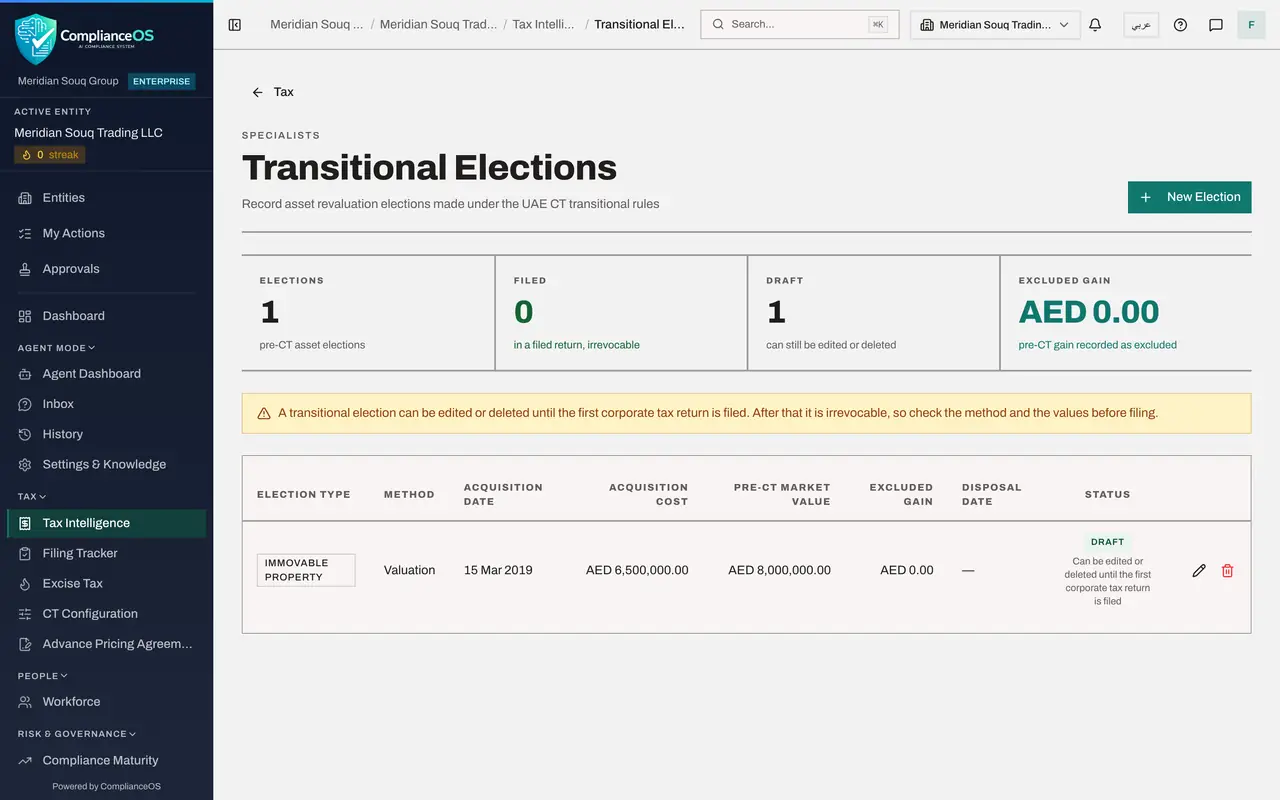
A transitional election is for an asset the entity owned before corporate tax began: land or buildings, intangible assets such as a trademark, or financial assets. It lets the gain from before that date be left out of taxable profit when the asset is sold. The note says an election can be edited or deleted until the first corporate tax return is filed; after that it cannot be withdrawn.
- 3
Select New Election
Select New Election at the top right. The Create Transitional Election form opens.
- Select New Election
- 4
Choose the asset type and the method
In Election Type choose the kind of asset: Immovable Property for a warehouse. In Method choose how the earlier gain is measured. Valuation uses the market value at the start of the first tax period. Time Apportionment spreads the total gain over the time the asset was held. Choose Valuation.
- Select Select asset type...
- Choose Immovable Property
- Select Select method...
- Choose Valuation
- 5
Enter when the asset was bought and what it cost
In Acquisition Date enter the purchase date and in Acquisition Cost the price paid in dirhams. The Al Quoz warehouse was bought on 15 March 2019 for 6,500,000.
- Type e.g. 1000000:
6500000
- Type e.g. 1000000:
- 6
Enter the market value and the first tax period
In Pre-CT Market Value enter what the asset was worth when corporate tax began, from a valuer's report. In First Tax Period Start enter the first day of the entity's first corporate tax year, 1 January 2024. Here the value is typed as 8,000,000, which the next steps will correct.
- Type e.g. 1500000:
8000000
- Type e.g. 1500000:
- 7
Add a note and select Create Election
In Notes say which asset this is and where the valuation came from. Then select Create Election.
- Type Notes (optional):
Al Quoz warehouse. Market value from independent valuer's report dated… - Select Create Election
- Type Notes (optional):
- 8
Read the tiles and the new row
Four tiles count the elections, how many are in a filed return and locked, how many are still drafts, and the gain recorded as excluded. The new row shows the type, method, purchase date, cost and market value. Status reads Draft, with the note that it can be edited or deleted until the first corporate tax return is filed.
- 9
Select the pencil and correct the market value
The valuer's report says 8,200,000, not 8,000,000. Select the pencil at the end of the row. In the Edit transitional election form, change Pre-CT Market Value to 8200000.
- Select Edit election or record the excluded gain
- Type Pre-CT Market Value (AED):
8200000
- 10
Record the sale: excluded gain and disposal date
The same form records the sale of the asset. The warehouse was sold on 10 March 2026. In Excluded gain type the gain that arose before corporate tax began: 8,200,000 less the cost of 6,500,000 is 1700000. In Disposal date enter the date of sale. The date decides which return takes the exclusion: the gain is taken out of taxable income in the tax period that contains it, here 2026, not 2025.
- Type Excluded gain (AED):
1700000 - Type Disposal date:
2026-03-10
- Type Excluded gain (AED):
- 11
Select Save changes
Select Save changes. The row now shows the corrected market value, the excluded gain of 1,700,000 and the disposal date, and the Excluded gain tile shows the same amount. The election is still a draft.
- Select Save changes
- 12
Create a second election to practise deleting
Select New Election again. Choose Intangible Asset as the type. Open Method: Valuation cannot be chosen for an intangible asset, so choose Time Apportionment; a line under the list says so. Enter 1 June 2020 as the acquisition date, 400000 as the cost, 650000 as the market value and 1 January 2024 as the first tax period start. Create Election stays greyed out until the type, the method, both dates and both amounts are filled. Select it.
- Select New Election
- Select Select asset type...
- Choose Intangible Asset
- Select Select method...
- Choose Time Apportionment
- Type e.g. 1000000:
400000 - Type e.g. 1500000:
650000 - Select Create Election
- 13
Select the bin on the practice election
Suppose that election was entered by mistake. Select the bin at the end of its row. A window names the draft election and warns that deleting it cannot be undone.
- Select Delete
- 14
Select Delete to confirm
Select Delete. The practice election is removed and the warehouse election remains. Once a return that uses an election is filed, its pencil and bin no longer work.
- Select Delete
How to check it worked
One election for Immovable Property is listed as a draft with a market value of AED 8,200,000, an excluded gain of AED 1,700,000 and the disposal date 10 March 2026, and the practice election for an intangible asset is gone.
Common mistakes
- Leaving Disposal date empty when you record the excluded gain. The date decides which year's return takes the exclusion: the gain is taken out of taxable income in the tax period that contains it.
- Choosing Valuation for an intangible asset such as a trademark. Valuation is for land and buildings; an intangible asset can only use Time Apportionment.
- Filing the return before checking the election. Once the return that uses it is filed, the election is locked.
Check your understanding
1. The warehouse was bought in 2019 and sold on 10 March 2026. Which corporate tax return takes the excluded gain?
- A.2019
- B.2024
- C.2025
- D.2026
Show answer
Answer: D. 2026
The gain is taken out of taxable income in the tax period that contains the disposal date. 10 March 2026 falls in the 2026 period.
2. Until when can a transitional election be edited or deleted?
- A.Never; it is locked on creation
- B.Until the corporate tax return that uses it is filed
- C.For 30 days
- D.Only by an administrator
Show answer
Answer: B. Until the corporate tax return that uses it is filed
The election is a draft until then. The banner on the screen and the note on each row say so.