Lesson 26 of 29
The finance side: the ledger profit behind the tax reconciliation
What you will be able to do
This lesson is for the finance manager and the accountant. You will open the profit and loss report for the tax year and see the two figures the corporate tax return takes from the accounts: the ledger profit that starts its reconciliation, and the tax transactions that are not in the ledger.
Before you start
- You are signed in with the Finance manager role for Meridian Souq Trading LLC. The tax manager cannot open Financial Reports; the two roles see the same figures from opposite sides.
- The chart of accounts is set up, and seven of the 2025 tax transactions have been posted to the ledger by the accountant and approved by you. The finance and accounting course covers both.
- The tax manager has computed the 2025 corporate tax return (lesson 17).
Steps
- 1
Open Financial Reports and select P&L
In the left menu choose Financial Reports, then select P and L, the profit and loss report, in the list on the left.
- Select Financial Reports
- Select P&L
- 2
Set the tax year and select Generate
In Period Start enter 1 January 2025 and in Period End 31 December 2025, the same year as the corporate tax return. Select Generate.
- Type Period Start:
2025-01-01 - Type Period End:
2025-12-31 - Select Generate
- Type Period Start:
- 3
Read the net profit
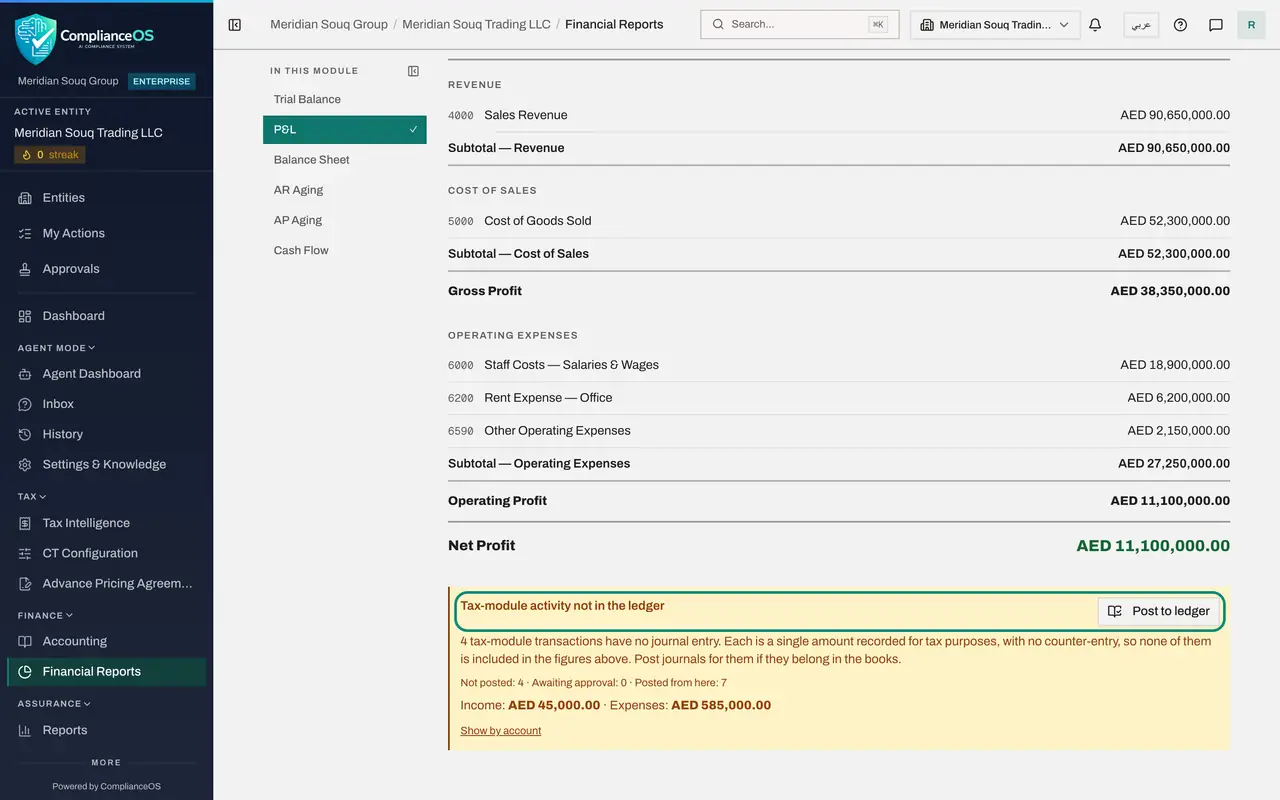
The report is built from posted journal entries only, as the line under the tiles says. Seven of the year's transactions are in the ledger: revenue of 90,650,000, cost of goods sold of 52,300,000, and staff costs, rent and other operating expenses. Net Profit is 11,100,000. This is the figure the corporate tax return shows as Accounting profit per ledger, the first line of its reconciliation.
- 4
Read Tax-module activity not in the ledger
The panel under the report is headed Tax-module activity not in the ledger. Four tax transactions have no journal entry, so they are not in the figures above: income of 45,000 and expenses of 585,000. Their difference, a net expense of 540,000, is the second line of the tax reconciliation. The counts show four not posted, none awaiting approval and seven posted from here.
- 5
Select Show by account
Select Show by account. The panel breaks the unposted amounts down by account and type, with the number of transactions in each: one of income and three of expenses. The account column shows a dash, because these imported transactions carry no account code.
- Select Show by account
- 6
Open Post to ledger to see the list
Select Post to ledger. The window lists the four remaining tax transactions with their date, description, type, amount and the status Can be posted: the entertainment, the fines, the loan interest and the London interest income. Ticking one shows the balanced journal entry it would create, after you say whether it is still owed or was paid through the bank. The entry then goes to the journal approval queue; nothing reaches the ledger until an approver posts it.
- Select Post to ledger
- 7
Select Cancel
Nothing more is posted in this lesson. Select Cancel to close the window.
- Select Cancel
- 8
Find the posted entry in Accounting, Journals
In the left menu choose Accounting and select Journals. The seven entries posted from the tax transactions are listed with the type TAX POSTING and the status POSTED, numbered in the 2025 series. Each description starts with Tax activity posted to ledger and names the transaction it came from.
- Select Accounting
- Select Journals
How to check it worked
The profit and loss report for 2025 shows a net profit of AED 11,100,000, the same figure as Accounting profit per ledger in the return's reconciliation, and the panel below it counts four tax transactions that are not in the ledger.
Common mistakes
- Expecting the report to include everything in Tax Intelligence. It is built from posted journal entries only; tax transactions without a journal entry are listed beside it, not inside it.
- Posting a tax transaction to the ledger when the same income or expense is already there from an invoice, a bill or a bank line. That would count it twice.
- Posting the year's transactions after the corporate tax return has been computed and not computing again. The reconciliation reads the ledger at the time it is computed.
Check your understanding
1. Where does the first line of the tax reconciliation, Accounting profit per ledger, come from?
- A.The tax manager types it in
- B.The net profit of the profit and loss report, built from posted journal entries for the same period
- C.The bank balance
- D.Last year's return
Show answer
Answer: B. The net profit of the profit and loss report, built from posted journal entries for the same period
Both screens read the same ledger. If the finance team posts or reverses an entry, the first line of the reconciliation changes with it.
2. The panel says four tax-module transactions have no journal entry. What does that mean for the report?
- A.The report is wrong
- B.Those amounts are not included in the report's figures; they appear on the reconciliation's second line instead
- C.They were deleted
- D.They are counted twice
Show answer
Answer: B. Those amounts are not included in the report's figures; they appear on the reconciliation's second line instead
The income and expenses of those transactions are shown under the report and carried into the return's reconciliation as tax-module activity not posted to the ledger.