Lesson 15 of 29
Group structure tools: tax groups, group transfers and partnerships
What you will be able to do
This lesson is for the tax manager. You will tour three screens under Corporate tax structure, learn what each one is for, and record a transfer of assets between two group companies so that its tax relief and its two-year watch period are tracked.
Before you start
- You are signed in with the Tax manager role for Meridian Souq Trading LLC.
- For the transfer you know the asset, the date, its market value and its book value, and the share of common ownership between the two companies.
- The group has decided to form a corporate tax group with Meridian Souq Trading LLC as its parent.
Steps
- 1
Open Tax Intelligence, select More, then Tax Groups
In the left menu choose Tax Intelligence and select More. Under Corporate tax structure, select Tax Groups. The note on the screen states the rule: a tax group files a single consolidated corporate tax return, the 375,000 dirham threshold applies once to the group total, and transactions between members are eliminated.
- Select More
- 2
Read the notice about organisation-level roles
With a Tax manager role held for one entity only, the page says that tax groups are managed at organisation level: a tax group spans several legal entities, so it needs a role held for the whole organisation. Ask an administrator to assign the role at organisation level. Here the organisation administrator, Layla Hassan, does that off camera, in Access control under People and assignments.
- 3
Refresh the page and select Create Tax Group
Once the role is granted, refresh the page. The notice is replaced by Create Tax Group. Select it. In Group Name type the name the group will file under. Group TRN is optional: the tax registration number the FTA gives the group once it is approved; leave it empty until then. The note says that the entity you are in becomes the parent of the group, and that a free zone company claiming the 0 percent rate cannot create or join a tax group.
- Select Create Tax Group
- Type Group Name:
Meridian Souq UAE Tax Group
- 4
Select Create Tax Group in the form
Select Create Tax Group at the bottom of the form. The group is listed with the status Elected and Meridian Souq Trading LLC as its parent and only member, 100 percent owned. Add Member adds the group's other mainland companies. Below are the year list and Compute Group CT Return, for the group's consolidated return, Saved group CT returns, and Loss Transfers, for moving a loss from one member to another.
- Select Create Tax Group
- 5
Go back to More and select Group Transfers
Select Tax at the top left to go back, select More, then Group Transfers. This screen records assets moved between companies in a qualifying group. Such a transfer can be made at book value with no gain taxed, as long as the conditions hold for two years; the yellow note explains the two-year clawback window.
- 6
Select Record Transfer and describe the asset
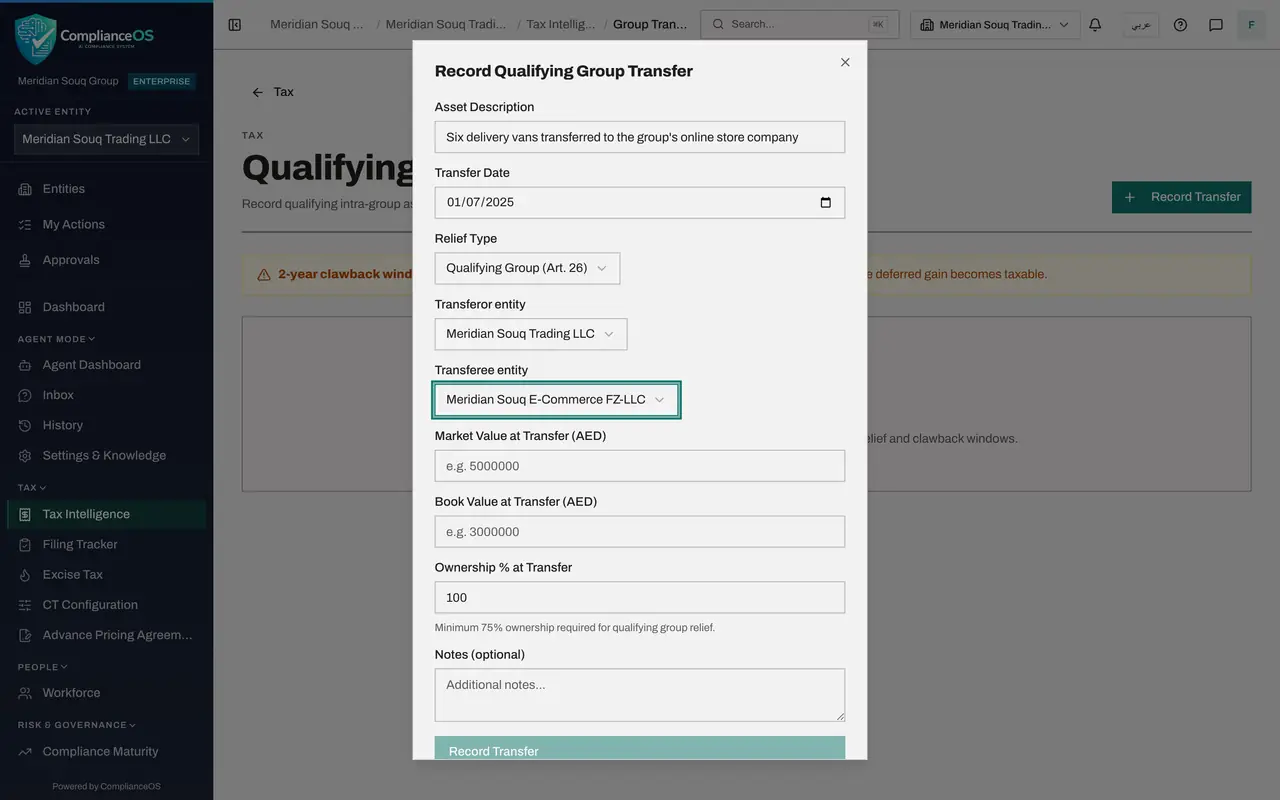
Select Record Transfer. In Asset Description say what was transferred. In Transfer Date enter the date it moved: 1 July 2025. In Relief Type choose Qualifying Group, Article 26, for a transfer between group companies; Business Restructuring, Article 27, is for the transfer of a whole business.
- Select Record Transfer
- Type e.g. Office building at JAFZA:
Six delivery vans transferred to the group's online store company - Select Select relief type...
- Choose Qualifying Group (Art. 26)
- 7
Enter the two companies
In Transferor entity choose the company giving up the asset, Meridian Souq Trading LLC, and in Transferee entity the company receiving it, Meridian Souq E-Commerce FZ-LLC. Both lists offer the entities of your organisation.
- Select Not specified
- Choose Meridian Souq Trading LLC
- Select Not specified
- Choose Meridian Souq E-Commerce FZ-LLC
- 8
Enter the values and the ownership
In Market Value at Transfer type what the asset was worth: 540000. In Book Value at Transfer type its value in the accounts: 420000. The difference, 120,000, is the gain that is deferred. In Ownership percent at Transfer type the common ownership of the two companies: 100. The relief needs at least 75.
- Type e.g. 5000000:
540000 - Type e.g. 3000000:
420000 - Type Min. 75%:
100
- Type e.g. 5000000:
- 9
Add a note and select Record Transfer
In Notes add the reference of the transfer agreement. Then select Record Transfer at the bottom of the form.
- Type Additional notes...:
Vans transferred at book value under transfer agreement TA-2025-07. - Select Record Transfer
- Type Additional notes...:
- 10
Read the transfer in the list
The transfer is listed with its date, relief type, market value and book value, its ownership percentage, the status Active and the date the clawback window ends, 1 July 2027, two years after the transfer. The red Clawback button records that a condition has failed and the deferred gain is to be taxed; leave it alone unless that has really happened. Check this list before any group asset is sold outside the group.
- 11
Go back to More and select Partnerships
Go back, select More, then Partnerships. Partnership Allocations is for an unincorporated partnership that is treated as transparent for tax: its taxable income is not taxed in the partnership but allocated to the partners. Meridian Souq Trading is a company, so the list is empty.
- 12
Select Add Partner to read the form
Select Add Partner. The form takes the Partner Name, the Allocation Percentage, which is that partner's share of the income, the Fiscal Year and optional Notes. A partnership adds one line for each partner, and the shares for a year should add up to 100.
- Select Add Partner
- 13
Close the form without saving
This entity has no partners, so select the cross to close the form without saving.
- Select Close
How to check it worked
CT Tax Groups lists Meridian Souq UAE Tax Group, Qualifying Group Transfers lists the delivery vans with their market value, book value and the end of the clawback window, and you can say what Partnership Allocations are for.
Common mistakes
- Recording a transfer between companies with less than 75 percent common ownership. The relief needs at least 75 percent, and the form says so under the ownership box.
- Forgetting the two-year window. If the asset leaves the group, or common ownership falls below 75 percent, within two years of the transfer, the gain that was deferred becomes taxable.
- Creating a tax group before the members qualify. Members must be resident, under at least 95 percent common ownership and share the same financial year; a free zone company claiming the 0 percent rate cannot join.
Check your understanding
1. What does a corporate tax group change?
- A.Each member files its own return as before
- B.The members file one consolidated return, the AED 375,000 threshold applies once to the group, and transactions between members are eliminated
- C.The group pays VAT together
- D.Nothing; it is a label
Show answer
Answer: B. The members file one consolidated return, the AED 375,000 threshold applies once to the group, and transactions between members are eliminated
That is what the note on the CT Tax Groups screen says. A free zone person that claims the 0 percent rate cannot create or join a tax group.
2. An asset is transferred within a qualifying group at book value. What must be watched afterwards?
- A.Nothing
- B.For two years: that the asset stays in the group and common ownership stays at 75 percent or more
- C.The VAT return for five years
- D.The exchange rate
Show answer
Answer: B. For two years: that the asset stays in the group and common ownership stays at 75 percent or more
If either condition fails within two years, the gain deferred at the time of transfer is clawed back and taxed.