Lesson 4 of 29
Fill in the entity's corporate tax profile
What you will be able to do
This lesson is for the tax manager. You will record the facts about the entity that decide how its corporate tax is worked out: its registration number, its financial year, its size and type, and the standing elections it has made.
Before you start
- You are signed in with the Tax manager role for Meridian Souq Trading LLC.
- You have the corporate tax registration number issued by the Federal Tax Authority, or FTA, and you know the month the financial year starts.
- You know whether the business has made any elections, such as exempting its foreign branches. Meridian Souq Trading has made none.
Steps
- 1
Open Tax Intelligence, select Setup, then CT Config
In the left menu choose Tax Intelligence. Select Setup, then the CT Config tab. CT is short for corporate tax. The form is in six parts, from top to bottom.
- Select Setup
- Select CT Config
- 2
Read the QFZP status note
QFZP means Qualifying Free Zone Person: a free zone business that meets the conditions to pay 0 percent corporate tax on its qualifying income. The note at the top says this entity has no free zone licence, so those rules do not apply to it. The Small Business Relief election below it has its own lesson, which comes next.
- 3
Type the registration number and check the financial year
Scroll to Registration. In CT Registration Number, type the corporate tax registration number the FTA issued. Fiscal year start month is the number of the month the financial year begins: 1 means January. It decides which dates a tax year covers and when the return is due, so check it against the entity's accounts.
- Type CT Registration Number:
CT-784512903
- Type CT Registration Number:
- 4
Choose the revenue bracket
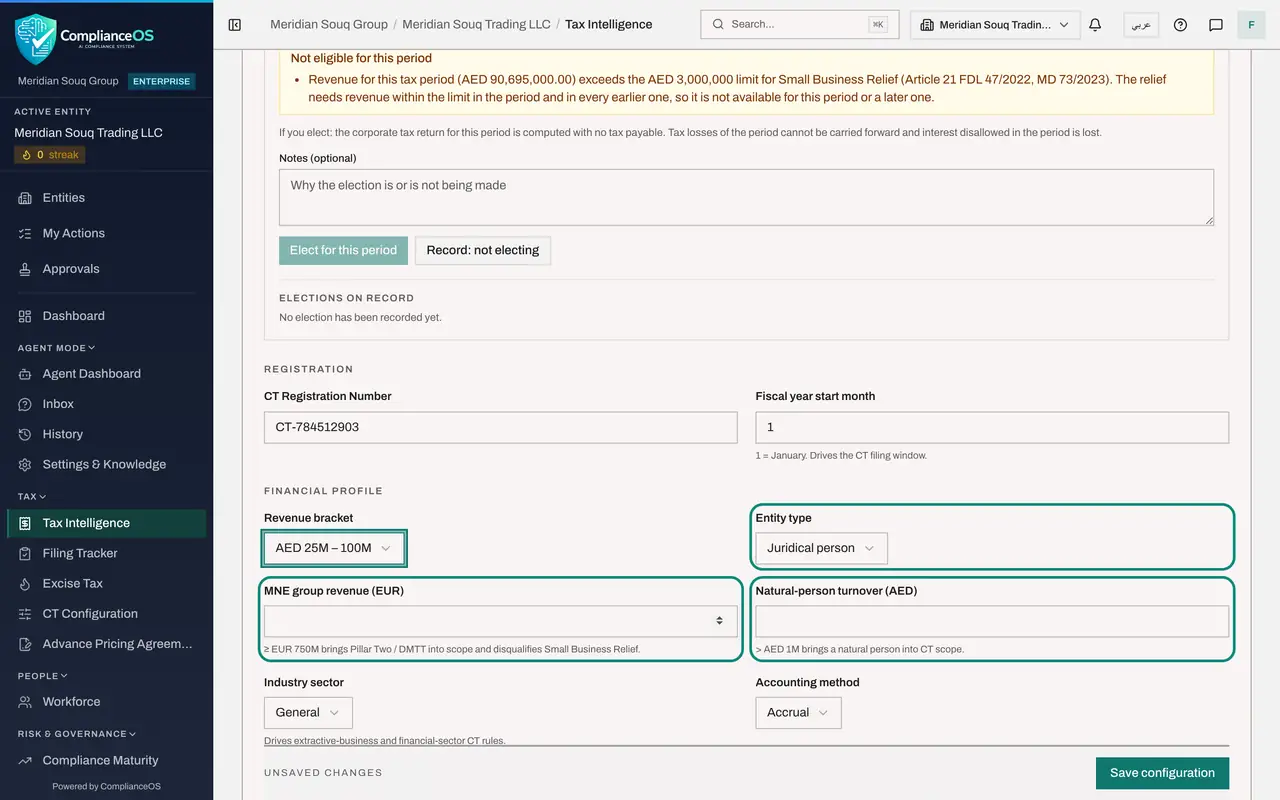
Under Financial profile, open Revenue bracket and choose the band the entity's yearly revenue falls in. Meridian Souq Trading turns over about 90 million dirhams, so choose AED 25M to 100M.
- Select Select…
- Choose AED 25M – 100M
- 5
Check the entity type and the two size boxes
Entity type is Juridical person for a company; Natural person is for an individual in business. MNE group revenue is only for an entity that belongs to a multinational group: at 750 million euros or more the group comes under the minimum top-up tax and the entity cannot use small business relief. Natural-person turnover applies only to an individual, who comes into corporate tax above 1 million dirhams. Leave both boxes empty for this company.
- 6
Check the industry sector and the accounting method
Industry sector switches on special rules for oil and gas, mining, banking and insurance; a retailer stays on General. Accounting method is Accrual for a business that records income when it is earned, or Cash basis for a small business that records it when it is paid. Open the Industry sector list to see the choices, then keep General.
- Select General
- Choose General
- 7
Read the two elections
Attribution and elections holds two standing choices. Foreign PE election: a PE, or permanent establishment, is a branch or fixed place of business abroad. Choose Elected only if the business has decided to exempt its qualifying foreign branches; otherwise their profit is taxed here with credit for foreign tax. Transparency election applies to partnerships. Leave both as they are.
- 8
Leave Exemption status at None
Exemption is for bodies the law exempts from corporate tax, such as a pension fund or a government entity. The list offers None, Automatic, Applied and awaiting the FTA, and Approved by the FTA, with boxes for the type and the FTA reference. A trading company is not exempt: leave None.
- 9
Leave ERP write-back switched off
Integration has one switch, Enable automatic write-back, which sends confirmed tax treatments back to a connected accounting system. Meridian Souq Trading has no accounting system connected, so leave it off.
- 10
Select Save configuration
The bar at the bottom reads Unsaved changes. Select Save configuration. The message Configuration saved appears and the bar changes to All changes saved.
- Select Save configuration
How to check it worked
The bar at the bottom of the form reads All changes saved, and the registration number and revenue bracket are still shown after you leave the tab and come back.
Common mistakes
- Leaving Fiscal year start month at 1 when the financial year does not start in January. The month decides which dates a tax year covers and when the return is due.
- Entering the entity's own revenue under MNE group revenue. That box is for the worldwide revenue of a multinational group, in euros. Leave it empty for a business that is not part of one.
- Setting Exemption status to Approved before the FTA has approved it. An exempt entity is taken out of the calculation.
Check your understanding
1. What does Fiscal year start month control?
- A.The VAT filing frequency
- B.Which dates a corporate tax year covers and when its return is due
- C.The currency of the return
- D.Who can approve the return
Show answer
Answer: B. Which dates a corporate tax year covers and when its return is due
The corporate tax year follows the financial year, and the return is due nine months after it ends.
2. Exemption status is set to Approved by FTA. What happens to the entity?
- A.Nothing changes
- B.It is treated as exempt and taken out of the corporate tax calculation, so it must only be set once the FTA has approved it
- C.Its rate drops to 5 percent
- D.It must file monthly
Show answer
Answer: B. It is treated as exempt and taken out of the corporate tax calculation, so it must only be set once the FTA has approved it
An exempt entity is taken out of the calculation. Use Applied, awaiting FTA while the application is pending.