Lesson 19 of 29
Approve and file the corporate tax return with Submit and Lock
What you will be able to do
This lesson is for the compliance officer, the second person in the filing. The tax manager prepared the 2025 return and it has been submitted on the tax authority's portal. You open it from the Filing Tracker, check it without recomputing, and use Submit and Lock to approve the filing, store the acknowledgement and freeze the year.
Before you start
- You are signed in with the Compliance officer role for Meridian Souq Trading LLC. You did not prepare the return.
- The tax manager has reviewed the return (lesson 18) and given you the portal's acknowledgement as a PDF with its reference number.
Steps
- 1
Open the Filing Tracker and find the return
In the left menu, under Tax, choose Filing Tracker. The row CT Return Filing 2025 shows the due date of 30 September 2026, the number of days it is overdue, and a line saying the return is still a draft and that filing it completes this deadline.
- 2
Select File the return
Select File the return on the row. The Corporate Tax Return page opens on the saved computation for 2025.
- Select File the return
- 3
Check the return without recomputing
Read the card and the table: tax of 942,750 dirhams for the period 1 January to 31 December 2025, due 30 September 2026, status Draft. The note above the card says this is the computation saved for the year. Do not select Recompute Now unless the figures need refreshing: a recompute that changes the return would make you a preparer as well.
- 4
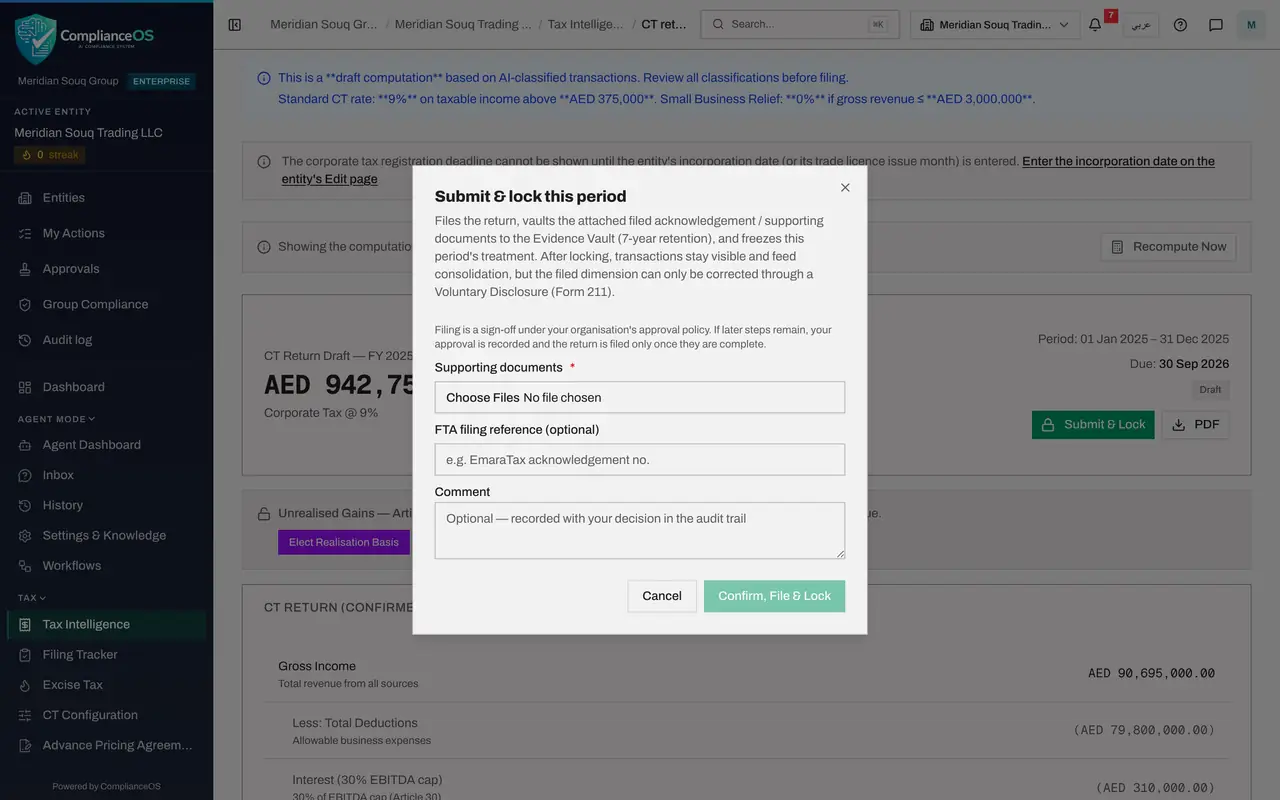
Select Submit and Lock
Select Submit and Lock. The window explains that the return is recorded as filed, the attached documents go to the Evidence Vault for seven years, and the year's treatment is frozen.
- Select Submit & Lock
- 5
Attach the acknowledgement and type the reference
Under Supporting documents, which is required, choose the acknowledgement the tax manager gave you. A line confirms one file attached. In FTA filing reference, type the acknowledgement number.
- Upload Supporting documents *:
ct-return-2025-acknowledgement.pdf - Type FTA filing reference (optional):
CT-2025-ACK-55120
- Upload Supporting documents *:
- 6
Add a comment and select Confirm, File and Lock
In Comment, note what you checked. Select Confirm, File and Lock. Because you did not prepare the return, your approval completes the policy's one step: the message Period filed and locked appears, and Approval progress shows Approved, one of one steps complete, approved by you, with your comment.
- Type Comment:
Reviewed the return prepared by Fatima Noor against the EmaraTax submi… - Select Confirm, File & Lock
- Type Comment:
- 7
Check the status and the approval
The page reloads on the filed return. The status reads Filed, and Submit and Lock is gone. A green box, Return filed, recomputed figures match, compares the figures as filed with today's data and finds nothing to correct. The year's transactions can no longer be reclassified; a correction now needs a voluntary disclosure.
How to check it worked
The return page shows the status Filed and the box Return filed, recomputed figures match, and Submit and Lock is no longer offered.
Common mistakes
- Selecting Recompute Now before signing when the figures have changed. A recompute that changes the return makes you a preparer as well, and then you cannot approve it.
- Approving without the acknowledgement. Attach the file the portal produced, so the filing can be proved later from the Evidence Vault.
- Approving a return you have not read. Your name is recorded as the approver in the audit trail.
Check your understanding
1. Why can the compliance officer file the return when the tax manager could not?
- A.The compliance officer has more seniority
- B.The compliance officer did not prepare the return, so they can be the independent second approver the policy requires
- C.The tax manager's role is read-only
- D.It is random
Show answer
Answer: B. The compliance officer did not prepare the return, so they can be the independent second approver the policy requires
The filing policy is maker and checker: the person who prepared the return cannot also approve it.
2. What does Submit and Lock do once approved?
- A.It sends the return to the Federal Tax Authority
- B.It records the return as filed, stores the attached documents in the Evidence Vault and freezes the year's tax treatment
- C.It deletes the draft
- D.It pays the tax
Show answer
Answer: B. It records the return as filed, stores the attached documents in the Evidence Vault and freezes the year's tax treatment
The return itself is submitted on the authority's portal. Submit and Lock records that fact here, keeps the proof for seven years and stops the filed figures from changing.