Lesson 7 of 29
Check Small Business Relief and record the election decision
What you will be able to do
This lesson is for the tax manager. You will read whether the entity may use Small Business Relief for a tax period, with the reason, the deadline and the effect on the return, and you will record the decision to elect or not to elect.
Before you start
- You are signed in with the Tax manager role for Meridian Souq Trading LLC.
- The year's transactions are classified and approved (lesson 6), so the card knows the revenue of the period.
- Small Business Relief lets a resident business with revenue of 3 million dirhams or less in the period, and in every earlier period, be treated as having no taxable income for that period. The choice is made period by period.
Steps
- 1
Open Tax Intelligence, select Setup, then CT Config
In the left menu choose Tax Intelligence. Select Setup, then the CT Config tab. The second box on the form is Small Business Relief election. Its first paragraph states the rule: revenue of 3 million dirhams or less in the period, and in every earlier period.
- Select Setup
- Select CT Config
- 2
Choose the tax period
Tax period, at the top right of the box, offers this year and the two before it. Choose 2025, the year being prepared. The four figures underneath belong to that period.
- Choose Tax period:
2025
- Choose Tax period:
- 3
Read the four figures
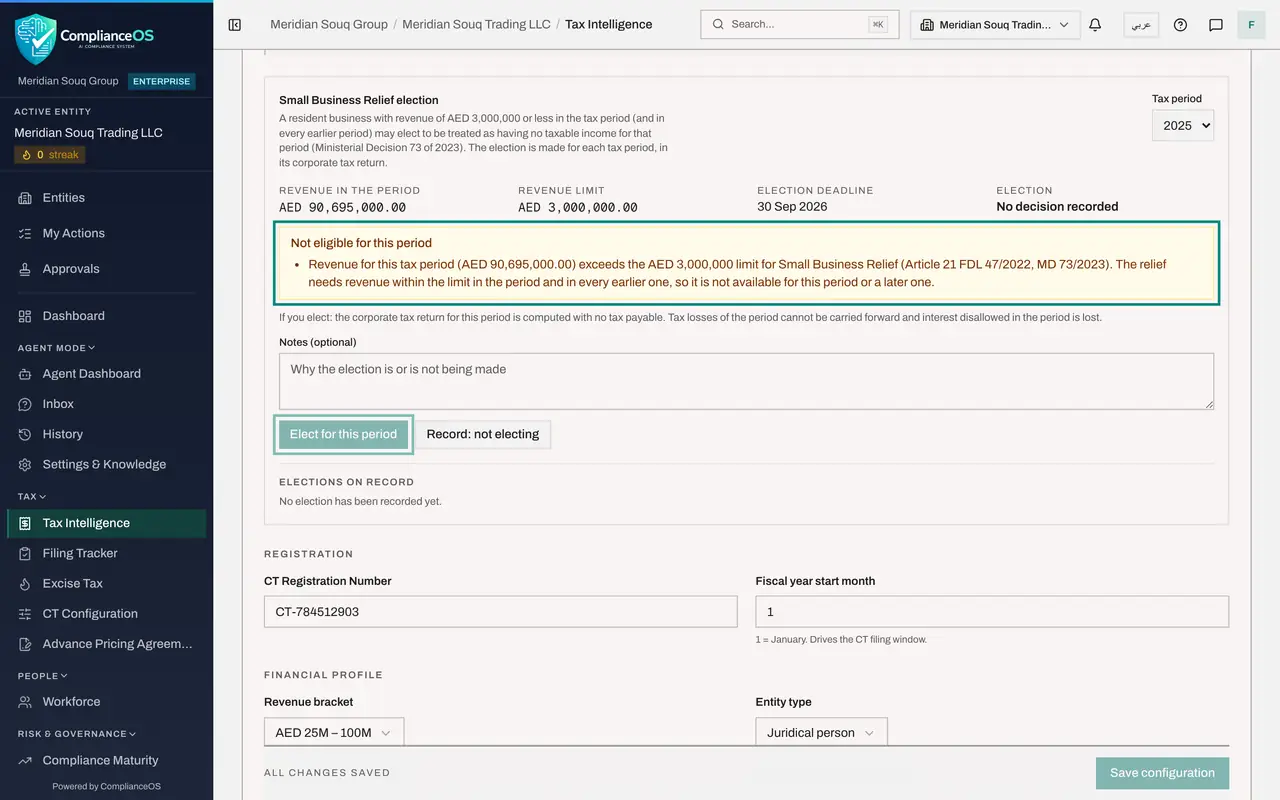
Revenue in the period is the income approved in Tax Intelligence for 2025: about 90.7 million dirhams. Revenue limit is 3 million. Election deadline is the date the return for the period is due, 30 September 2026, because the election is made in that return. Election shows the decision on record; here, No decision recorded.
- 4
Read why the entity is not eligible
The yellow box says Not eligible for this period and gives the reason: revenue for the period, about 90.7 million dirhams, exceeds the 3 million limit, and the relief needs revenue within the limit in the period and in every earlier one, so it is not available for this period or a later one. Elect for this period is greyed out. The line under the box states what electing would do: the return is computed with no tax payable, the period's tax losses cannot be carried forward and disallowed interest is lost.
- 5
Write a note and select Record: not electing
Even when the relief is not available, record the decision so the file shows it was considered. In Notes, type the reason. Then select Record: not electing. A message confirms it and Election changes to Not elected.
- Type Notes (optional):
Revenue for 2025 is above the AED 3 million limit, so the relief is no… - Select Record: not electing
- Type Notes (optional):
- 6
Find the decision under Elections on record
Elections on record, at the bottom of the box, lists the latest decision for each period. It now shows 1 January to 31 December 2025, Not elected.
- 7
Look at an earlier period
Choose 2024 in Tax period. No income is recorded for 2024, so the card says Eligible, but the election deadline, 30 September 2025, is behind us. The Elect button is greyed out and the line beside the buttons says the election deadline for this period has passed.
- Choose Tax period:
2024
- Choose Tax period:
- 8
Look at the current period
Choose 2026. No income for 2026 is in Tax Intelligence yet, but the card still says Not eligible for this period, and gives the reason: the relief is permanently lost, because revenue exceeded 3 million dirhams in an earlier period. Once the limit has been passed in any period, the election cannot be made again. For a business that is under the limit, the card says Eligible, Elect for this period is live, and after electing the second button becomes Withdraw the election.
- Choose Tax period:
2026
- Choose Tax period:
How to check it worked
Under Elections on record, the period 1 January to 31 December 2025 shows Not elected, and you can say why the entity is not eligible for 2025.
Common mistakes
- Reading Eligible on an old period as an invitation to elect. A period with no income recorded looks eligible, but if its return deadline has passed the election can no longer be made.
- Forgetting what the election costs. For an elected period, tax losses cannot be carried forward and interest that was disallowed is lost.
- Leaving a period with No decision recorded. Recording that you are not electing shows a reviewer that the question was considered.
Check your understanding
1. The entity's revenue for 2025 is about AED 90.7 million. What does the card show for 2025?
- A.Eligible for this period
- B.Not eligible for this period, and the Elect button is greyed out
- C.Elected
- D.An error
Show answer
Answer: B. Not eligible for this period, and the Elect button is greyed out
Revenue is far above the AED 3,000,000 limit, so the election is not offered. You can still record that no election is made.
2. Revenue was above AED 3 million in 2025. In 2026 it falls to AED 2 million. Can the entity elect for 2026?
- A.Yes, each period is judged on its own
- B.No. Once revenue has exceeded the limit in any period, the relief is permanently lost
- C.Yes, with FTA approval
- D.Only if it withdraws the 2025 decision
Show answer
Answer: B. No. Once revenue has exceeded the limit in any period, the relief is permanently lost
The card for 2026 says so in its reason: the relief is permanently lost because revenue exceeded the limit in a prior period.