Lesson 8 of 29
Record a related-party transaction and its transfer-pricing method
What you will be able to do
This lesson is for the tax manager. You will open the Related Party Registry, then record a transaction with a company in the same group, with its value and the method used to show the price is fair, so that it is ready for the transfer-pricing disclosure that goes with the corporate tax return.
Before you start
- You are signed in with the Tax manager role for Meridian Souq Trading LLC. This role can now create and edit transfer-pricing records and open the Related Party Registry.
- You know the related party's name and country, what was supplied, the total value for the year in dirhams, and which pricing method the group uses.
- In 2025 Meridian Souq Trading sold homeware worth AED 4,250,000 to its sister company, Meridian Souq E-Commerce FZ-LLC.
Steps
- 1
Open Tax Intelligence, select Analysis, then Transfer Pricing
In the left menu choose Tax Intelligence. Select Analysis, then the Transfer Pricing tab. Transfer pricing is the price charged between companies under common ownership, called related parties. The tax law expects that price to be what independent businesses would agree, and asks for the larger transactions to be disclosed with the return. The list, TP Records, is empty.
- Select Analysis
- Select Transfer Pricing
- 2
Select Related Parties
Four buttons sit above the list: Related Parties, TP Docs, CT-TP1 history and Add Record. Select Related Parties. It opens the Related Party Registry, which is also in the left menu under Risk and Governance.
- Select Related Parties
- 3
Read the Related Party Registry
The registry lists the suppliers and customers brought in from a connected accounting system, so that you can tag the ones that are related and have their transactions recorded for you. The three tiles count the synced contacts, those tagged as related and those not yet reviewed. This entity has no accounting system connected, so the list says No contacts synced yet. That does not stop you: related-party transactions can be typed in directly.
- 4
Select Transfer Pricing to go back
Select the Transfer Pricing button at the top right of the registry. It returns you to the Transfer Pricing tab in Tax Intelligence.
- Select Transfer Pricing
- 5
Select Add Record
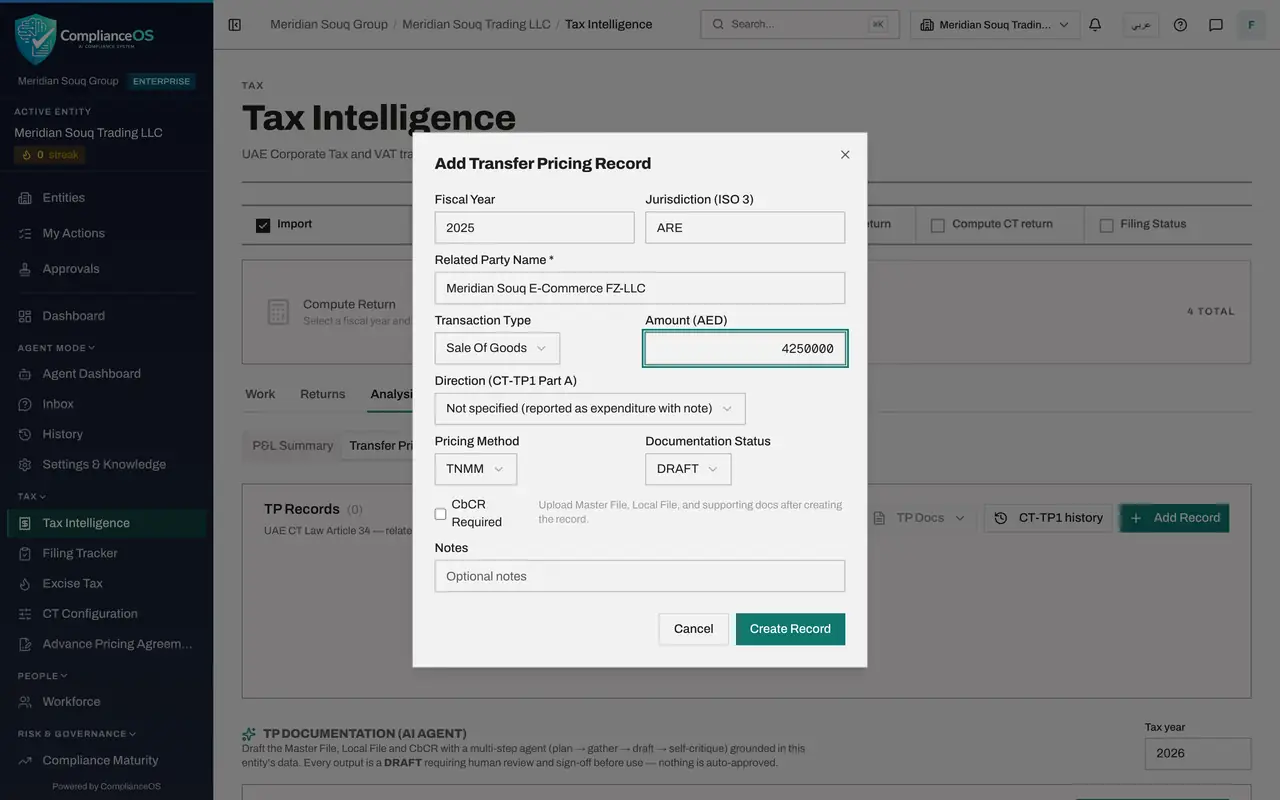
Select Add Record. The Add Transfer Pricing Record form opens. One record holds one kind of transaction with one related party for one year.
- Select Add Record
- 6
Enter the year, the country code and the name
Fiscal Year is the tax year the transaction belongs to: type 2025. In Jurisdiction, type the related party's three-letter country code: ARE is the United Arab Emirates. In Related Party Name, which is required, type the company's legal name.
- Type Fiscal Year:
2025 - Type e.g. ARE, USA:
ARE - Type Company name:
Meridian Souq E-Commerce FZ-LLC
- Type Fiscal Year:
- 7
Choose the type and enter the year's total
Transaction Type says what passed between the companies. The list covers goods, services, royalties, interest, management fees, guarantees, cost sharing and leases, each as income or expense. The entity sold goods, so choose Sale Of Goods. In Amount, type the total for the year in dirhams: 4250000.
- Select Transaction Type
- Choose Sale Of Goods
- Type AED 0.00:
4250000
- 8
Choose the direction
Direction decides where the amount appears in Part A of the disclosure form, which is called CT-TP1. Choose Income because the entity made the sale. Choose Expenditure for something the entity bought or paid for.
- Select Direction (CT-TP1 Part A)
- Choose Income
- 9
Choose the pricing method
Pricing Method is how the group shows the price is fair. CUP, the comparable uncontrolled price method, compares the price with the same goods sold to independent customers. RPM starts from the resale price, CPM from cost plus a mark-up, TNMM compares net profit margins and PSM splits the combined profit. Choose the method in the group's transfer-pricing policy; here it is CUP.
- Select Pricing Method
- Choose CUP
- 10
Check the document status, add a note and select Create Record
Documentation Status starts as DRAFT; the other choices are COMPLETE and FILED. Tick CbCR Required only if the group must file a country-by-country report. In Notes, say what the transaction is. Then select Create Record.
- Type Optional notes:
Wholesale supply of homeware to the group's online store, 2025 - Select Create Record
- Type Optional notes:
- 11
Find the record and read the tiles
The record is listed with its jurisdiction, type, amount, method, the source Manual and the document status DRAFT. Risk reads Not assessed. Four tiles now head the tab: Records, Documented, Risk flagged and Related-party value.
- 12
Select the pencil to edit the record
At the end of the row are AI Assess, a pencil, an arrow that opens the record's detail and a bin. Select the pencil. The Edit Transfer Pricing Record form opens with the same boxes.
- Select Edit record
- 13
Change the document status and select Save Changes
The group's transfer-pricing file for this sale is finished, so open Documentation Status and choose COMPLETE. Select Save Changes. The row now shows COMPLETE and the Documented tile counts it.
- Select Documentation Status
- Choose COMPLETE
- Select Save Changes
- 14
See what the bin asks before deleting
Select the bin at the end of the row. A window asks you to confirm before the record is deleted. This record is wanted, so select Cancel.
- Select Delete
- Select Cancel
How to check it worked
The record is listed under TP Records with the related party, the type Sale of goods, AED 4,250,000, the method CUP and the document status Complete, and the tiles above the list count it.
Common mistakes
- Typing the country name in Jurisdiction. The box takes the three-letter country code, such as ARE for the United Arab Emirates or GBR for the United Kingdom.
- Leaving Direction as Not specified. The disclosure then reports the amount as expenditure with a note. Choose Income when the entity sold and Expenditure when it bought.
- Recording each invoice separately. Enter one record for each related party and type of transaction, with the total for the year.
Check your understanding
1. The entity sold goods worth AED 4,250,000 to a sister company during the year. What do you choose in Direction?
- A.Expenditure
- B.Income
- C.Not specified
- D.It does not matter
Show answer
Answer: B. Income
A sale is income for the entity. Not specified would be reported as expenditure with a note.
2. The Related Party Registry is empty. Can you still record related-party transactions?
- A.No, connect an accounting system first
- B.Yes. The registry only lists contacts brought in from a connected accounting system; records can be typed in directly under TP Records
- C.Only an administrator can
- D.Only after the return is filed
Show answer
Answer: B. Yes. The registry only lists contacts brought in from a connected accounting system; records can be typed in directly under TP Records
The registry is a convenience for tagging synced contacts. Add Record works without it.