Lesson 25 of 29
Gap analysis, penalties and the five QFZP conditions
What you will be able to do
This lesson is for the tax manager. For the group's free zone company you will run a gap analysis against the zone's rules, check for penalties, and read the five conditions that decide whether the company is a Qualifying Free Zone Person for the year, including the de minimis test on its income.
Before you start
- You are signed in with the Tax manager role and working in Meridian Souq E-Commerce FZ-LLC.
- The licence is registered, and the 2025 substance assessment has been run and reviewed (lessons 22 to 24).
- QFZP means Qualifying Free Zone Person: a free zone business that meets the conditions to pay 0 percent corporate tax on its qualifying income.
Steps
- 1
Open Substance Assessment and read the status
Working in Meridian Souq E-Commerce FZ-LLC, choose Free Zones and select Substance Assessment. The strip at the top shows the QFZP status, Borderline, and a substance score of 88 out of 100, taken from the assessment. A yellow line, QFZP compliance gap detected, links to the reasons. The 2025 assessment is listed with the review status Confirmed, recorded by the compliance officer in the previous lesson.
- Select Substance Assessment1 (1)
- 2
Run the gap analysis
Select Gap Analysis in the list on the left, then select Run Gap Analysis. The AI compares the company with the zone's requirements. After a short wait a message confirms Gap analysis completed, and the analysis opens with today's date: a compliance score, how many obligations are met out of the total, and how many gaps were found.
- Select Gap Analysis1 (1)
- Select Run Gap Analysis
- 3
Read the gaps
Below the score, Gaps by severity lists what is missing, the most serious first. Each gap shows its severity, its category, the obligation, the requirement, a recommendation, a reference and a deadline. The AI wrote this list: check each gap against the zone's own rules before you act on it. Select Close when you have read it.
- 4
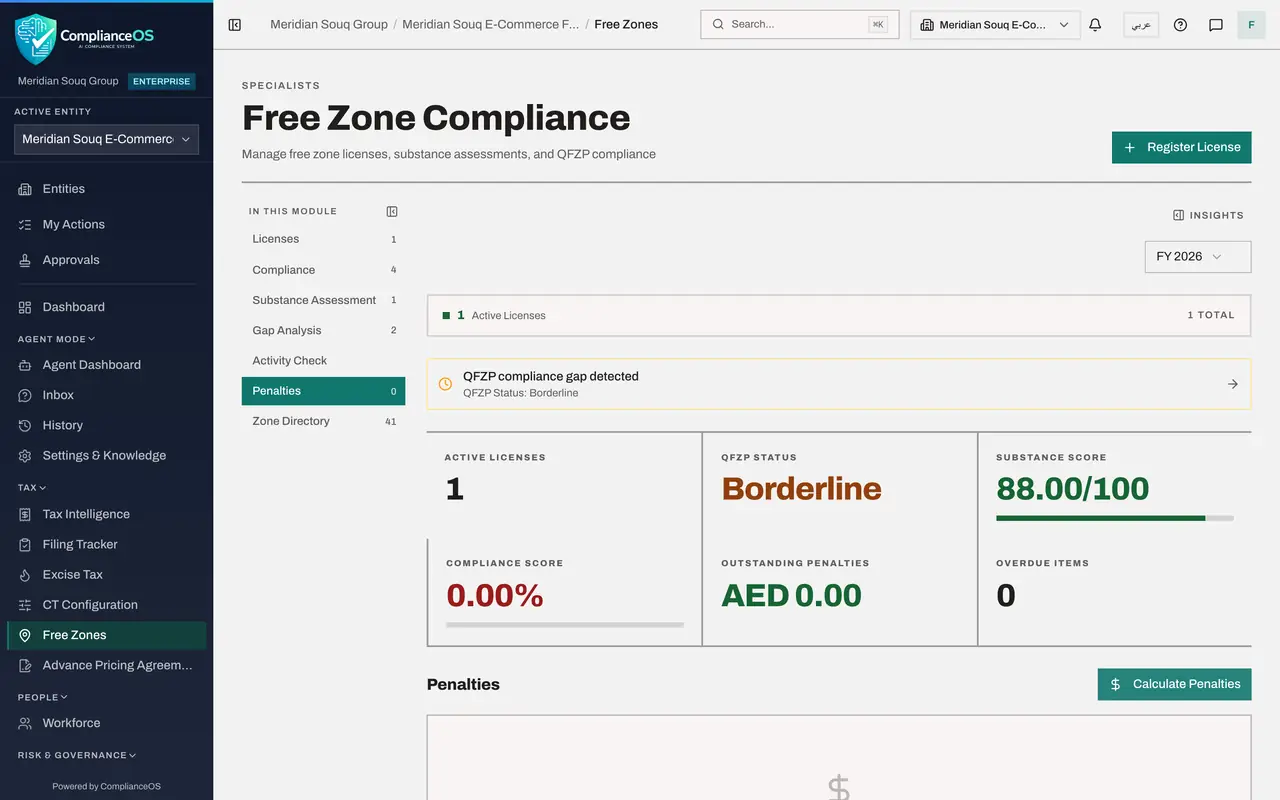
Check Penalties
Select Penalties, then Calculate Penalties. The system works out any penalty for overdue free zone obligations, such as a licence renewed late. The licence is in date, so none is recorded.
- Select Penalties0 (0)
- Select Calculate Penalties
- 5
Open QFZP and CT Filing
Now read the overall status. Open Tax Intelligence, select More, then CT Filing. For a free zone entity the page QFZP and CT Filing gives the QFZP status, Borderline, and the readiness to claim the 0 percent rate for 2025: Not ready, hard blockers present. Below it are the five conditions, each marked Pass or Fail with its legal reference: adequate substance, qualifying income under the de minimis test, no election to be taxed at the standard rate, arm's-length pricing with transfer-pricing documents, and audited financial statements. All five must hold.
- 6
Find the condition that fails
Substance passes, with the score from the assessment. Audited IFRS financial statements shows Fail: no audited statements have been uploaded, and they are required for a qualifying free zone person whatever its size. The line To fix says what to do. Until every condition passes, the company cannot rely on the 0 percent rate.
- 7
Read the de minimis test and the filing package
Under the five conditions, De minimis test shows the non-qualifying share of the income recorded in Tax Intelligence for this company, against the lower of 5 percent or 5 million dirhams. No transactions have been imported for the free zone company yet, so it reads zero and Safe; the figures you typed into the substance assessment are kept there. At the bottom, EmaraTax filing package downloads the return for the portal, with a warning to resolve the failing conditions before relying on the 0 percent rate.
- 8
See the same status in CT Config
Select Back to Tax, then Setup and the CT Config tab. For a free zone entity the first box shows the QFZP status for its licence, Borderline, with the substance score, the date it was last assessed and a link to review the substance assessment. It is the same status as on the Free Zones strip and the filing page. The line underneath explains that the status comes from the substance assessment and cannot be set here.
- Select Setup
- Select CT Config
How to check it worked
The QFZP and CT Filing page shows Pass or Fail for each of the five conditions for 2025, and CT Config shows the same QFZP status as the Free Zones screen.
Common mistakes
- Stopping at the substance score. The 0 percent rate needs all five conditions, including audited financial statements, which the QFZP and CT Filing page checks one by one.
- Reading the gap analysis as a legal opinion. It is written by the AI; a requirement or a date it quotes may not apply to this company, so check each gap against the zone's own rules.
- Expecting a Borderline status to mean the company qualifies. Borderline means the substance looks adequate but at least one condition is not met; the filing page names it.
Check your understanding
1. The assessment shows a high substance score, but the QFZP and CT Filing page marks Audited IFRS financial statements as Fail. Can the company claim the 0 percent rate?
- A.Yes, the score is enough
- B.No. All five conditions must hold, and audited statements are required for a qualifying free zone person whatever its size
- C.Yes, if revenue is under AED 50 million
- D.Only for half the year
Show answer
Answer: B. No. All five conditions must hold, and audited statements are required for a qualifying free zone person whatever its size
The page says all must hold. Upload the audited statements to clear that condition.
2. Where do you see, in one place, whether the free zone company qualifies for the year?
- A.The Filing Tracker
- B.Tax Intelligence, More, CT Filing: the page QFZP and CT Filing
- C.The Zone Directory
- D.Compliance Maturity
Show answer
Answer: B. Tax Intelligence, More, CT Filing: the page QFZP and CT Filing
That page lists the five conditions with Pass or Fail and the status for the year at the top.