Lesson 10 of 29
Use the transfer-pricing tools: benchmarks, adjustments, safe harbours and agreements
What you will be able to do
This lesson is for the tax manager. You will use the tools under TP Enhancements: look up a market range from the comparables database, test a margin against it, check for safe harbours, draft an intercompany agreement, and read the year-on-year trends.
Before you start
- You are signed in with the Tax manager role for Meridian Souq Trading LLC.
- The sale of goods to Meridian Souq E-Commerce FZ-LLC is recorded under TP Records for 2025 (lesson 8).
- You know the industry code of the business. Meridian Souq Trading is a wholesaler and retailer of household goods; this lesson uses code 4690, non-specialised wholesale trade.
Steps
- 1
Open Transfer Pricing and scroll to TP Enhancements
In Tax Intelligence select Analysis, then Transfer Pricing, and scroll down to TP Enhancements. The first box, Benchmarking, starts with the comparables database: the curated entries that come with the system, any entries built from your own records, the industries and transaction types covered, the data version and when it was last refreshed.
- Select Analysis
- Select Transfer Pricing
- 2
Enter the industry, the transaction type and the year
Under the database figures, type the Industry code: 4690 is non-specialised wholesale trade. In Transaction type choose Sale of goods. Fiscal year shows 2025; change it to 2024, the year the curated data covers. Jurisdiction stays AE, the country code used by the database.
- Type Industry code:
4690 - Select Transaction type
- Choose Sale of goods
- Type Fiscal year:
2024
- Type Industry code:
- 3
Select Compute IQR
Select Compute IQR. IQR is the interquartile range: the middle band of margins earned by independent businesses in that industry. The result shows six comparables, a lower quartile, called Q1, of 3.25 percent, a median of 4.5 percent and an upper quartile, Q3, of 6.13 percent, with the full range beside them. A related-party margin inside the band from Q1 to Q3 is treated as arm's length.
- Select Compute IQR
- 4
Test a margin with Compute adjustment
The next box, Arm's-length adjustment, tests a record against a market range. In TP record choose the sale to Meridian Souq E-Commerce. In Tested margin type the net margin the tested party earned, as a percentage: 3.2. Select Compute adjustment. The result reads Not tested, no arm's-length range: the test looks for at least five comparables for the record's own industry, type, year and jurisdiction, here 2025, and finds none, because the curated data covers 2024. The note says how to fix it: add benchmarks for the year, or record the range from your own study. Compared by eye with the 2024 range above, 3.2 is just under the lower quartile.
- Select TP record
- Choose Meridian Souq E-Commerce FZ-LLC · CUP
- Type Tested margin (%):
3.2 - Select Compute adjustment
- 5
Read Apply adjustment to CT return
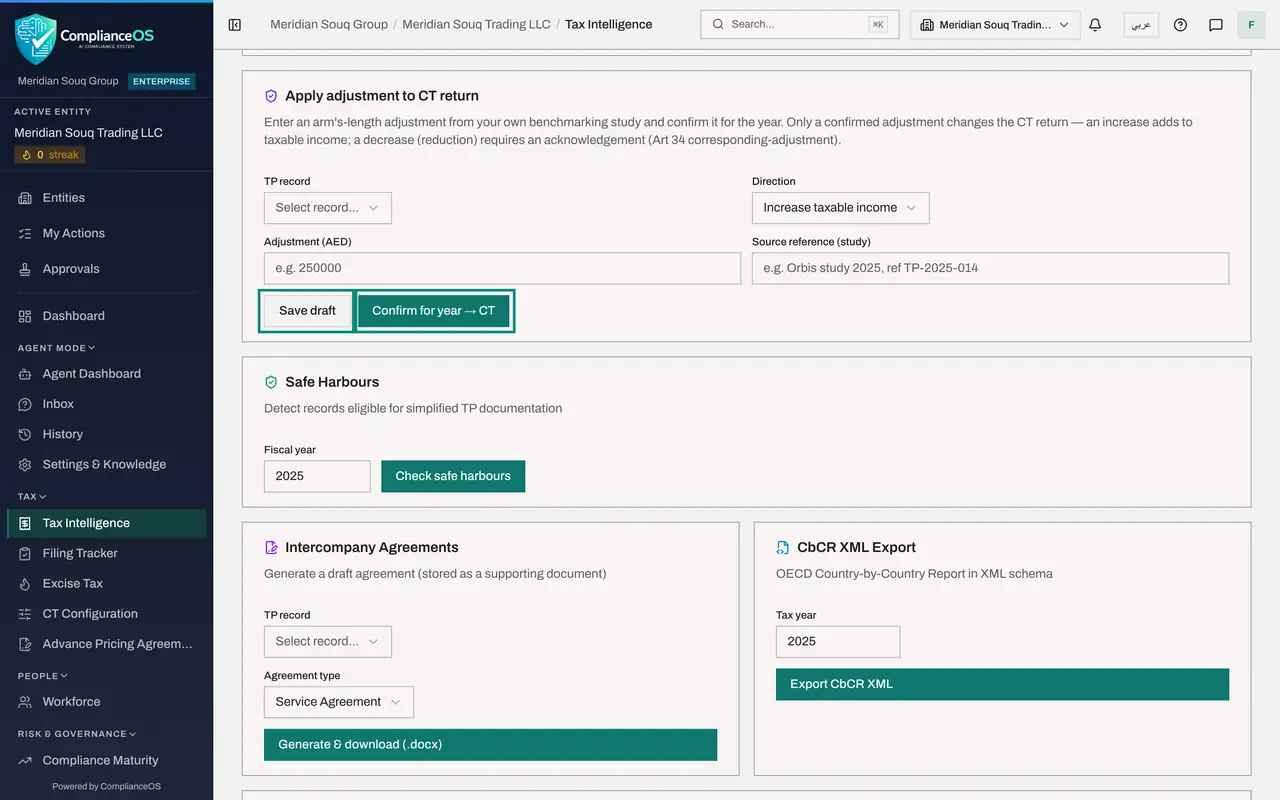
Apply adjustment to CT return is where an adjustment from your own benchmarking study is entered: the record, the Direction, which is Increase taxable income or a decrease, the amount in dirhams and the reference of the study. Save draft keeps it without effect. Confirm for year sends it to the corporate tax return: an increase adds to taxable income, and a decrease needs an acknowledgement. Nothing is entered in this lesson; an adjustment is a decision for the business, backed by a study.
- 6
Check for safe harbours
Safe Harbours finds records that qualify for simplified documentation. Fiscal year shows 2025. Select Check safe harbours. The result lists each record of the year: whether it qualifies, the type of safe harbour, the documentation needed and the reason. The sale of 4.25 million dirhams does not qualify, so a full local file is required.
- Type Fiscal year:
2025 - Select Check safe harbours
- Type Fiscal year:
- 7
Generate a draft intercompany agreement
Intercompany Agreements writes a draft agreement from a record. In TP record choose the sale to Meridian Souq E-Commerce. Open Agreement type to see the kinds on offer and choose Supply of Goods Agreement, which fits this sale. Select Generate and download. A Word file is downloaded and a copy is stored with the record as a supporting document.
- Select TP record
- Choose Meridian Souq E-Commerce FZ-LLC · Sale of goods
- Select Agreement type
- Choose Supply of Goods Agreement
- Select Generate & download (.docx)
- 8
Know what CbCR XML Export is for
CbCR XML Export produces the country-by-country report as a data file in the format tax authorities exchange. Only the ultimate parent of a large multinational group files one, for groups with revenue of 3.15 billion dirhams or more, so Meridian Souq does not use it. Type the tax year and select Export CbCR XML when it applies.
- 9
Load the year-on-year trends
TP Trends compares related-party transactions across years. Leave Start year and End year as they are, 2023 to 2025, and select Load trends. A line above the table flags what changed: Meridian Souq E-Commerce is a new related party first appearing in 2025. The table lists each counterparty with its type, method and change from year to year. AI assess, beside the button, asks the AI assistant to comment on the trends.
- Select Load trends
How to check it worked
The Benchmarking box shows a market range for industry 4690 with a median of 4.5 percent, a Word file with the draft agreement is in your downloads, and TP Trends flags Meridian Souq E-Commerce FZ-LLC as a new related party in 2025.
Common mistakes
- Selecting Confirm for year under Apply adjustment to CT return to try it. A confirmed adjustment changes the taxable income of the return. Use Save draft while you are still testing figures.
- Reading Not tested as a pass. The adjustment test needs a market range for the record's own year; without one it does not judge the margin at all.
- Sending out the generated agreement as it stands. It is a draft built from the record, for legal counsel to review before the two companies sign.
Check your understanding
1. What is the interquartile range used for in transfer pricing?
- A.It is the VAT rate range
- B.It is the middle band of results earned by independent businesses; a related-party result inside it is accepted as arm's length
- C.It sets the corporate tax rate
- D.It is the range of exchange rates
Show answer
Answer: B. It is the middle band of results earned by independent businesses; a related-party result inside it is accepted as arm's length
The range runs from the lower quartile to the upper quartile of comparable independent results. A margin outside it suggests an adjustment.
2. Which adjustment changes the corporate tax return?
- A.Any adjustment, as soon as it is computed
- B.A draft adjustment
- C.Only an adjustment that has been confirmed for the year
- D.None; adjustments are for information
Show answer
Answer: C. Only an adjustment that has been confirmed for the year
The box says so: only a confirmed adjustment changes the return. An increase adds to taxable income, and a decrease needs an acknowledgement.