Lesson 23 of 28
Remove an owner, and restore one removed by mistake
What you will be able to do
This lesson is for the compliance officer. A person's control over the company has ended, so you will remove her from the register with the date it ended and a reason. You will see where removed owners are kept, find the removal in the change log, and then restore her, as you would after a removal made by mistake.
Before you start
- The three owners are on the register, and the two shareholders hold 100 percent between them.
- You are signed in as the compliance officer. In the demo company this role can remove an owner; the AML officer cannot.
Steps
- 1
Select the red bin on the person's row
In UBO Records, find Hessa Butti Al Qemzi, who holds no shares but could appoint the directors. Her right ended on 1 October. Select the red bin at the end of her row. You may need to scroll the table sideways to see it.
- Select Delete UBO
- 2
Enter the date the ownership ended
The window says she will be ended as of the date below and that the record stays in the history and the change log. In Ownership ended on, enter 1 October 2026. The date starts as today and cannot be earlier than the date her control began.
- Type Ownership ended on:
2026-10-01
- Type Ownership ended on:
- 3
Write the reason
In Reason for removal say why, in at least 5 characters. The note under it reminds you that removing an owner is a register change that must be filed with the registrar within 15 days.
- Type Reason for removal:
Her right to appoint directors ended when the shareholders' agreement…
- Type Reason for removal:
- 4
Select Remove owner
Select Remove owner. A message says Owner removed, a filing with the registrar is now due. She leaves UBO Records, and Active UBOs drops to 2.
- Select Remove owner
- 5
Find her under Removed owners
Scroll down past UBO Records. A card called Removed owners lists her with her percentage, the date the ownership ended, your reason, and your name under Removed by. The text says a removal can be undone until it is filed with the registrar.
- 6
Find the removal in the Change Log
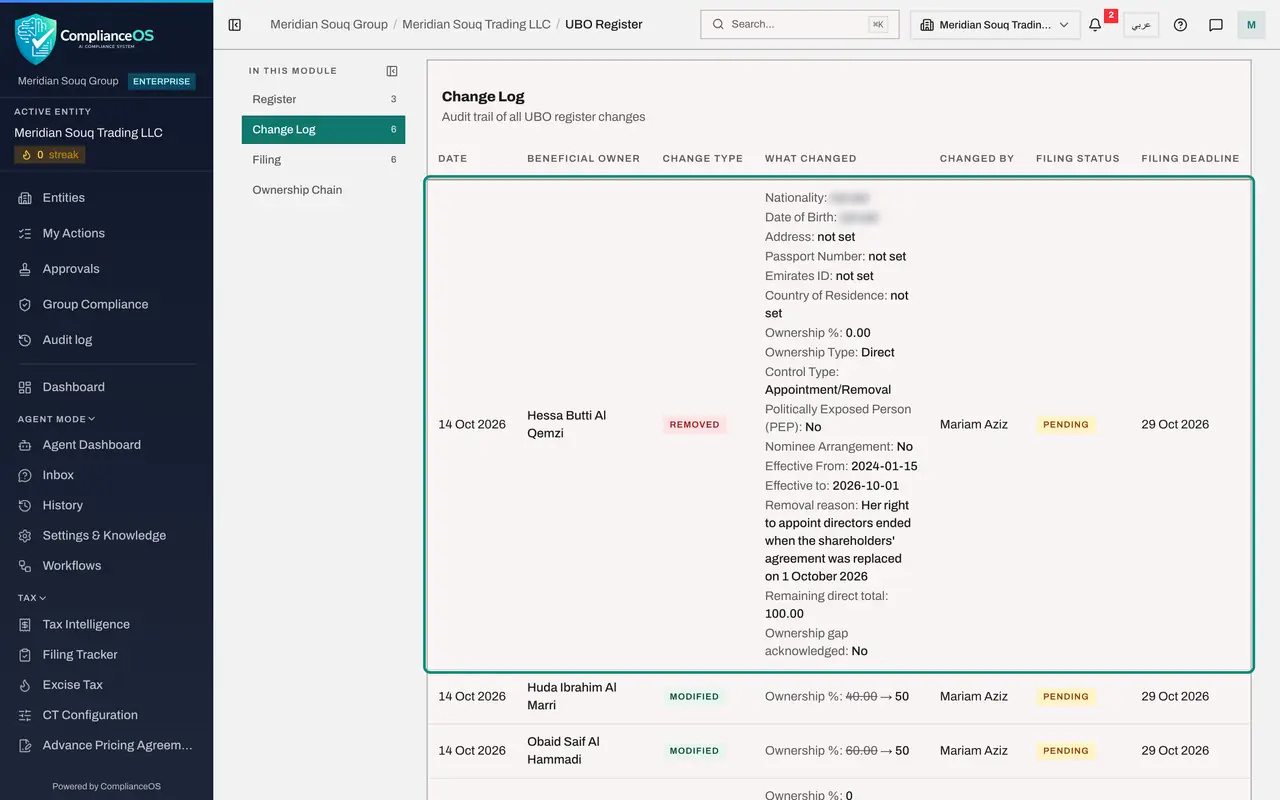
Select Change Log on the left. The newest line is the removal, with her name, the type of change, your name and a filing deadline. Then select Register to go back.
- Select Change Log6
- 7
Select Restore
Suppose the removal was a mistake: the new shareholders' agreement kept her right. Go back to Register, scroll to Removed owners and select Restore on her line. The window says she will be put back on the register and screened again, and that the removal's filing is cancelled because it was never filed.
- Select Register3
- Select Restore
- 8
Give the reason and select Restore
In Reason for restoring say why, then select Restore. A message says Owner restored to the register.
- Type Reason for restoring:
Removed in error: the new shareholders' agreement keeps her right to a… - Select Restore
- Type Reason for restoring:
- 9
See what happens when shares are left unaccounted for
Removing a shareholder is different, because shares must add up. Select the red bin on the row of Huda Ibrahim Al Marri, type a reason, and select Remove owner. The app does not remove her yet. An amber box says that after this removal the remaining owners would hold 50 percent of the direct shareholding, not 100 percent, and asks you to tick a box confirming that this is correct and that the rest is held by people who are not beneficial owners.
- Select Delete UBO
- Type Reason for removal:
Shares sold to an outside investor - Select Remove owner
- 10
Select Cancel
Only tick the box when the shares really have gone to someone who is not a beneficial owner, for example many small investors. When the buyer is a beneficial owner, move the shares first, as in the previous lesson. She is still an owner here, so select Cancel.
- Select Cancel
- 11
Check she is back
She is listed in UBO Records again with the status Active, and Active UBOs shows 3. The change log keeps both the removal and the restore, so the history shows exactly what happened.
How to check it worked
After the removal the person is listed under Removed owners with the date, your reason and your name. After the restore she is back in UBO Records with the status Active, and the Change Log shows both actions.
Common mistakes
- Ticking the confirmation box to get past the amber warning. It records your statement that the missing shares are held by people who are not beneficial owners. If the buyer is a beneficial owner, move the shares first, then remove the seller.
- Entering an end date earlier than the date the ownership started. The app refuses it.
- Trying to restore after the removal was filed. Restore is offered only until the removal has been filed with the registrar; after that, add the owner again.
Check your understanding
1. What happens to an owner's record when you remove them?
- A.It is deleted for good
- B.It is ended as of the date you give and kept under Removed owners and in the change log
- C.It is hidden from everyone
- D.It is sent to the regulator
Show answer
Answer: B. It is ended as of the date you give and kept under Removed owners and in the change log
Removal ends the ownership; it does not erase history. The record, the reason and the person who removed it all stay.
2. What must you give to remove an owner?
- A.Nothing
- B.The date the ownership ended and a reason of at least 5 characters
- C.A second person's password
- D.The owner's passport scan
Show answer
Answer: B. The date the ownership ended and a reason of at least 5 characters
The Remove owner button stays grey until both are filled in. The reason is shown later beside the removed owner.