Lesson 10 of 28
Add a customer due diligence record
What you will be able to do
This lesson is for the AML officer. You will open customer due diligence records, called CDD records, for two customers: the company that paid 126,000 dirhams in cash, and an individual. You will fill in every field of the form, learn what each choice means, and read the notice that says the customer's name is sent to a news search when you save.
Before you start
- You are signed in as the AML officer for the entity.
- You have identified the customer and know where its money comes from.
- Adverse media checks are switched on for the entity, which is the starting setting. A later lesson shows the switch.
Steps
- 1
Open the due diligence tab and start a new record
In the hub select the tab called CDD Records. One record is already there: the one the app opened for the new trade customer. Select the button Add CDD Record at the top right.
- Select CDD Records1
- Select Add CDD Record
- 2
Type the customer's name
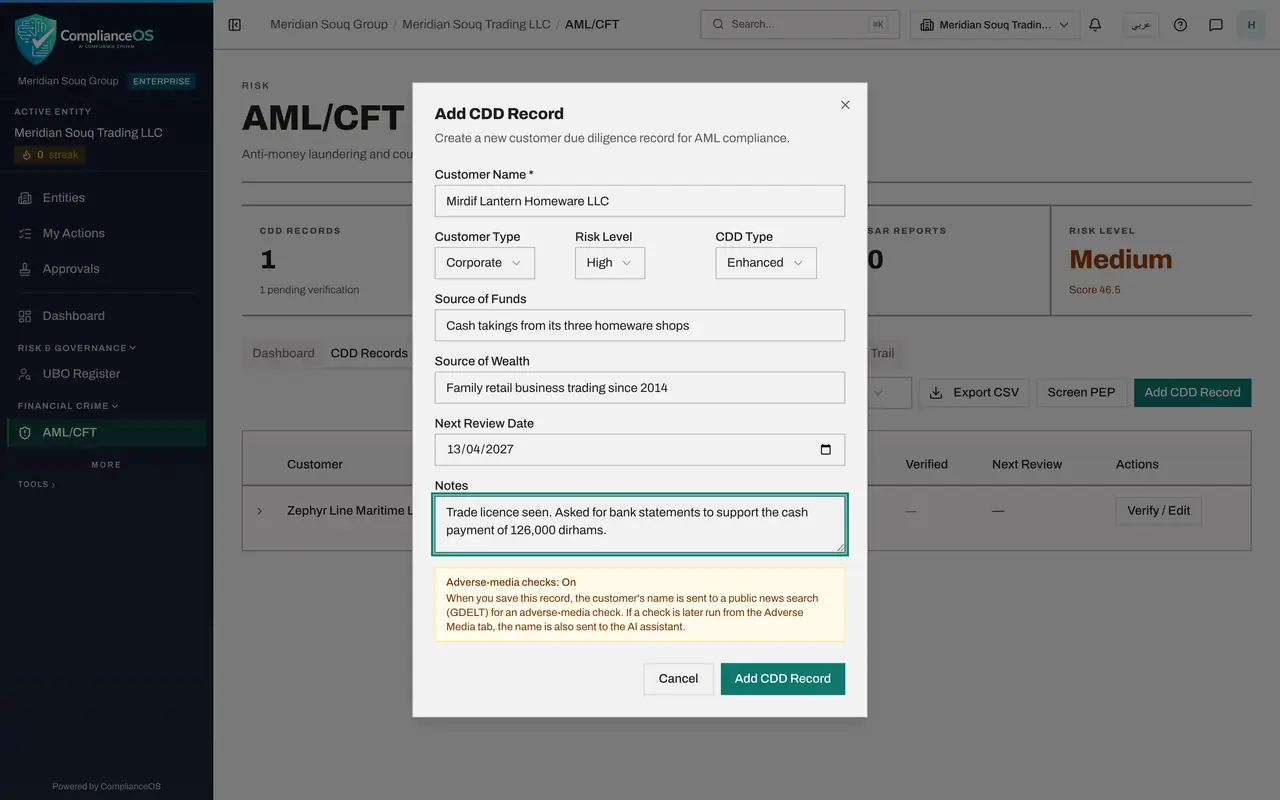
In Customer Name type the full legal name, here Mirdif Lantern Homeware LLC. This is the only required field, but an empty record is of no use, so fill in the rest.
- Type Customer Name *:
Mirdif Lantern Homeware LLC
- Type Customer Name *:
- 3
Choose the customer type
Open Customer Type. Individual is a person and Corporate is a company or other organisation. Choose Corporate.
- Select Corporate
- Choose Corporate
- 4
Choose the risk level
Open Risk Level. The choices run from Low to Prohibited, which means you will not deal with the customer at all. This customer paid a large amount in cash, so choose High.
- Select Medium
- Choose High
- 5
Choose the CDD type
Open CDD Type. Standard is the normal level of checks. Simplified is for customers you have rated low risk. Enhanced means extra checks, and is what a high risk customer needs. Choose Enhanced.
- Select Standard
- Choose Enhanced
- 6
Record where the money comes from
Source of Funds is where the money for this business with you comes from. Source of Wealth is how the customer built up what it owns. Write both in plain words.
- Type Source of Funds:
Cash takings from its three homeware shops - Type Source of Wealth:
Family retail business trading since 2014
- Type Source of Funds:
- 7
Set the next review date and add notes
In Next Review Date enter when the record must be looked at again. For a high risk customer that is sooner: here 13 April 2027, six months away. Use Notes for what you saw and what is still missing.
- Type Next Review Date:
2027-04-13 - Type Notes:
Trade licence seen. Asked for bank statements to support the cash paym…
- Type Next Review Date:
- 8
Read the adverse media notice
At the bottom of the form a notice says Adverse-media checks: On. It tells you that when you save, the customer's name is sent to a public news search for an adverse media check. If the switch were off, the notice would say that no name is sent.
- 9
Select Add CDD Record to save
Select Add CDD Record at the bottom of the form. A message says CDD record created, and the customer appears in the list with the status Pending.
- Select Add CDD Record
- 10
Start a record for an individual
Select Add CDD Record again. Type Imran Rafiq Siddiqui, choose Individual as the customer type, Low as the risk level, and leave the CDD type on Standard.
- Select Add CDD Record
- Type Customer Name *:
Imran Rafiq Siddiqui - Select Corporate
- Choose Individual
- Select Medium
- Choose Low
- 11
Complete and save the second record
Type the source of funds and the source of wealth, set the next review date to 13 October 2027, one year away, and select Add CDD Record.
- Type Source of Funds:
Salary - Type Source of Wealth:
Employment as a shop manager - Type Next Review Date:
2027-10-13 - Select Add CDD Record
- Type Source of Funds:
- 12
Open a row to read the whole record
Select the first customer's row. It opens to show the source of funds, the source of wealth, the documents collected, your notes, who verified the record, who last updated it, and when it was created. Select the row again to close it.
- 13
Check the counters
The CDD Records counter at the top now shows 3, with 3 pending verification, and the tab carries the same number. Pending records are the subject of the next lesson.
How to check it worked
Both customers are listed on the due diligence tab with the status Pending, and the first counter at the top shows three records.
Common mistakes
- Typing a trading name. Use the full legal name, so the record can be matched with screening checks and transactions.
- Choosing Standard for a customer you rated High. A high risk customer needs Enhanced due diligence.
- Leaving Next Review Date empty. The record then never comes up for review.
Check your understanding
1. A new CDD record is saved with the status Pending. What does Pending mean?
- A.The customer is blocked
- B.The details are recorded but nobody has yet confirmed the identity documents
- C.The record is waiting for the regulator
- D.The customer has a sanctions match
Show answer
Answer: B. The details are recorded but nobody has yet confirmed the identity documents
Saving the form records what you know. Verification is a separate step, shown in the next lesson, after the documents have been checked.
2. What does the notice at the bottom of the form tell you while adverse media checks are On?
- A.Nothing leaves the app
- B.When you save, the customer's name is sent to a public news search
- C.The customer will be emailed
- D.The record will be deleted after a year
Show answer
Answer: B. When you save, the customer's name is sent to a public news search
The notice is there so you know before you save that the name goes outside ComplianceOS for the adverse media check.