Lesson 19 of 28
Map relationships and run the network analysis
What you will be able to do
This lesson is for the AML officer. Money laundering often hides in connections: the same person behind a customer and a supplier, or ownership that runs in a circle. You will record three relationships between parties, read them back, and run the network analysis, which looks for circular ownership, links to politically exposed persons, links to sanctioned parties, and concentration.
Before you start
- You are signed in as the AML officer for the entity.
- You know the relationships from documents you have seen, such as a trade licence that names a manager.
Steps
- 1
Open the Network tab
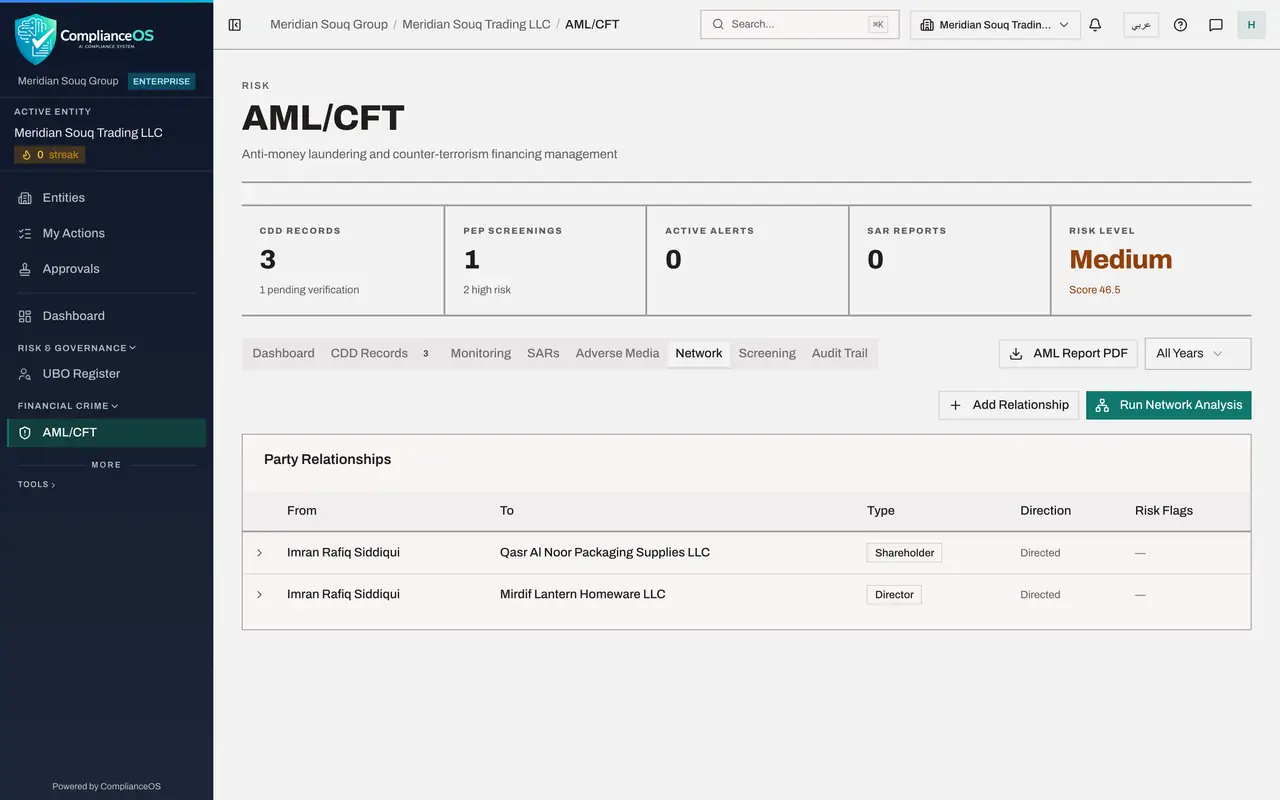
In AML/CFT select the Network tab. Party Relationships is empty. Two buttons sit above it: Add Relationship and Run Network Analysis.
- Select Network
- 2
Select Add Relationship and name the two parties
Select Add Relationship. A relationship runs from one party to another. In From Party type the person, Imran Rafiq Siddiqui. In To Party type the company, Mirdif Lantern Homeware LLC. Spell each name exactly as it is spelt elsewhere.
- Select Add Relationship
- Type From Party *:
Imran Rafiq Siddiqui - Type To Party *:
Mirdif Lantern Homeware LLC
- 3
Choose the relationship type
Open Relationship Type. The choices are UBO for a beneficial owner, Director, Shareholder, Family, Business Partner, Agent and Guarantor. The trade licence names this person as the manager, so choose Director.
- Select UBO
- Choose Director
- 4
Leave Bidirectional unticked and save
Bidirectional relationship means the relationship is the same in both directions, as with family members or business partners. A directorship runs one way, so leave it unticked. Select Add Relationship. A message says Relationship added.
- Select Add Relationship
- 5
Add the same person's link to a supplier
Add a second relationship: from Imran Rafiq Siddiqui to the supplier Qasr Al Noor Packaging Supplies LLC, with the type Shareholder. You learnt this from the supplier's ownership documents.
- Select Add Relationship
- Type From Party *:
Imran Rafiq Siddiqui - Type To Party *:
Qasr Al Noor Packaging Supplies LLC - Select UBO
- Choose Shareholder
- Select Add Relationship
- 6
Add an owner of your own company
Add a third: from Obaid Saif Al Hammadi to Meridian Souq Trading LLC, with the type UBO. He is one of your company's beneficial owners, who are recorded in full in the UBO Register later in this course.
- Select Add Relationship
- Type From Party *:
Obaid Saif Al Hammadi - Type To Party *:
Meridian Souq Trading LLC - Select UBO
- Choose UBO
- Select Add Relationship
- 7
Read the list and open a line
Party Relationships now lists the three relationships with their type, direction and any risk flags. Two lines share the same person: he connects a customer and a supplier. Select a line to open it and see when it was recorded and whether it carries any flag.
- 8
Select Run Network Analysis
Scroll up and select Run Network Analysis. A message says Network analysis complete and a result card appears above the list. The four boxes count the parties, the relationships, a risk score and the number of risk flags.
- Select Run Network Analysis
- 9
Read the four kinds of finding
Below the boxes are four lists: Circular Ownership, PEP Connections, Sanctions Connections and Concentration Risks. Each shows a count and either the findings or None detected. The analysis does not judge that one person sits behind both a customer and a supplier; that conclusion is yours to draw from the list of relationships.
How to check it worked
Party Relationships lists three relationships, and Network Analysis Result shows 5 parties and 3 relationships with a risk score.
Common mistakes
- Spelling a party differently in two relationships. The analysis connects parties by name, so a different spelling is treated as a different party.
- Ticking Bidirectional for ownership or directorship. Those run one way: from the person to the company. Use it only for relationships that are the same in both directions, such as family or business partners.
- Leaving the tab and expecting the result to be there later. The analysis result is shown until you leave the tab; run it again when you need it.
Check your understanding
1. A person is a director of a customer and a shareholder of a supplier. Why record both relationships?
- A.It changes the VAT treatment
- B.It lets you and the analysis see that one person connects a customer and a supplier
- C.It is required to save a CDD record
- D.It hides the supplier from screening
Show answer
Answer: B. It lets you and the analysis see that one person connects a customer and a supplier
A link between a party you sell to and a party you buy from is exactly the kind of connection an AML officer needs to know about.
2. What does Run Network Analysis report?
- A.Only the number of customers
- B.Counts of parties and relationships, a risk score, and any circular ownership, PEP connections, sanctions connections and concentration risks
- C.The tax due
- D.The sanctions lists that are out of date
Show answer
Answer: B. Counts of parties and relationships, a risk score, and any circular ownership, PEP connections, sanctions connections and concentration risks
The result card shows the four totals at the top and the four kinds of finding below, each with a count or None detected.