Lesson 21 of 28
Record the company's beneficial owners
What you will be able to do
This lesson is for the compliance officer, who keeps the register of beneficial owners. An ultimate beneficial owner, or UBO, is a real person who owns or controls 25 percent or more of the company, or controls it in another way. You will add three owners, filling in every field of the form: two shareholders, and one person who holds no shares but has the right to appoint the directors.
Before you start
- You are signed in as the compliance officer for the entity. Adding owners needs permission to create UBO records.
- You have each owner's identity document and the company's shareholding documents.
- The identity numbers, phone numbers and addresses in this example are invented.
Steps
- 1
Open the UBO Register
In the left menu, under Risk and Governance, select UBO Register. The boxes at the top summarise the register and UBO Records lists the owners. On a new company everything is empty, and a yellow Ownership Threshold Warning says no owners are declared.
- Select UBO Register
- 2
Start a new owner
On the card that lists the owners, select the button Add UBO. A form opens for one owner. Full Name, Ownership percent and Control Type are required.
- Select Add UBO
- 3
Enter who the owner is
Type the Full Name exactly as on the passport or Emirates ID, here Obaid Saif Al Hammadi. Then the Nationality and the Date of Birth. The name is what gets screened, so spell it as the document does.
- Type Beneficial owner full name:
Obaid Saif Al Hammadi - Type e.g. UAE:
UAE - Type Date of Birth:
1974-03-18
- Type Beneficial owner full name:
- 4
Enter the identity numbers and contact details
Type the Passport Number and the Emirates ID number from the documents, the Country of Residence, and a Phone number and Email. These are optional in the form, but the registrar expects them in the declaration.
- Type Passport Number:
P0000101 - Type Emirates ID:
784-1974-0000001-1 - Type e.g. UAE:
UAE - Type Phone:
+971 50 000 0101 - Type e.g. ubo@example.com:
obaid.alhammadi@example.com
- Type Passport Number:
- 5
Enter the share and how it is held
In Ownership percent type the owner's share, here 60. Open Ownership Type: Direct means the shares are in the person's own name, and Indirect means they are held through another company. Leave Direct.
- Type Ownership % *:
60 - Select Ownership Type
- Choose Direct
- Type Ownership % *:
- 6
Choose the control type
Open Control Type and choose how this person controls the company: Shareholding, Voting Rights, Appointment or Removal of directors, or Other Significant control. Choose Shareholding.
- Select Control Type *
- Choose Shareholding
- 7
Add the address and the source of wealth
Type the owner's Address, and in Source of Wealth say how the owner built up their money. Intermediate Entities is only for indirect ownership: it names the companies between the person and this company.
- Type Address:
Villa 12, Street 4, Al Barsha, Dubai - Type e.g. Business income, Inheritance:
Family trading business
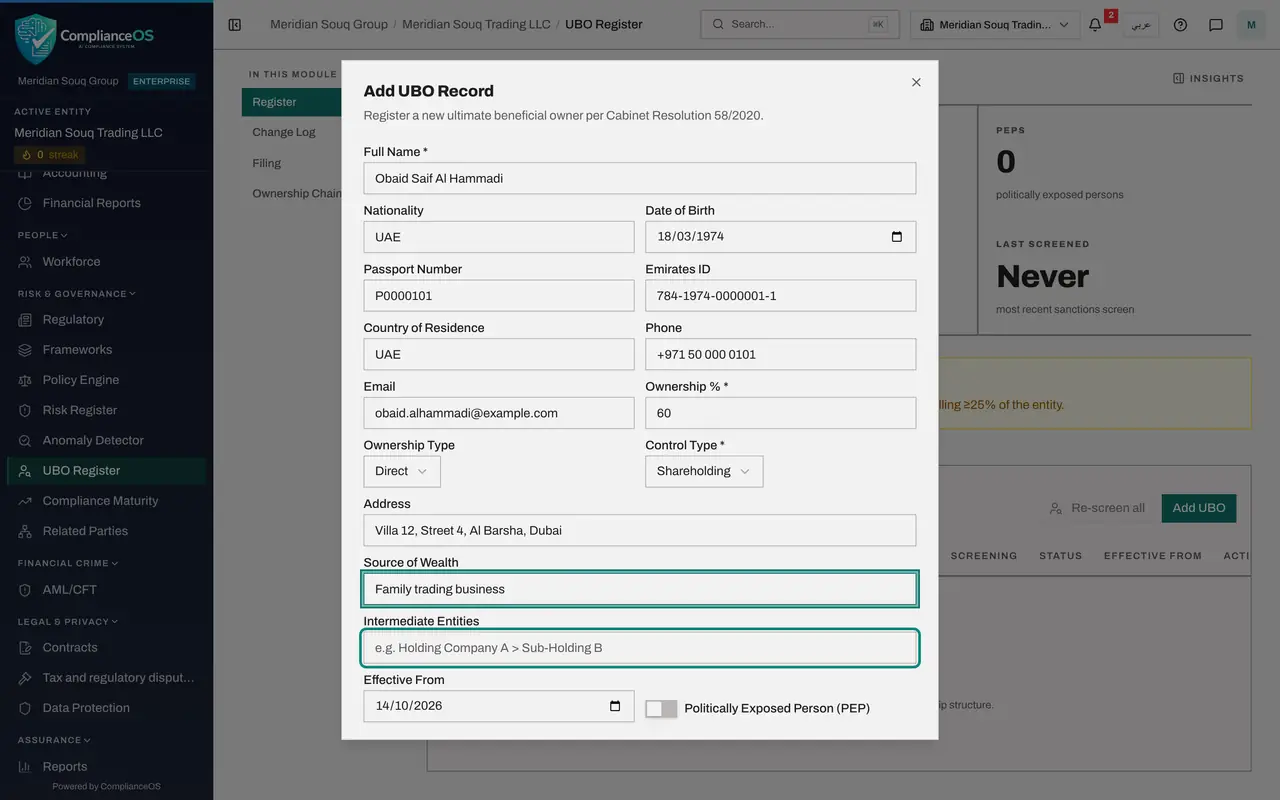
- Type Address:
- 8
Set the start date and check the two switches
Effective From is the date the person became an owner. It starts as today; this owner has held his shares since 1 March 2019, so change it. Switch on Politically Exposed Person if the owner holds or held a prominent public position, and Nominee Arrangement if they hold the shares for someone else, which opens a box for that person's name. Neither applies here.
- Type Effective From:
2019-03-01
- Type Effective From:
- 9
Select Add UBO to save
Select Add UBO at the bottom of the form. The button says Adding for several seconds while the name is screened against the sanctions lists. Then a message says UBO record added and the owner appears in UBO Records. The Screening column says Clear.
- Select Add UBO
- 10
Start the second owner
Select Add UBO again. Type Huda Ibrahim Al Marri, the nationality and the date of birth.
- Select Add UBO
- Type Beneficial owner full name:
Huda Ibrahim Al Marri - Type e.g. UAE:
UAE - Type Date of Birth:
1979-11-02
- 11
Enter her share and save
She holds the other 40 percent directly, also since 1 March 2019. Type 40, choose Shareholding, set Effective From, and select Add UBO.
- Type Ownership % *:
40 - Select Control Type *
- Choose Shareholding
- Type Effective From:
2019-03-01 - Select Add UBO
- Type Ownership % *:
- 12
Add a person who controls without owning
The third person, Hessa Butti Al Qemzi, holds no shares, but the shareholders' agreement gives her the right to appoint most of the directors. Select Add UBO, type her name, type 0 in Ownership percent, and choose Appointment or Removal as the Control Type. Set Effective From to 15 January 2024.
- Select Add UBO
- Type Beneficial owner full name:
Hessa Butti Al Qemzi - Type Ownership % *:
0 - Select Control Type *
- Choose Appointment/Removal
- Type Effective From:
2024-01-15
- 13
Save the third person
Select Add UBO. All three are now listed, each with a share, a control type, the screening result Clear and the status Active.
- Select Add UBO
- 14
Read the totals
Scroll to the top. Active UBOs shows 3 and Total Ownership shows 100 percent, so the yellow warning has gone. Pending Filings shows 3: every addition is a change that must be filed with the registrar. Last Screened shows today's date.
How to check it worked
UBO Records lists the three owners, Active UBOs shows 3, Total Ownership shows 100.0%, and the yellow Ownership Threshold Warning has gone.
Common mistakes
- Adding a company as an owner. The register is for real people. If shares are held through another company, add the person behind it, choose Indirect, and name the company in Intermediate Entities.
- Leaving Effective From as today for an owner of long standing. It is the date the ownership began, and an owner cannot later be removed with a date before it.
- Closing the form while it says Adding. Saving takes several seconds because the owner's name is screened against the sanctions lists.
Check your understanding
1. A person owns no shares but can appoint and remove most of the directors. Do they belong in the register?
- A.No, only shareholders are owners
- B.Yes: add them with 0 percent and the control type Appointment or Removal
- C.Only if they are a director themselves
- D.Only if they are a politically exposed person
Show answer
Answer: B. Yes: add them with 0 percent and the control type Appointment or Removal
Control counts as well as ownership. Control Type records how the person controls the company: by shares, by voting rights, by appointing and removing directors, or by other significant means.
2. What does the Screening column show after you save an owner?
- A.Whether the owner paid for the shares
- B.The result of the sanctions screening that ran when you saved: Clear, Potential Match, Confirmed Match or Not Screened
- C.The owner's credit score
- D.Nothing until an administrator approves
Show answer
Answer: B. The result of the sanctions screening that ran when you saved: Clear, Potential Match, Confirmed Match or Not Screened
Every owner is screened on saving. Anything other than Clear needs the AML officer's attention.