Lesson 26 of 28
The beneficial owner register for the AML officer
What you will be able to do
This lesson is for the AML officer. Beneficial owners are screened as part of AML work, so this role can read the register, export it and screen the owners again, but cannot change who the owners are. You will see what the register looks like with this role, screen one owner and then all owners again, find those checks on the Screening tab, and download the declaration.
Before you start
- The compliance officer has recorded the owners, as in the earlier lessons.
- You are signed in as the AML officer, Hamad Ali.
- The sanctions watchlists are up to date. If they are not, the app says the owner was not screened, and why.
Steps
- 1
Open the UBO Register
In the left menu select UBO Register. You see the same register as the compliance officer: the counters, the owners, and the list on the left with Register, Change Log, Filing and Ownership Chain.
- Select UBO Register
- 2
Notice what this role does not have
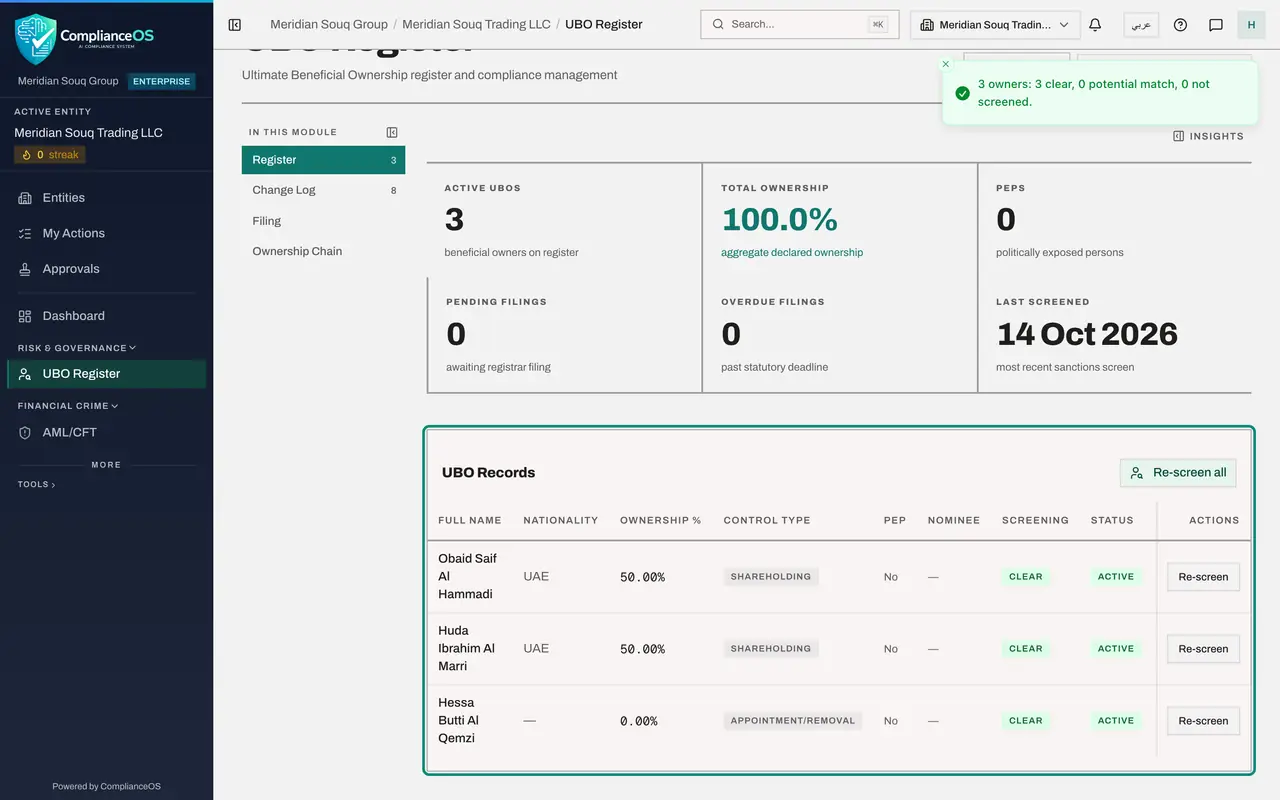
Scroll to UBO Records. There is no Add UBO button, and each row has only Re-screen: no Edit and no red bin. At the top there is no Record annual confirmation button. This role reads and screens; it does not change the register.
- 3
Select Re-screen on one owner
Select Re-screen on the first owner's row. After a few seconds a message gives the result for that owner: screened, no match found. The Screening column stays Clear.
- Select Re-screen
- 4
Screen every owner again
At the top of the list of owners, select the button named Re-screen all. It screens every active owner in one go and takes a little longer. The message sums up the result: three owners, three clear, no potential match and none left unscreened.
- Select Re-screen all
- 5
Check Last Screened
Scroll to the top. Last Screened shows today's date. If a list had been out of date, the message would have said how many owners were not screened and why, and the column would say Not Screened rather than Clear.
- 6
Find the checks on the Screening tab
Open AML/CFT and select the Screening tab. All Screening Checks has new lines for the owners, with the type UBO. Each time an owner is screened, a line is added, so the list is the history of every screen.
- Select AML/CFT
- Select Screening
- 7
Read the change log and the filing status
Go back to the UBO Register and select Change Log on the left: you can read every change and who made it. Select Filing: you can read the filing status and reference, but there is no box to record a filing.
- Select UBO Register
- Select Change Log8
- Select Filing
- 8
Select Export PDF Declaration
Select Export PDF Declaration at the top right. The same declaration the compliance officer downloads is saved to your computer, for a bank or an auditor who asks who owns the company.
- Select Export PDF Declaration
How to check it worked
After you screen all the owners again, a message reports three owners and all three clear, and the Screening tab of the hub lists a check for each owner with the type beneficial owner.
Common mistakes
- Looking for Add UBO or Edit. They are not shown to this role. Ask the compliance officer to change the register.
- Assuming Clear lasts for ever. Lists change every day; screen the owners again when lists are updated or an owner's details change.
- Ignoring a result other than Clear. Potential Match means a review is waiting on the Screening tab; Not Screened means the check did not run.
Check your understanding
1. What can the AML officer do in the UBO Register?
- A.Add, edit and remove owners
- B.View the register, export the declaration, and screen owners again
- C.Nothing; the page is hidden
- D.Record filings
Show answer
Answer: B. View the register, export the declaration, and screen owners again
The role reads the register and screens. Changing owners and recording filings belong to the compliance officer.
2. Where is the evidence that an owner was screened?
- A.Only in the Screening column of the register
- B.In AML/CFT, on the Screening tab, as a check with the type UBO
- C.In the tax return
- D.It is not kept
Show answer
Answer: B. In AML/CFT, on the Screening tab, as a check with the type UBO
Every screen of an owner writes a check to the screening list, with its status, score and time, exactly like a customer or supplier.