Lesson 8 of 28
Find any screening check again
What you will be able to do
This lesson is for the AML officer and for anyone who has to show an auditor that a name was screened. You will read the summary at the top of the Screening tab, filter the list by status and by year, sort it, hide the side list to make room, and read the Needs Attention counts after the reviews of the earlier lessons.
Before you start
- Six names have been screened in the earlier lessons: three by hand and three from the accountant's transactions.
- You are signed in as the AML officer for the entity.
Steps
- 1
Read the summary at the top
At the top of the Screening tab, a line in red says one escalated check is awaiting senior review. Under it, a strip shows how the six checks divide, and the five boxes give the same numbers: 6 screened, 5 cleared, 1 escalated.
- 2
Filter by status on the left
The list on the left, In this module, has one line for each status with its count. Select Escalated. All Screening Checks now shows only the escalated check. The Matched Entry column names the list entry and its source, here Training examples, fictional.
- Select Escalated1
- 3
Select All again
Scroll up and select All to list every check. The newest is at the top.
- Select All6
- 4
Filter by year
Above the list is a year filter that starts on All Years. Open it and choose FY 2026 to keep only the checks run in that year. All six were run this year, so they all stay.
- Select Year
- Choose FY 2026
- 5
Sort by a column
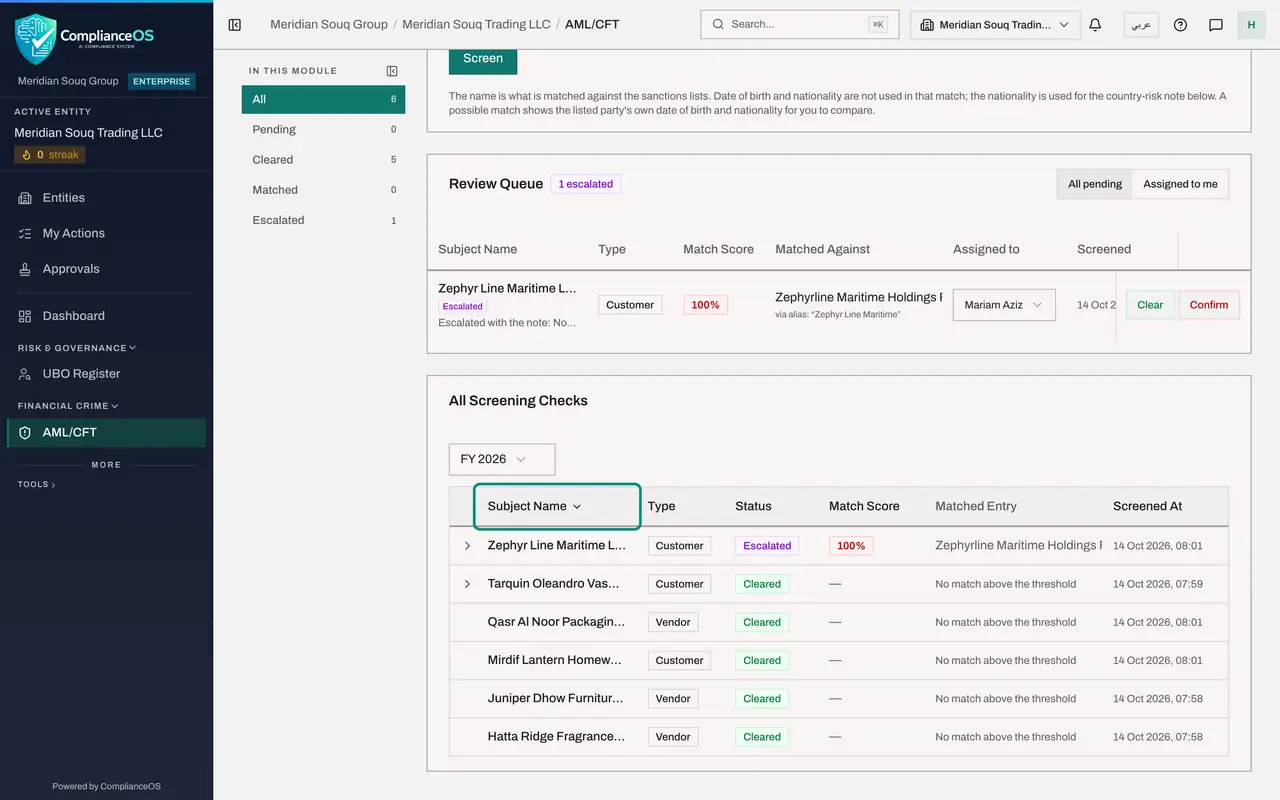
Select a column heading to sort by it. Select Subject Name: the checks are now ordered by name, and a small arrow beside the heading shows the direction. Select the heading again to reverse the order. Status, Match Score and Screened At sort the same way.
- Select Subject Name
- 6
Sort by time again
Select Screened At to sort by time. The first click puts the newest check at the top, which is the order you want for daily work. A second click, as here, puts the oldest first.
- Select Screened At
- Select Screened At
- 7
Collapse the side list
Select the small icon beside In this module to collapse the side list. The statuses move to a row of buttons above the page. At this window size the Insights panel takes the free space and docks on the right; Hide, above it, closes the panel when you want the table at full width.
- Select Collapse section list
- 8
Bring the side list back
Scroll up and select the icon at the end of the row of status buttons to dock the list on the left again.
- Select Dock section list
- 9
Read Needs Attention
Select Insights. Under Needs Attention, Escalated now shows 1 with a red dot, and the AI Note counts six parties screened. The watchlists above are still current.
- Select Show insights panel
How to check it worked
You can show, for any supplier or customer, the row in All Screening Checks with its status, score, the time it was screened and, where a person decided, the note.
Common mistakes
- Concluding that a name was never screened because it is not on the first page. Check the status filter on the left and the year filter above the list first.
- Forgetting that the red line at the top is a to-do. It counts escalated checks that still need a decision.
- Sorting by name and then reading the top row as the latest check. After sorting, the order is no longer by time.
Check your understanding
1. An auditor asks whether a supplier was screened last year. What do you do?
- A.Screen the supplier again today
- B.Choose that year in the filter above All Screening Checks and find the supplier's row
- C.Look in the Monitoring tab
- D.Ask the accountant
Show answer
Answer: B. Choose that year in the filter above All Screening Checks and find the supplier's row
Every check is kept with the time it was run. The year filter narrows the list to the checks of one year.
2. What does the number beside Escalated on the left tell you?
- A.How many checks were cleared
- B.How many checks were passed up for a decision and are still waiting
- C.How many lists are out of date
- D.How many people can review
Show answer
Answer: B. How many checks were passed up for a decision and are still waiting
Each status on the left carries its count. Escalated checks are unfinished, so the count should come back to zero.