Lesson 13 of 28
How long identity documents are kept, and deleting one
What you will be able to do
This lesson is for the AML officer. A customer has closed his account. You will record the date the relationship ended, see the date on which his documents will be deleted, delete a file that was uploaded twice by giving a reason, and change the number of years documents are kept for this entity.
Before you start
- The individual customer has a CDD record, added in an earlier lesson.
- You are signed in as the AML officer. Changing the retention period needs permission to edit AML records.
- You know your company's retention rule. The law requires at least five years after the relationship ends.
Steps
- 1
Open the customer's record
On the CDD Records tab select Verify / Edit on the individual customer's row. He closed his account at the end of September.
- Select Verify / Edit
- 2
Try a date in the future
In Relationship end date enter 31 December 2026, a date that has not yet come, and select Save. A red message says the relationship end date cannot be in the future. Nothing is saved.
- Type Relationship end date:
2026-12-31 - Select Save
- Type Relationship end date:
- 3
Enter the real end date and save
Change the date to 30 September 2026, the day the account was closed, and select Save. The message says CDD record updated.
- Type Relationship end date:
2026-09-30 - Select Save
- Type Relationship end date:
- 4
Store his proof of address
Open the record again. In Document type choose Proof of address, choose the file imran-siddiqui-proof-of-address.png, and select Upload document. A picture file is stored the same way as a PDF.
- Select Verify / Edit
- Select Passport
- Choose Proof of address
- Upload Choose a file:
imran-siddiqui-proof-of-address.png - Select Upload document
- 5
Read when the document will be deleted
The last line under the stored document now says Kept until 30 September 2031, then deleted. That is the relationship end date plus five years, the retention period of this entity. While the end date was empty, the line said the document is kept while the relationship is ongoing.
- 6
Upload the same file again by mistake
Suppose the same bill is uploaded a second time by mistake. Choose Proof of address and the same file, and select Upload document. The section now lists two documents.
- Select Proof of address
- Choose Proof of address
- Upload Choose a file:
imran-siddiqui-proof-of-address.png - Select Upload document
- 7
Select the bin beside the duplicate
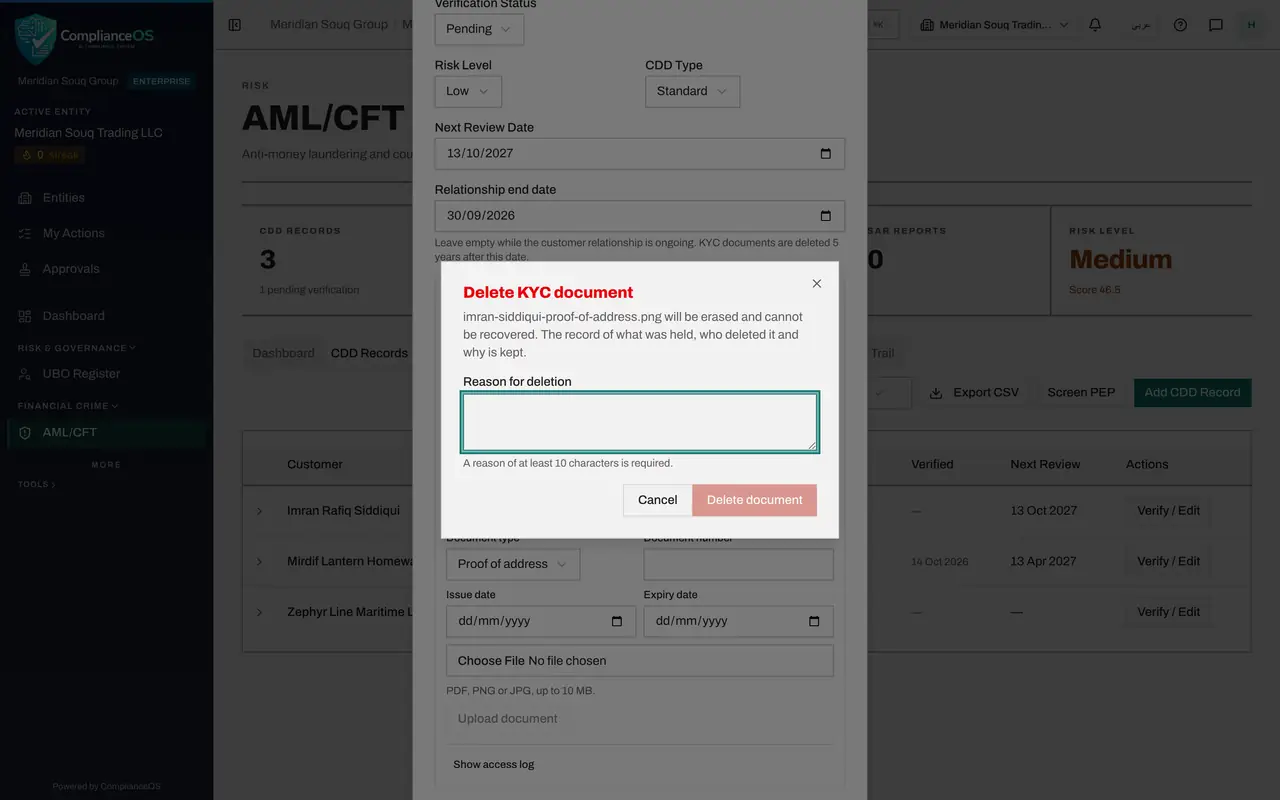
Select the red bin at the end of one of the two lines. A window titled Delete KYC document says the file will be erased and cannot be recovered, and that the record of what was held, who deleted it and why is kept.
- Select Delete document
- 8
Type the reason
In Reason for deletion say why. At least 10 characters are required, and the Delete document button stays grey until then.
- Type Reason for deletion:
Duplicate upload of the same utility bill
- Type Reason for deletion:
- 9
Select Delete document
Select Delete document. A message confirms that the document was deleted and that the deletion and its reason are recorded. The line stays in the list, marked Deleted, with your name, the date and the reason, but the file is gone.
- Select Delete document
- 10
Close the window with the Escape key
With two lines in the list, the Cancel and Save buttons are below the bottom of the screen. Press the Escape key to close the window. The documents were already stored and deleted when you used their buttons.
- 11
Open the retention setting
The number of years is a setting of the entity. Select the Adverse Media tab. In the first card, find KYC document retention. It shows 5 years, the legal minimum, and accepts 5 to 30.
- Select Adverse Media
- 12
Change it to 6 years and save
This company's policy is six years. Type 6 in the box and select Save beside it. A message says KYC documents are now kept for 6 years after the relationship ends. The line under the card records who last changed the settings and when.
- Type KYC document retention:
6 - Select Save
- Type KYC document retention:
- 13
See the new deletion date on the record
Go back to CDD Records and open the customer's Verify and Edit window once more. The stored document now says Kept until 30 September 2032. The change applies to every customer of this entity.
- Select CDD Records3
- Select Verify / Edit
How to check it worked
The customer's stored document shows Kept until 30 September 2032, then deleted; the duplicate shows as Deleted with your reason; and the retention setting on the Adverse Media tab shows 6 years.
Common mistakes
- Entering a relationship end date in the future. The app refuses it: record the date once the relationship has actually ended.
- Deleting a document to tidy up. Deletion erases the file for good; only the record of what was held, who deleted it and why is kept.
- Setting retention below five years. The box accepts 5 to 30 years only.
Check your understanding
1. A customer relationship ended on 30 September 2026 and the entity keeps KYC documents for 6 years. When are the documents deleted?
- A.Immediately
- B.30 September 2031
- C.30 September 2032
- D.Never
Show answer
Answer: C. 30 September 2032
The deletion date is the relationship end date plus the entity's retention period. While the end date is empty, documents are kept as long as the relationship lasts.
2. What do you need to delete a stored KYC document by hand?
- A.Nothing, one click
- B.A reason of at least 10 characters, which is recorded with your name
- C.The customer's permission in the app
- D.An administrator password
Show answer
Answer: B. A reason of at least 10 characters, which is recorded with your name
The delete window will not continue without a reason. The file is erased, and the deletion and its reason stay on the record.