Lesson 22 of 28
Record a change of ownership and read the change log
What you will be able to do
This lesson is for the compliance officer. One owner has sold 10 percent of the company to another. You will lower the seller's share, raise the buyer's, attach the share transfer agreement as proof, and read the change log, which records who changed what, from which value to which, and the deadline for filing the change.
Before you start
- The three owners of the previous lesson are on the register.
- You are signed in as the compliance officer. Changing owners needs permission to edit UBO records.
- You have the signed share transfer agreement. The file in this example is an invented specimen.
Steps
- 1
Select Edit on the selling owner's row
In UBO Records, select Edit on the row of the owner who is selling, Obaid Saif Al Hammadi. The Edit UBO Record form holds the same fields as the form you used to add him.
- Select Edit
- 2
Lower the seller's share
Change Ownership percent from 60 to 50.
- Type Ownership %:
50
- Type Ownership %:
- 3
Select Save Changes
Select Save Changes at the bottom of the form. A message says UBO record updated. The row shows 50 percent, Total Ownership at the top drops to 90 percent, and the yellow Ownership Threshold Warning returns to say that part of the ownership is unaccounted for.
- Select Save Changes
- 4
Raise the buyer's share
Select Edit on the row of the buyer, Huda Ibrahim Al Marri, change Ownership percent from 40 to 50, and select Save Changes. Total Ownership is 100 percent again and the warning goes.
- Select Edit
- Type Ownership %:
50 - Select Save Changes
- 5
Open the seller's record to attach proof
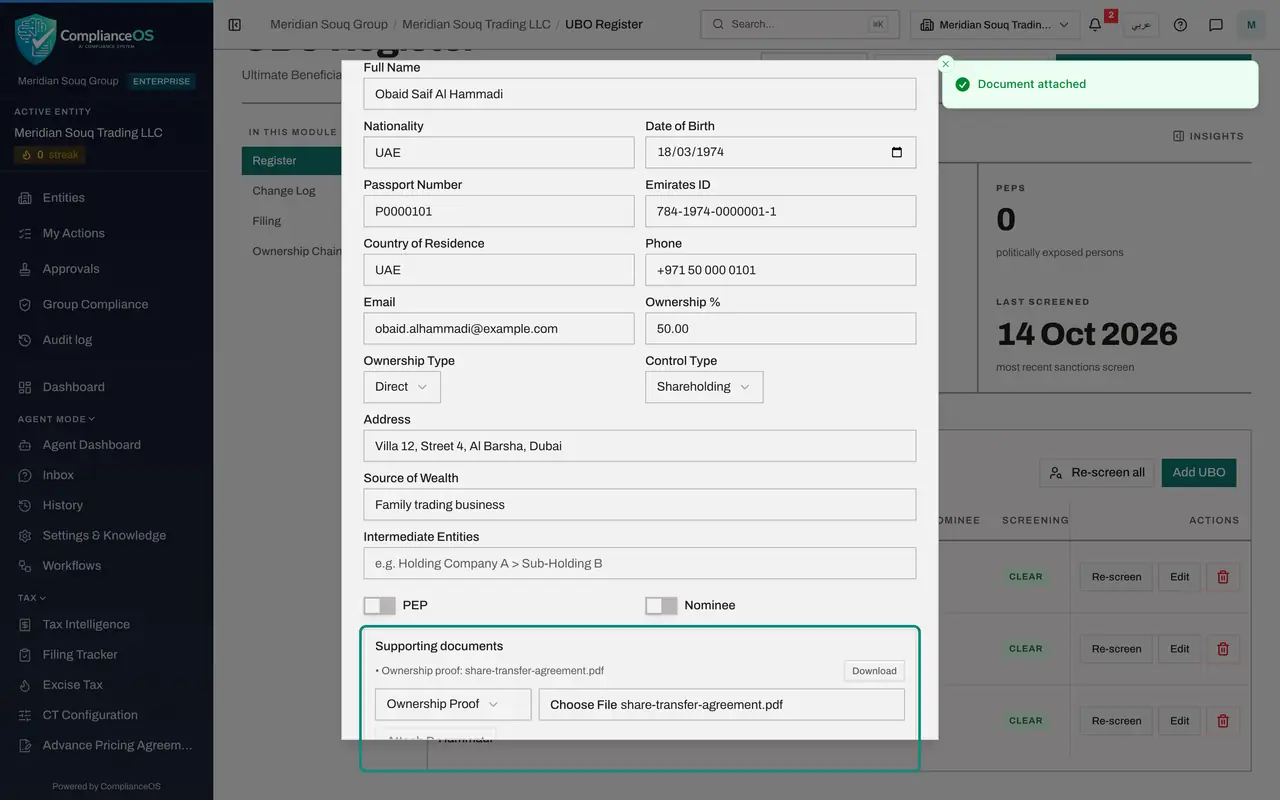
Select Edit on the seller's row again and scroll to Supporting documents at the bottom of the form. Open the list beside the file box: the choices are Identity, Passport, Emirates ID, Ownership Proof and Other. Choose Ownership Proof.
- Select Edit
- Select Supporting documents
- Choose Ownership Proof
- 6
Choose the file and select Attach Document
Choose the file, here share-transfer-agreement.pdf, and select Attach Document. A message says Document attached. Attaching is immediate; you do not need Save Changes for it.
- Upload file:
share-transfer-agreement.pdf - Select Attach Document
- Upload file:
- 7
Select Download to check the stored file
The agreement is now listed under Supporting documents with a Download button. Select it: the stored file is saved to your computer, which proves the document is really kept with the owner's record.
- Select Download share-transfer-agreement.pdf
- 8
Select Cancel to close the form
Select Cancel. The agreement stays with the seller's record and can be downloaded from here whenever the registrar asks for it.
- Select Cancel
- 9
Open the Change Log
On the left, under In this module, select Change Log. Every change to the register is listed, newest first, with the date, the owner, the type of change, what changed, who changed it, the filing status and the filing deadline.
- Select Change Log5
- 10
Read a modified line
The lines marked Modified are changes to owners already on the register. What Changed shows the old value, an arrow, and the new value: Ownership percent 40 to 50 for the buyer, and 60 to 50 for the seller. Changed By shows your name. This register also carries earlier corrections of the two shares, each on its own line. The lines marked Added, from when the owners were entered, list the values they started with.
- 11
Read the filing status and deadline
Each new line has the filing status Pending and a Filing Deadline 15 days after the change. The Pending Filings box at the top counts the lines that are still pending. A later lesson records the filing, after which a line says Filed.
How to check it worked
The two owners each show 50.00%, Total Ownership is still 100.0%, and the Change Log lists the two changes as lines marked Modified, each showing the old and the new percentage with your name.
Common mistakes
- Raising the buyer before lowering the seller. The total may not go above 100 percent, so lower first, then raise.
- Changing a percentage without attaching proof. The registrar may ask for the document behind every change.
- Forgetting the filing deadline. Every change is listed as Pending with a deadline 15 days after it was made.
Check your understanding
1. After you lower the seller's share and before you raise the buyer's, what does the register show?
- A.Nothing changes
- B.Total Ownership below 100 percent and a yellow warning that part of the ownership is unaccounted for
- C.The seller is removed
- D.The change is filed automatically
Show answer
Answer: B. Total Ownership below 100 percent and a yellow warning that part of the ownership is unaccounted for
For that moment the shares add up to less than 100 percent, and both the Total Ownership box and the warning say so. They clear when the buyer's share is raised.
2. What does one line of the change log tell you?
- A.Only the date
- B.The date, the owner, the type of change, the old and new values, who made it, its filing status and the filing deadline
- C.The owner's bank balance
- D.The sanctions lists used
Show answer
Answer: B. The date, the owner, the type of change, the old and new values, who made it, its filing status and the filing deadline
The change log is the register's own audit trail. It names the person who made each change and shows values as old, arrow, new.