Lesson 17 of 27
From the data map to a cross-border transfer
What you will be able to do
See how the data map leads to the Cross-Border register. You will add a system hosted outside the United Arab Emirates, describe the record it holds, and accept the suggestion the data map then makes to record a cross-border transfer.
Before you start
- You are signed in with the Data Protection Officer role for the entity.
- The activity Online order fraud screening and the processor SafeCart Fraud Analytics are on record, as added earlier in this course.
- The data map holds the loyalty portal hosted in Ireland, which produced the suggestion you saw at the end of the data map lesson.
Steps
- 1
Open the Cross-Border section
In Data Protection, select Cross-Border. The blue note sums up the rule. The United Arab Emirates has published no list of adequate countries, so no destination is treated as adequate by default. A transfer needs either UAE Data Office approval under Article 22, or an Article 23 case such as a binding contract or the person's express consent. No transfer is recorded yet.
- Select Cross-Border0 (0)
- 2
Open Data map and find the suggestion
Select Data map and look under Suggestions: Personal data stored in IE has no transfer record. IE is Ireland, where the loyalty portal you added to the data map is hosted. The line under it says Ireland has a data-protection law but no adequacy decision.
- Select Data map
- 3
Select Record transfer and choose the mechanism
Select Record transfer on the suggestion. A short form opens. The note explains that having a law is not adequacy, so the transfer needs an Article 23 basis. Open Transfer mechanism and choose Binding contract or standard clauses: the supplier's contract includes standard clauses.
- Select Record transfer
- Select Choose a mechanism
- Choose Binding contract / standard clauses
- 4
Name the recipient and select Record transfer
Recipient or provider starts with the system's name. Replace it with the legal name of the organisation that receives the data, and select Record transfer. The suggestion closes, and a green line says Transfer recorded, with an Open it link to the new transfer.
- Type Recipient / provider:
BrightPoints Loyalty Cloud Ltd - Select Record transfer
- Type Recipient / provider:
- 5
Add the second system to the data map
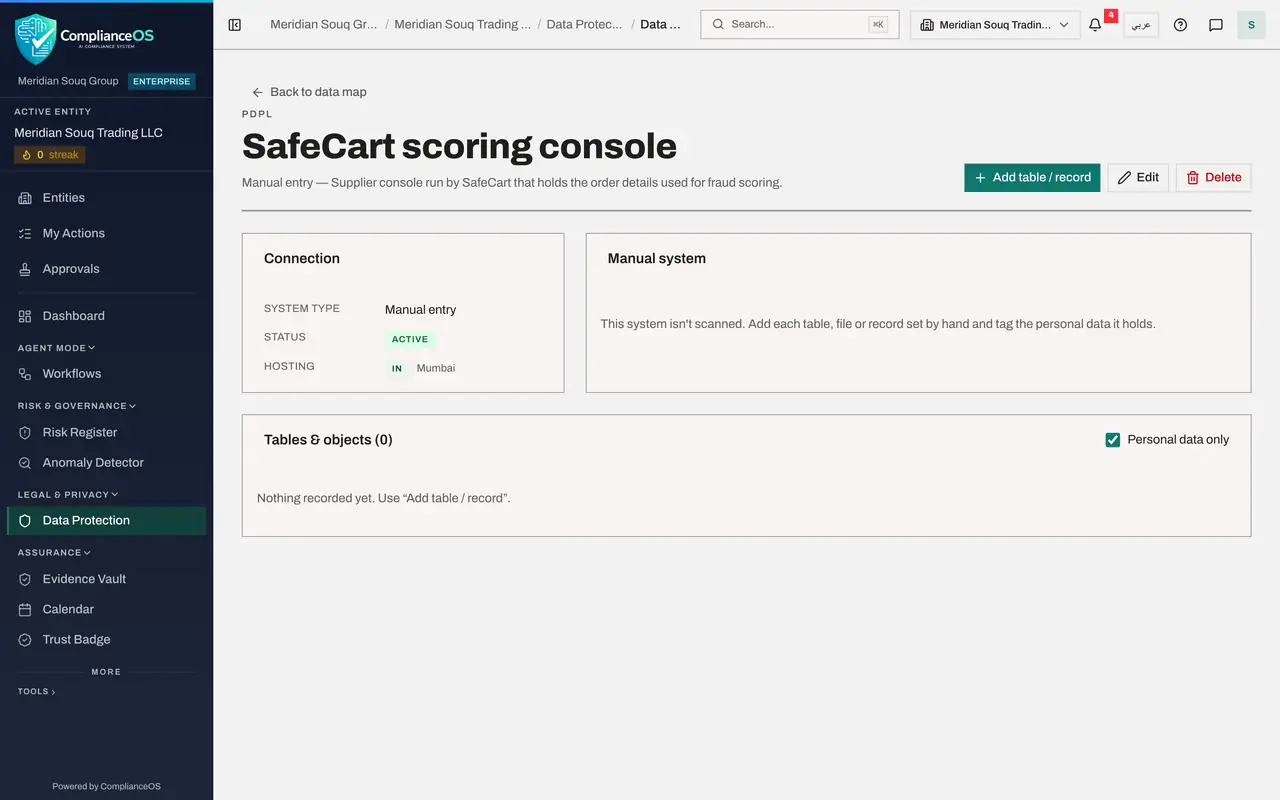
The fraud scoring supplier keeps order data on its own console in India, and that system is not in the data map yet. Select Add system at the top of the data map. Open System type and choose Manual entry. Type the name, IN as the hosting country and Mumbai as the region.
- Select Add system
- Select Databricks
- Choose Manual entry
- Type Name:
SafeCart scoring console - Type Hosting country (ISO):
IN - Type Hosting region:
Mumbai
- 6
Describe the system, save it and open it
Type a description and select Save. Then select the system's name in the Systems list to open it.
- Type Description:
Supplier console run by SafeCart that holds the order details used for… - Select Save
- Type Description:
- 7
Add the record the system holds
Select Add table or record. Type the name Order risk scores and tick Customers. Add three fields: Customer name as Identity, Person name; Delivery address as Contact, Postal address; and Device identifier as Online, Device identifier. Select Save.
- Select Add table / record
- Type Name:
Order risk scores - Select Customers
- Type Name of field 1:
Customer name - Select Category for field 1
- Choose Identity · Person name
- Select Add field
- Type Name of field 2:
Delivery address - Select Category for field 2
- Choose Contact · Postal address
- Select Add field
- Type Name of field 3:
Device identifier - Select Category for field 3
- Choose Online · Device identifier
- Select Save
- 8
Link the record to its activity
Select Link to RoPA activity, choose Online order fraud screening and select Link.
- Select Link to RoPA activity
- Select Choose an activity
- Choose Online order fraud screening
- Select Link
- 9
Go back to the data map and read the suggestion
Select the system's name, then Back to data map. Under Suggestions there is a new entry tagged Cross border: Personal data stored in IN has no transfer record. IN is India. The line under it says India is a country with a data-protection law and no adequacy decision. If the suggestion is not there yet, select Refresh.
- Select Back to data map
- Select Refresh
- 10
Record the second transfer
Select Record transfer on the new suggestion. The note explains that India has a data-protection law of its own, but there is no adequacy decision for it, so the transfer needs an Article 23 basis. Open Transfer mechanism and choose Binding contract or standard clauses, the contract terms being signed with the supplier.
- Select Record transfer
- Select Choose a mechanism
- Choose Binding contract / standard clauses
- 11
Name the second recipient and save
Replace the system's name with the legal name of the supplier and select Record transfer. Both transfers are now in the Cross-Border register; the next lesson reads them there.
- Type Recipient / provider:
SafeCart Fraud Analytics Pvt Ltd - Select Record transfer
- Type Recipient / provider:
How to check it worked
the data map shows two systems and no open suggestion, and the number beside Cross-Border in the section list reads two.
Common mistakes
- Typing the supplier's home country when the data is hosted somewhere else. Hosting country is where the data is stored; that is what decides whether a transfer is suggested.
- Selecting Dismiss on a suggestion because the transfer is small. A dismissed suggestion stays dismissed, and the transfer is then missing from the register.
- Starting to send data once the transfer is recorded. A recorded transfer is Pending review; it should not start until it is approved.
Check your understanding
1. The form that opens from Record transfer says the destination has a data-protection law of its own but no adequacy decision. What does the transfer need?
- A.Nothing more
- B.An Article 23 basis, such as a binding contract or the person's express consent
- C.A new processing activity
- D.Approval from the supplier
Show answer
Answer: B. An Article 23 basis, such as a binding contract or the person's express consent
Having a law is not adequacy. Without an adequacy decision the transfer needs an Article 23 basis.
2. What makes the data map suggest a cross-border transfer?
- A.Any new system
- B.A system hosted outside the country holds personal data and no transfer on record covers that country
- C.A processor without an agreement
- D.A DPIA with a high risk level
Show answer
Answer: B. A system hosted outside the country holds personal data and no transfer on record covers that country
The data map compares where each system is hosted with the transfers on record, and suggests a transfer when one is missing.