Lesson 2 of 27
Set the regime, the deadlines and the Data Protection Officer
What you will be able to do
Record the settings every other part of the module relies on: which data-protection law the entity follows, how many days you allow for requests and breach reports, who the Data Protection Officer is, and how children's data is treated.
Before you start
- You are signed in with the Data Protection Officer role for the entity.
- You know whether the entity is onshore, or in the Dubai International Financial Centre or Abu Dhabi Global Market free zones, which have their own laws.
- You have the Data Protection Officer's name, work email, phone number and appointment date.
Steps
- 1
Open Regime and DPO
In Data Protection, select Regime and DPO in the In this module list. The first card shows the regime: the data-protection law this entity follows, and its regulator. It starts on Derive from legal structure, which works the law out from the company type.
- Select Regime & DPO
- 2
Open the Regime list
Select the Regime field. There are four choices: Derive from legal structure, UAE PDPL for onshore companies, the DIFC Data Protection Law for the Dubai International Financial Centre, and the ADGM Data Protection Regulations for Abu Dhabi Global Market.
- Select Derive from legal structure
- 3
Choose UAE PDPL and select Save
Meridian Souq Trading is a Dubai mainland company, so choose UAE PDPL onshore, then select Save on the regime card. Choosing the law yourself records a clear decision instead of relying on the company type.
- Choose UAE PDPL (onshore)
- Select Save
- 4
Read the response and reporting deadlines
The next card sets four periods: the days to answer a data subject request, the days a request can be extended by, the hours to report a breach to the regulator, and the days to answer a complaint. The note above the card explains that the law's executive regulations are not issued yet, so these periods are your internal policy.
- 5
Set a shorter internal deadline and select Save
Meridian Souq answers requests within 25 days as its own policy. Type 25 in DSR response and select Save on this card. Leave the other three fields empty: an empty field uses the regime default written under it.
- Type DSR response:
25 - Select Save
- Type DSR response:
- 6
Say that a Data Protection Officer is required
On the Data Protection Officer card, open DPO required and choose Yes, a DPO is required. Choose No, not required if you have assessed it and the entity does not need one. Either answer clears the Not assessed tag.
- Select Not assessed
- Choose Yes, a DPO is required
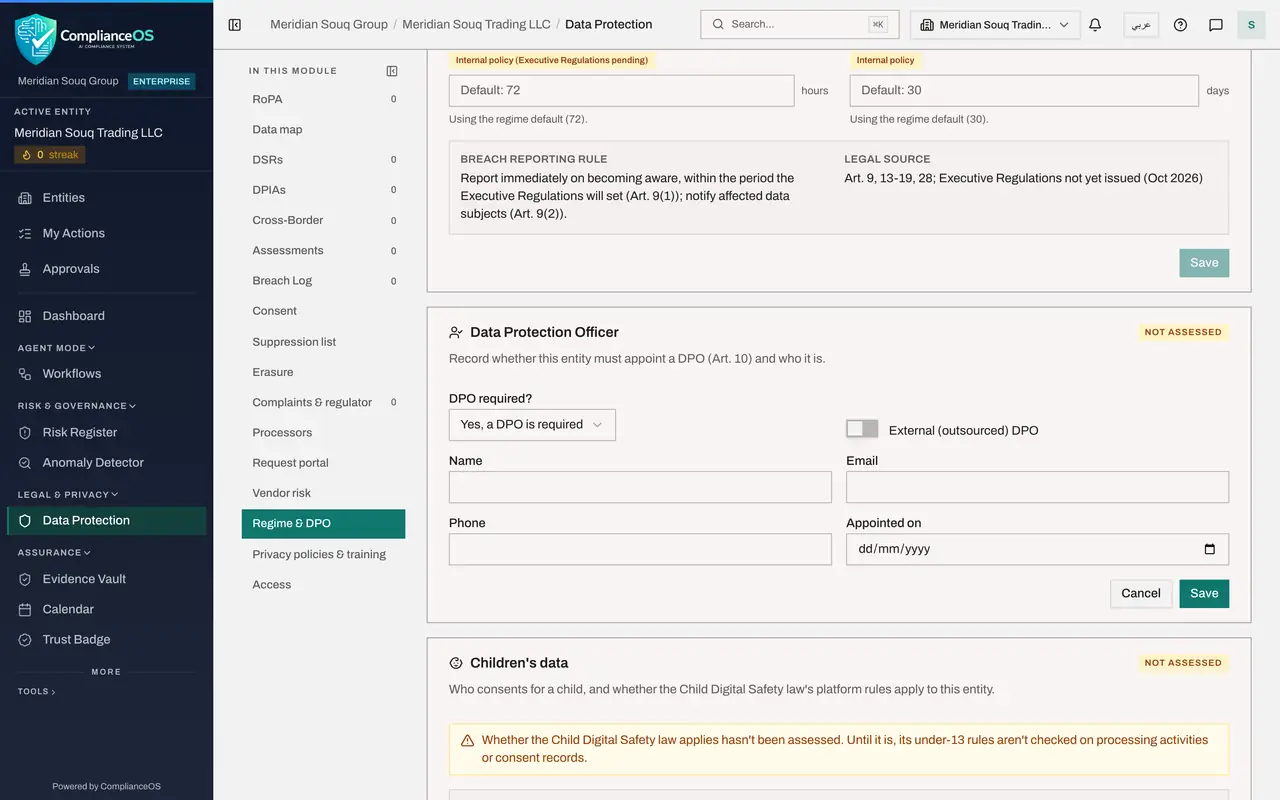
- 7
Enter the officer's name, email and phone
Type the officer's name, work email and phone number. These details are what people are given when they ask who is responsible for their data. Leave External outsourced DPO switched off unless an outside firm holds the role.
- Type Name:
Sara Ahmed - Type Email:
sara.ahmed@c05.example.com - Type Phone:
+971 4 555 0142
- Type Name:
- 8
Enter the appointment date and select Save
In Appointed on, enter the date the officer took up the role, here the first of September 2025. Select Save on this card. The tag at the top of the card changes to DPO appointed.
- Type Appointed on:
2025-09-01 - Select Save
- Type Appointed on:
- 9
Read the Children's data card
The Children's data card covers two things. Age of consent is the age below which a parent or guardian consents for a child; it is 18 unless you change it. The second question is whether the Child Digital Safety law applies, which it does for digital platforms and internet providers that serve users in the United Arab Emirates.
- 10
Say that the Child Digital Safety law applies and select Save
Meridian Souq runs a shopping app with a Kids Club, so open Does the Child Digital Safety law apply and choose Yes, we are a digital platform. Select Save on this card. From now on, activities that process the data of children under 13 are checked against that law.
- Select Not assessed
- Select Save
- 11
Read the lawful bases available
The last card lists the lawful bases this regime allows: consent under Article 6, or one of the Article 4 cases where consent is not needed, such as performing a contract with the person or meeting a legal obligation. Every lawful basis list in the module offers exactly these choices.
How to check it worked
the regime card shows the law and the regulator under Applies now, the Data Protection Officer card is tagged DPO appointed, and the Children's data card no longer says Not assessed.
Common mistakes
- Leaving DPO required on Not assessed. The Insights panel keeps warning that the requirement has not been assessed until you choose Yes or No.
- Typing a number in every deadline field. An empty field uses the regime default, which is safer than copying the default in by hand, because the default follows the law if it changes.
- Saving only one card. Each card on this page has its own Save button, and a change is not kept until you select the Save on that card.
Check your understanding
1. You leave the Breach report to regulator field empty. What deadline does ComplianceOS use?
- A.No deadline
- B.The regime default shown under the field
- C.24 hours
- D.The last value anyone typed
Show answer
Answer: B. The regime default shown under the field
An empty field uses the regime default. The text under each field says which default is in use.
2. What changes when you answer Yes to Does the Child Digital Safety law apply?
- A.Children's data can no longer be recorded
- B.Processing activities and consent records for under-13s are checked against that law's rules
- C.Every activity needs a new impact assessment
- D.Nothing; it is only a note
Show answer
Answer: B. Processing activities and consent records for under-13s are checked against that law's rules
When the law applies, activities that process the data of children under 13 are checked for parental consent, age verification and no targeted advertising.