Lesson 19 of 27
Record, use and withdraw your organisation's adequacy assessment
What you will be able to do
Record your organisation's own assessment that a destination country protects personal data adequately, see what it changes on the transfers to that country, and withdraw it when it no longer holds.
Before you start
- You are signed in with the Data Protection Officer role for the entity.
- The Cross-Border register holds transfers to India, as recorded earlier in this course.
- Your organisation has a written assessment of the destination: who made it, on what basis, when, when it is due for review, and where the document is kept.
Steps
- 1
Open Cross-Border and find the adequacy card
In Data Protection, select Cross-Border and scroll below the register to the card Your organisation's adequacy assessments. It explains that no destination is treated as adequate by default, and that you may record your own assessment: who assessed the destination, on what basis, where it is written up and when it is due for review. So far no destination has been assessed.
- Select Cross-Border3 (3)
- 2
Check the transfer to India before you start
Before you record anything, select Review on the transfer to HelloDesk Support Services in India. Its risk level is High, and Adequacy and destination law reads No adequacy decision, Article 23 basis needed.
- Select Review
- 3
Select Record an assessment and enter the country
Select Cancel to close the transfer. Then select Record an assessment on the adequacy card. In Destination country, type the two-letter code, IN for India.
- Select Cancel
- Select Record an assessment
- Type Destination country (two-letter code) *:
IN
- 4
Say what the assessment is based on
In What the assessment is based on, summarise the reasoning: the destination's law and regulator, the rights people can enforce there, and the rules on access by public authorities.
- Type What the assessment is based on *:
India's Digital Personal Data Protection Act 2023 and its rules, the D…
- Type What the assessment is based on *:
- 5
Enter who assessed it and the two dates
In Assessed by, type the name and role of the person responsible. Enter the assessment date and the review date, one year later. The assessment stops counting the day after its review date, until it is reviewed and updated here.
- Type Assessed by *:
Sara Ahmed, Data Protection Officer - Type Assessment date *:
2026-10-01 - Type Review date *:
2027-10-01
- Type Assessed by *:
- 6
Enter the document reference and a note
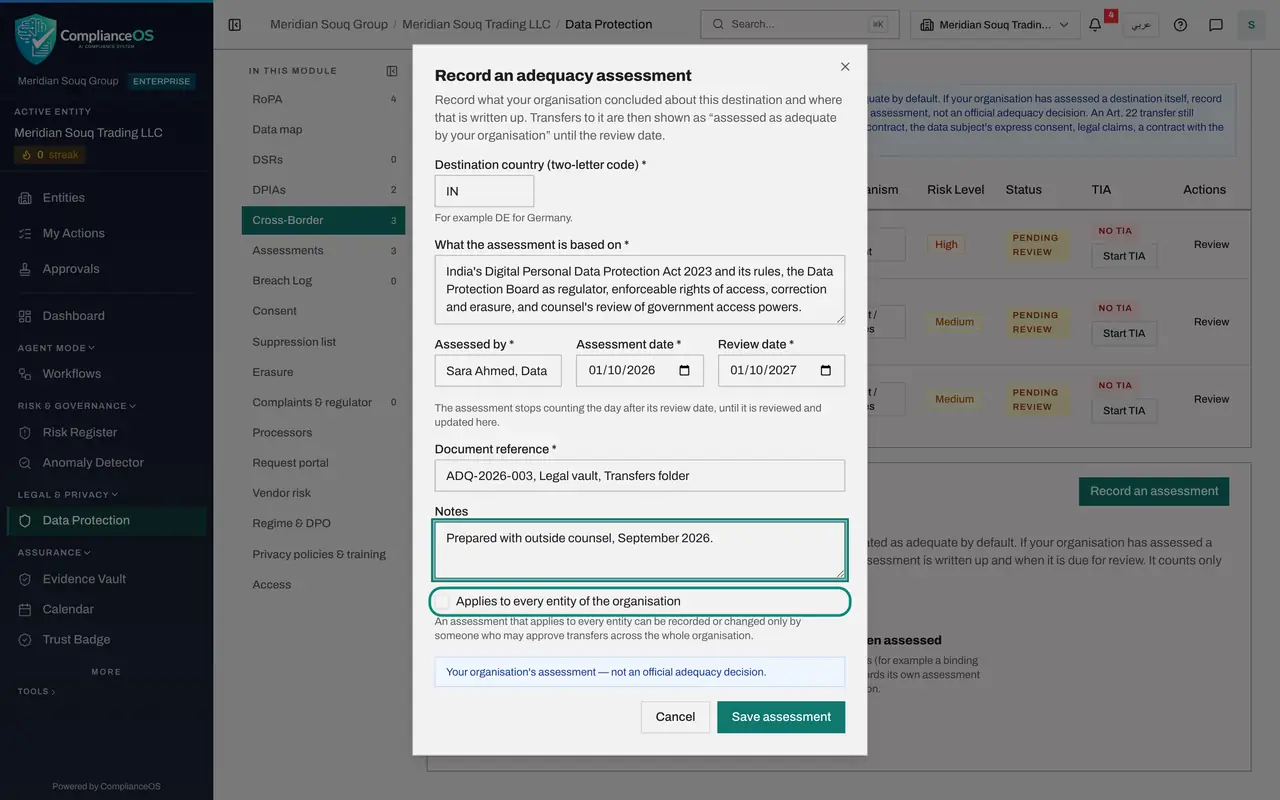
In Document reference, say where the written assessment is kept. It is required. Add a note if it helps. Applies to every entity of the organisation is greyed out for you: only someone who may approve transfers across the whole organisation can record an assessment for every entity.
- Type Document reference *:
ADQ-2026-003, Legal vault, Transfers folder - Type Notes:
Prepared with outside counsel, September 2026.
- Type Document reference *:
- 7
Select Save assessment
Select Save assessment. A message confirms that the assessment is saved and says how many transfers were updated. The card now lists India with the assessment date, who assessed it, the review date, the document and the status Current, with Edit and Withdraw.
- Select Save assessment
- 8
See the effect on the transfer
Scroll up to the register. The risk of the transfer to HelloDesk has dropped from High to Medium. Select Review on it: Adequacy and destination law now reads Assessed as adequate by your organisation, with the date and the assessor, and the reminder that this is your organisation's assessment, not an official adequacy decision, with the review date.
- Select Review
- 9
Select Withdraw
A month later, counsel advises that the assessment was premature. Select Cancel to close the transfer, go back to the card and select Withdraw on the India row. The form warns that transfers to India will no longer be treated as adequate, that their risk is recalculated, and that an approved transfer impact assessment that relied on it is flagged for re-assessment.
- Select Cancel
- Select Withdraw
- 10
Give the reason and confirm
Type the reason, which is required, and select Withdraw. A message says the assessment is withdrawn and how many transfers were updated.
- Type Reason *:
Counsel advises waiting until India's rules are fully in force. To be… - Select Withdraw
- Type Reason *:
- 11
Tick Show withdrawn
The card is back to No destination has been assessed, but the record is kept. Tick Show withdrawn to see it, marked Withdrawn.
- Select Show withdrawn (1)
- 12
Check the transfers again
Scroll up to the register. The transfer to HelloDesk is back at High, and a line under the risk level records why: the risk was raised because your organisation withdrew its adequacy assessment for this destination.
How to check it worked
the card shows the assessment for India as Withdrawn when you tick Show withdrawn, and the transfer to HelloDesk Support Services is back at High risk with a note saying the risk was raised because the assessment was withdrawn.
Common mistakes
- Treating your own assessment as an official adequacy decision. Every screen repeats it: this is your organisation's assessment, not an official decision. A transfer that relies on Article 22 still needs UAE Data Office approval.
- Recording an assessment with no document behind it. Document reference is required because an auditor will ask to read the assessment itself.
- Forgetting the review date. The assessment stops counting the day after its review date, and the risk of every transfer to that country goes back up until you review and update it.
Check your understanding
1. What happens to transfers to a country when you record your organisation's adequacy assessment for it?
- A.They are approved automatically
- B.They are labelled Assessed as adequate by your organisation and their risk is recalculated
- C.They no longer need a transfer impact assessment or approval
- D.Nothing changes
Show answer
Answer: B. They are labelled Assessed as adequate by your organisation and their risk is recalculated
The label on each transfer changes and its risk is recalculated. The transfers still need their assessment and approval.
2. You withdraw the assessment. What happens to the record of it?
- A.It is deleted
- B.It is kept, marked Withdrawn with your reason, and the transfers' risk is recalculated
- C.It stays current until its review date
- D.It is sent to the regulator
Show answer
Answer: B. It is kept, marked Withdrawn with your reason, and the transfers' risk is recalculated
The withdrawal form says the assessment is kept as a record. Tick Show withdrawn to see it.