Lesson 4 of 27
Record children's data and automated decisions
What you will be able to do
Add two activities that need extra detail: one that processes children's data, with its age bands and age checks, and one where a system decides about people automatically, with a description of the logic and the right to human review.
Before you start
- You are signed in with the Data Protection Officer role for the entity.
- The Children's data card in Regime and DPO says whether the Child Digital Safety law applies. In this company it does, so activities for children under 13 are checked against it.
- You have added at least one ordinary activity, as in the previous lesson.
Steps
- 1
Select Add Activity and enter the basics
On the RoPA section, select Add Activity. Type the name Kids Club birthday rewards. Open Legal Basis and choose Consent, because a parent signs the child up. Then type the purpose.
- Select Add Activity
- Type Activity Name *:
Kids Club birthday rewards - Select Select lawful basis
- Choose Consent — Art. 6
- Type Purpose *:
Send a birthday voucher to children whose parent has signed them up to…
- 2
Enter the data, the people and the retention period
List the data categories and the data subjects, and type 1095 days, three years, in Retention.
- Type Data Categories (comma-separated):
Child's first name, Date of birth, Parent's name, Parent's mobile numb… - Type Data Subjects (comma-separated):
Children, Parents and guardians - Type Retention (days):
1095
- Type Data Categories (comma-separated):
- 3
Tick Processes children's data
Scroll down and tick Processes children's data. A child is anyone under 18. More fields open: the age bands, how age is verified, and two further tick boxes.
- 4
Tick the age bands
Under Age bands, tick Under 13 and 13 to 17, because the club takes children of both ages. Ticking Under 13 opens a list headed Child Digital Safety law: under-13 requirements, showing which requirements are met.
- Select Under 13
- Select 13 to 17
- 5
Describe how age is verified
In How age is verified, describe the check in a sentence. It is required for children under 13. The requirement Age verification is described changes to met as you type.
- Type How age is verified *:
The parent enters the child's date of birth at sign-up and confirms it…
- Type How age is verified *:
- 6
Tick High-privacy settings by default
Leave Used for targeted advertising unticked: children's data may not be used to target adverts, and the form refuses to save if it is ticked. Tick High-privacy settings by default, which means a child's account starts with the most private settings. All four requirements now read met.
- 7
Select Add Activity to save
Select Add Activity. The form closes and the activity appears in the register with a Children tag under its name. The note on the form also recommended an impact assessment for children's data.
- Select Add Activity
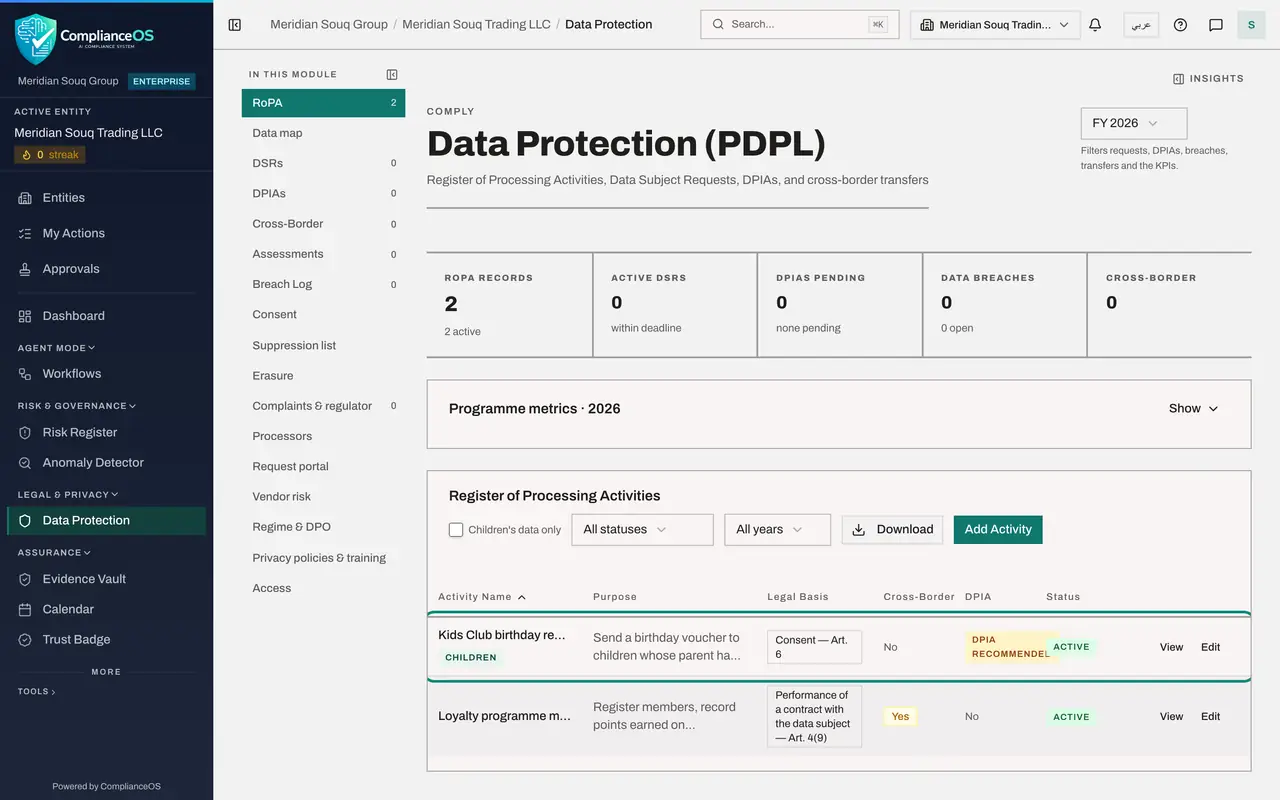
- 8
Select Add Activity again for the fraud check
The online store scores every order for fraud and can block a payment without a person looking at it. Select Add Activity, type the name Online order fraud screening, choose Performance of a contract with the data subject as the legal basis, and type the purpose.
- Select Add Activity
- Type Activity Name *:
Online order fraud screening - Select Select lawful basis
- Type Purpose *:
Score each online order for fraud before payment is taken, and block o…
- 9
Enter the data, the people, the retention period and the processor
List the data categories and data subjects, type 365 days in Retention, and name the supplier that runs the scoring in Processors.
- Type Data Categories (comma-separated):
Name, Delivery address, Device identifier, Order history, Card type - Type Data Subjects (comma-separated):
Online customers - Type Retention (days):
365 - Type Processors (comma-separated):
SafeCart Fraud Analytics Pvt Ltd
- Type Data Categories (comma-separated):
- 10
Tick Automated decision-making and describe the logic
Scroll down and tick Automated decision-making. This means decisions about people made solely by automated processing, including profiling. A required field opens: How the automated decision is made. Describe the logic, the data it uses and the effect on the person.
- Type How the automated decision is made *:
A model scores each order from zero to one hundred using the delivery…
- Type How the automated decision is made *:
- 11
Tick Data subjects can ask for human review
Tick Data subjects can ask for human review. A blocked customer can call the service desk and have a person look at the order. If you leave this unticked, a note reminds you that people may object to decisions made solely by automated processing.
- Select Data subjects can ask for human review
- 12
Select Add Activity to save
Select Add Activity. The register now lists three activities. Online order fraud screening carries the tag Automated decisions, Article 18, under its name.
- Select Add Activity
- 13
Select Show on Programme metrics
Go to the top of the page and select Show on Programme metrics. Under Processing register, the counts now read three activities, one with automated decisions, one cross-border transfer and one with children's data.
- Select Show
How to check it worked
the register shows three activities. Kids Club birthday rewards carries a Children tag and Online order fraud screening carries an Automated decisions tag, and the Programme metrics count one activity with children's data and one with automated decisions.
Common mistakes
- Recording an activity for children under 13 with a lawful basis other than consent. When the Child Digital Safety law applies, the form refuses to save until the basis is consent, given by a parent or guardian.
- Ticking Used for targeted advertising on a children's activity. The law does not allow it, and the form refuses to save while it is ticked.
- Ticking Automated decision-making and leaving the description empty. The form refuses to save until you describe how the decision is made.
Check your understanding
1. The Child Digital Safety law applies to the entity. Which lawful basis can an activity for children under 13 use?
- A.Performance of a contract
- B.Legal obligation
- C.Consent, given by a verified parent or guardian
- D.Any basis in the list
Show answer
Answer: C. Consent, given by a verified parent or guardian
The under-13 requirements list on the form shows it: the lawful basis must be consent, given by a verified parent or guardian.
2. What must you write when you tick Automated decision-making?
- A.Nothing more
- B.How the automated decision is made: the logic, the data used and the effect on the person
- C.The name of the software supplier only
- D.The number of decisions made each year
Show answer
Answer: B. How the automated decision is made: the logic, the data used and the effect on the person
The field How the automated decision is made is required once the box is ticked. People have the right to object to decisions made solely by automated processing, so the logic has to be on record.