Lesson 18 of 27
Sign off the AI's classifications and close the catch-up
What you will be able to do
This lesson is for the tax manager. The accountant has brought in earlier months and had the AI classify them, and every classification is waiting for a person. You will open the months from Catch-up bookkeeping, read why the AI chose each category, approve the AI's suggestions in the Sign-off cockpit, and see the months turn to Done.
Before you start
- You are signed in as the tax manager, Fatima Noor, who holds the permission to approve tax records.
- Eight earlier transactions have been imported and classified by the accountant. All eight are AI suggestions waiting for sign-off.
Steps
- 1
Open Catch-up bookkeeping
In the left menu select Tax Intelligence. Select Returns, then CT Return, then the shortcut Catch-up. Five months are marked Needs review, each with a Review link.
- Select Tax Intelligence
- Select Returns
- Select CT Return
- Select Catch-up
- 2
Select Review
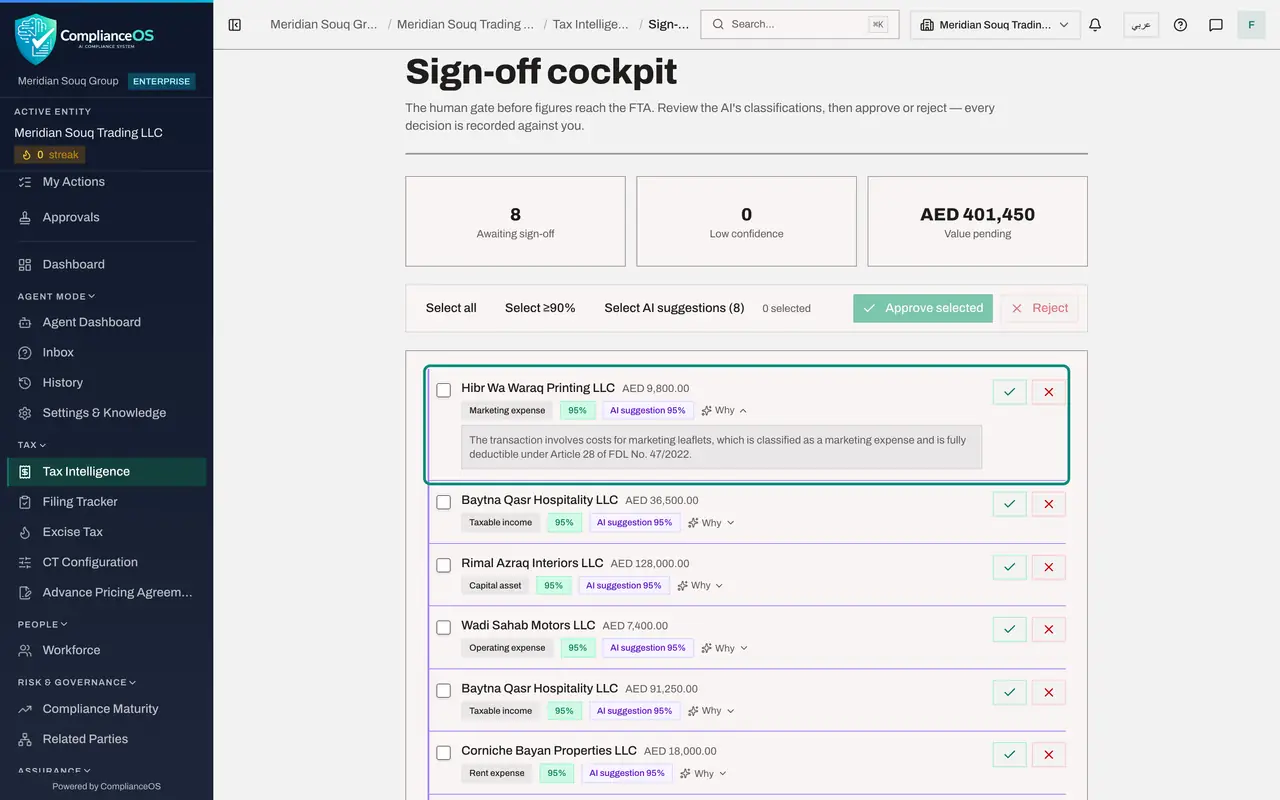
Select Review in the box of January 2025. The Sign-off cockpit opens. Awaiting sign-off reads 8, Low confidence reads 0, and Value pending is the total amount of the eight transactions.
- Select Review
- 3
Read a row and select Why
Each row shows the counterparty, the amount, the proposed category, the confidence and where the classification came from: here AI suggestion, 95 percent. Select Why on the first row. The AI's reasoning opens under it.
- Select Why
- 4
Select the AI suggestions
Having checked each row against the documents, select Select AI suggestions, 8. All eight rows are ticked, and the count beside the buttons reads 8 selected. A note under the buttons reminds you that the 8 selected lines are AI suggestions and that approving them records you as the reviewer. Select all and Select 90 percent and above are the other quick choices, and each row has its own tick box.
- Select Select AI suggestions (8)
- 5
Select Approve selected
Select Approve selected. A message confirms that 8 were approved, each decision recorded against your name, and the cockpit says Nothing awaiting sign-off. Reject would refuse the ticked proposals instead.
- Select Approve selected
- 6
Go back to Catch-up and reload
Use the browser's Back button to return to Catch-up bookkeeping, and reload the page. Every month with data is now marked Done with a tick, and the line at the top reads Books are caught up: every month with data is fully signed off.
How to check it worked
The Sign-off cockpit says Nothing awaiting sign-off. On Catch-up bookkeeping, after a reload, every month with data is marked Done and the line at the top reads Books are caught up.
Common mistakes
- Approving all the AI's suggestions without reading them. Open Why on each row you are not sure of, and reject what is wrong: every decision is recorded against your name.
- Reading a 95 percent confidence as a check by a person. It is the AI's own score. The label AI suggestion tells you no rule and no person has decided the row yet.
Check your understanding
1. What does the label AI suggestion on a row of the cockpit mean?
- A.A person approved it
- B.The category was proposed only by the AI and is waiting for a person's sign-off
- C.A statutory rule decided it
- D.It was imported that way
Show answer
Answer: B. The category was proposed only by the AI and is waiting for a person's sign-off
Each row shows where its classification came from. AI-only classifications are not approved by themselves: they wait here.
2. Who can approve the classifications in the Sign-off cockpit?
- A.Anyone who can see the page
- B.Someone holding the permission to approve tax records, such as the tax manager
- C.Only the auditor
- D.The AI
Show answer
Answer: B. Someone holding the permission to approve tax records, such as the tax manager
The accountant can classify but not approve. The tax manager holds the approve permission, and each approval is recorded against her name.