Lesson 11 of 27
Compute the excise return, read it and recompute it
What you will be able to do
This lesson is for the accountant, who prepares the return. You will have the app add up September's movements into an excise return, read its totals and its breakdown by category, add a movement that arrived late and compute the same period again, download the return as a PDF and the list of returns as a CSV file, compute a second period, and see that the accountant cannot file a return.
Before you start
- You are signed in as the accountant, Ahmed Saleh. Nine stock movements are recorded: eight for September 2026 and one for late August.
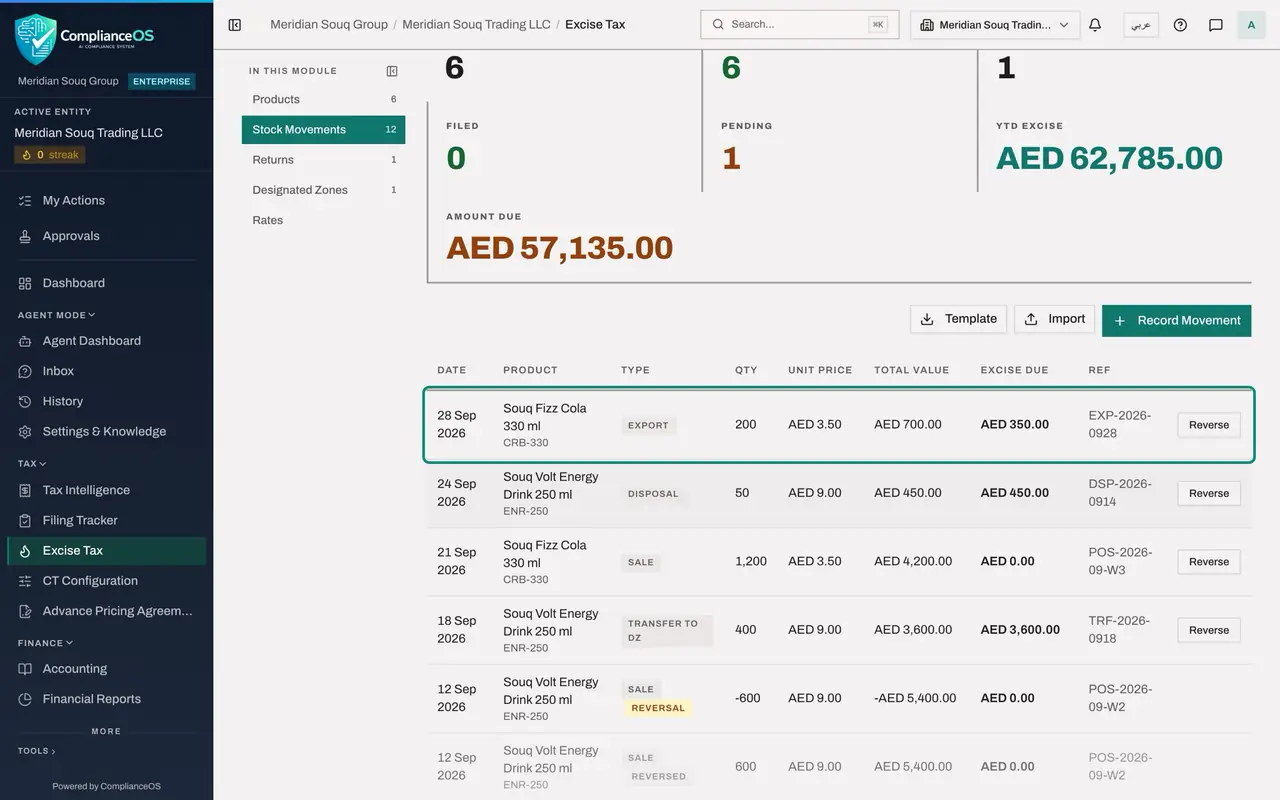
- One more document has just arrived: 200 cans of Souq Fizz Cola 330 ml were exported on 28 September 2026 under the reference EXP-2026-0928.
Steps
- 1
Open Excise Tax and select Returns
In the left menu select Excise Tax. Under In this module select Returns. It says No excise returns computed.
- Select Excise Tax
- Select Returns
- 2
Select Compute Return
Select Compute Return. The Compute Excise Return form opens with two dates.
- Select Compute Return
- 3
Enter the period
In Period Start enter the first day of the tax period, 1 September 2026. In Period End enter its last day, 30 September 2026. Every movement dated from the first date to the second, both included, is counted.
- Type Period Start:
2026-09-01 - Type Period End:
2026-09-30
- Type Period Start:
- 4
Select Compute Return
Select Compute Return in the form. It closes with the message Excise return computed, and the return appears as a card.
- Select Compute Return
- 5
Read the return
The card is headed with the period. Its status is Draft. Taxable Qty is the net number of units, 10,750. Excise Due is the net excise for the period, 57,135.00 dirhams. Filing Ref shows a dash until the return is filed, and Computed shows today's date. On the right are the buttons Recompute, File and PDF.
- 6
Open the category breakdown
Select Category Breakdown, 4 categories, at the foot of the card. One line appears for each category with its rate, its taxable quantity, its taxable value and its excise. Energy Drinks shows 17,550.00 dirhams: 21,600.00 charged on the import, less 3,600.00 for the transfer to the designated zone and 450.00 for the disposal.
- Select Category Breakdown (4 categories)
- 7
Record the movement that arrived late
The export note has arrived. Select Stock Movements, then Record Movement. Choose CRB-330, the cola, and the type EXPORT. Enter the date 28 September 2026, the quantity 200, the unit price 3.50 and the reference EXP-2026-0928. Select Record Movement.
- Select Stock Movements
- Select Record Movement
- Select Product
- Choose CRB-330 — Souq Fizz Cola 330 ml
- Select Movement Type
- Choose EXPORT
- Type Date:
2026-09-28 - Type Quantity:
200 - Type Unit Price (AED):
3.50 - Type Reference Number:
EXP-2026-0928 - Select Record Movement
- 8
Select Recompute on the return
Go back to Returns. The draft still shows the old figures: it does not change by itself. Select Recompute on the card. The message Excise return computed appears.
- Select Returns
- Select Recompute
- 9
Read the refreshed return
There is still one card for September: the draft was refreshed, not doubled. Taxable Qty is now 10,550 and Excise Due is 56,785.00 dirhams, which is 350.00 dirhams lower because of the export.
- 10
Download the return as a PDF
Select PDF on the card. A PDF of the return is downloaded. Use it as your working paper when you enter the figures on the tax authority's portal, and for the person who reviews the return.
- Select PDF
- 11
Export the list of returns
Select Export CSV above the cards. A CSV file named excise returns with today's date is downloaded, with one line per return: the period, the status, the taxable quantity, the excise due, the filing reference and when it was computed.
- Select Export CSV
- 12
Compute the August return
The import file also brought in one molasses import dated 27 August. Select Compute Return, enter 1 August 2026 and 31 August 2026, and select Compute Return. A second card appears for August, with a quantity of 200 and excise due of 6,000.00 dirhams.
- Select Compute Return
- Type Period Start:
2026-08-01 - Type Period End:
2026-08-31 - Select Compute Return
- 13
Check the figures at the top
At the top of the page, Pending now reads 2 and Amount Due adds up both drafts: two returns are computed and not yet filed.
- 14
Try to file the September return yourself
Select File on the September card, type a reference and select Confirm and File. The app refuses with the message Access Denied. Filing needs the permission to approve excise returns, which the accountant does not hold, and it must be done by someone other than the person who computed the figures. The tax manager files it in the next lesson.
- Select File
- Type e.g. EX-2025-001:
EX-2026-09-0147 - Select Confirm & File
How to check it worked
The Returns section shows two drafts: September 2026, with a taxable quantity of 10,550 and excise due of 56,785.00 dirhams after the recompute, and August 2026, with 6,000.00 dirhams. A PDF of the return and a CSV file of the returns list have been downloaded, and the attempt to file as the accountant was refused.
Common mistakes
- Treating the first computation as final. A draft does not change by itself, so select Recompute after the last movement of the period is recorded.
- Choosing a period that does not match the tax period, for example the first to the twenty-ninth. Movements dated outside the two dates are left out without any warning.
- Expecting to file the return yourself as the accountant. Filing needs the approve permission and a second person.
- Thinking that Compute Return files anything. It only adds up the movements. Filing is a separate step, shown in the next lesson, and the tax authority receives nothing from the app.
Check your understanding
1. You computed the September return, then recorded one more September movement. What should you do?
- A.Nothing, the return updates itself
- B.Select Recompute on the return's card
- C.Delete the return first
- D.File the return and amend it
Show answer
Answer: B. Select Recompute on the return's card
Recompute refreshes the draft in place. In this lesson the excise due fell from 57,135.00 to 56,785.00 dirhams after the export was added.
2. In the category breakdown, why is the excise for Energy Drinks lower than the excise charged on the import?
- A.The rate changed
- B.The transfer to the designated zone and the disposal were taken off
- C.Sales were taken off
- D.It is a rounding difference
Show answer
Answer: B. The transfer to the designated zone and the disposal were taken off
The return charges imports and production, and takes off transfers to a designated zone, exports and disposals. Sales do not change it.