Lesson 7 of 27
Record an import of excise goods, field by field
What you will be able to do
This lesson is for the accountant. Excise is worked out from stock movements: each import, production run, sale, transfer or disposal of excise goods is recorded as one movement. You will record an import of energy drinks and learn every field of the Record Stock Movement form, then read the excise the app worked out and see the stock on the product.
Before you start
- You are signed in as the accountant, Ahmed Saleh, and the products are registered.
- You have the import paperwork. Here it is an invented shipment: 2,400 cans of Souq Volt Energy Drink 250 ml, received on 3 September 2026 at a cost of 4.20 dirhams a can, under the customs declaration DXB-IM-26-090311.
Steps
- 1
Open Excise Tax and select Stock Movements
In the left menu select Excise Tax. Under In this module select Stock Movements. The list is empty.
- Select Excise Tax
- Select Stock Movements
- 2
Select Record Movement
Select Record Movement. The Record Stock Movement form opens.
- Select Record Movement
- 3
Choose the product
Open Product and choose ENR-250, the energy drink. The list shows every registered product by its code and name. A product must be registered before it can be chosen here.
- Select Product
- Choose ENR-250 — Souq Volt Energy Drink 250 ml
- 4
Choose the movement type
Open Movement Type. There are nine types: import, local purchase, production, export, transfer to a designated zone, transfer from a designated zone, sale, disposal and adjustment. Choose IMPORT. The note under the field reminds you that an import adds stock, and that a sale, an export or a disposal takes stock away.
- Select Movement Type
- Choose IMPORT
- 5
Enter the date
In Date enter the day the goods moved, here 3 September 2026. Type it or use the calendar icon. The date decides which return period the movement falls in.
- Type Date:
2026-09-03
- Type Date:
- 6
Type the quantity
In Quantity type the number of units, here 2400 cans. Count in the same unit the product is sold in.
- Type Quantity:
2400
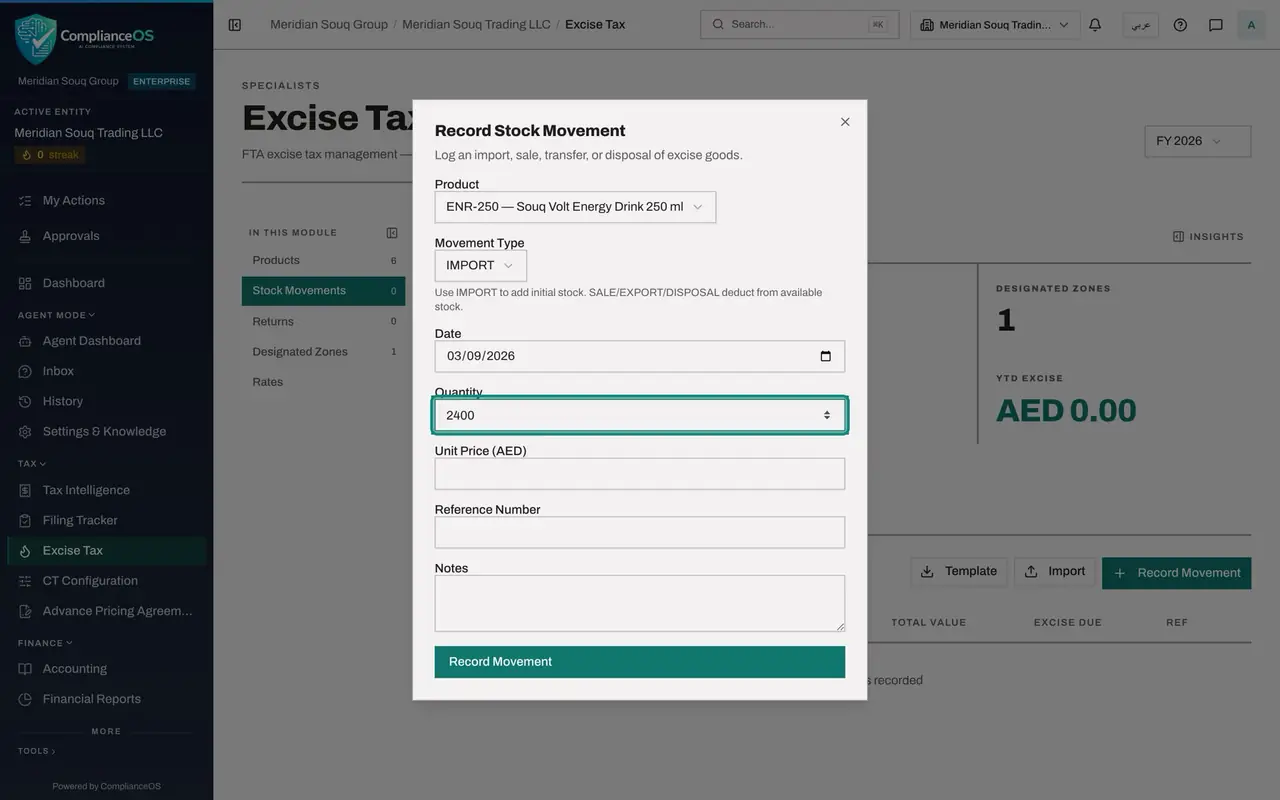
- Type Quantity:
- 7
Type the unit price
In Unit Price type the price of one unit on this movement, in dirhams. For this import it is the cost per can, 4.20. Quantity times unit price gives the Total Value in the list.
- Type Unit Price (AED):
4.20
- Type Unit Price (AED):
- 8
Type the reference number
In Reference Number type the number of the document behind the movement. For an import that is the customs declaration, here DXB-IM-26-090311. The field is optional, but it is what ties the row to its paperwork, so always fill it in.
- Type Reference Number:
DXB-IM-26-090311
- Type Reference Number:
- 9
Add a note
Notes is optional free text for anything a colleague should know, such as the shipment or the supplier. Type: First autumn shipment of energy drinks.
- Type Notes:
First autumn shipment of energy drinks
- Type Notes:
- 10
Select Record Movement
Select Record Movement at the bottom of the form. The form closes with the message Stock movement recorded.
- Select Record Movement
- 11
Read the new row
The row shows the date, the product with its code, the type IMPORT, the quantity 2,400 and the unit price 4.20 dirhams. Total Value is 10,080.00 dirhams. Excise Due is 21,600.00 dirhams: the app charged 100 percent on the retail sale price of 9.00 dirhams, because it is higher than the unit price of 4.20. The last column is the reference.
- 12
Check the stock on the product
Select Products. The row of ENR-250 now shows 2,400 under Stock, with its value beside it under Stock Value.
- Select Products
How to check it worked
The Stock Movements list has one row dated 3 September 2026 of type IMPORT: quantity 2,400, unit price 4.20 dirhams, total value 10,080.00 dirhams, excise due 21,600.00 dirhams and the reference DXB-IM-26-090311. In Products, ENR-250 shows a stock of 2,400.
Common mistakes
- Leaving Reference Number empty. The reference is how you and an auditor trace a row back to its paperwork.
- Expecting the excise to be a percentage of the unit price you typed. For a percentage rate the app uses whichever is higher, the unit price on the movement or the retail sale price of the product. Here the retail price of 9.00 dirhams was used.
- Trying to edit a movement. A movement cannot be edited or deleted: one recorded in error is reversed, as shown in a later lesson, so check every field before you select Record Movement.
Check your understanding
1. 2,400 cans were imported at 4.20 dirhams each. The product's retail sale price is 9.00 dirhams and its rate is 100 percent. What excise does the app show?
- A.10,080.00 dirhams
- B.21,600.00 dirhams
- C.Zero
- D.4,320.00 dirhams
Show answer
Answer: B. 21,600.00 dirhams
The app took the higher of the two prices, the retail sale price of 9.00 dirhams: 2,400 cans times 9.00 dirhams times 100 percent is 21,600.00 dirhams.
2. Which movement type adds stock when goods first arrive from abroad?
- A.SALE
- B.DISPOSAL
- C.IMPORT
- D.EXPORT
Show answer
Answer: C. IMPORT
The note under Movement Type says to use IMPORT to add initial stock. Sale, export and disposal take stock away.