Lesson 27 of 27
How this connects: calendar, Evidence Vault, Filing Tracker and audit log
What you will be able to do
This lesson is for the compliance officer, and for anyone who wants to know where the work in this course shows up elsewhere. You will follow the excise returns into the Compliance Calendar, the Evidence Vault and the Filing Tracker, and find the excise work, the portal submissions and the policy rules in the audit log. You will also see which connections do not exist, so that you do not rely on them.
Before you start
- You are signed in as the compliance officer, Mariam Aziz.
- The September excise return is filed, the August return is filed and amended, and the October return is a draft. Two portal submissions and one policy rule are on record.
Steps
- 1
Open the Compliance Calendar and select Sync Deadlines
In the left menu, in the group Assurance, select Calendar. Select Sync Deadlines at the top right. The calendar pulls in the deadlines of every module, and with them one entry for each excise return.
- Select Calendar
- Select Sync Deadlines
- 2
Read the excise deadlines
On the right, under October Deadlines, is Excise Return, 1 to 30 September 2026, on 15 October, marked Completed, because the return was filed. Select it to see its details above the list. Under Upcoming Deadlines is the October return, due on 15 November and Pending. The entry dated 31 December was added by the workflow run in the earlier lesson. An excise deadline falls 15 days after the end of its period. Completed at the top counts 2: September and August.
- Select Excise Return, 1 to 30 September 2026
- 3
Open the Evidence Vault
In the left menu select Evidence Vault. Three records are listed, all named Excise Return Filed, with the source Excise Return, the label Sealed, and the retention 7Y Tax, which keeps them for seven years. The app wrote one each time a return was filed: September, August, and the August amendment.
- Select Evidence Vault
- 4
Open one record
Select the name of a record. Its detail window shows a preview of what was sealed: the filing reference, the period, the status Filed and the total excise due. Further down are the source type, when it was created, the retention and its expiry, and who performed the filing. The record cannot be altered, which is what makes it evidence.
- 5
Close the record and open the Filing Tracker
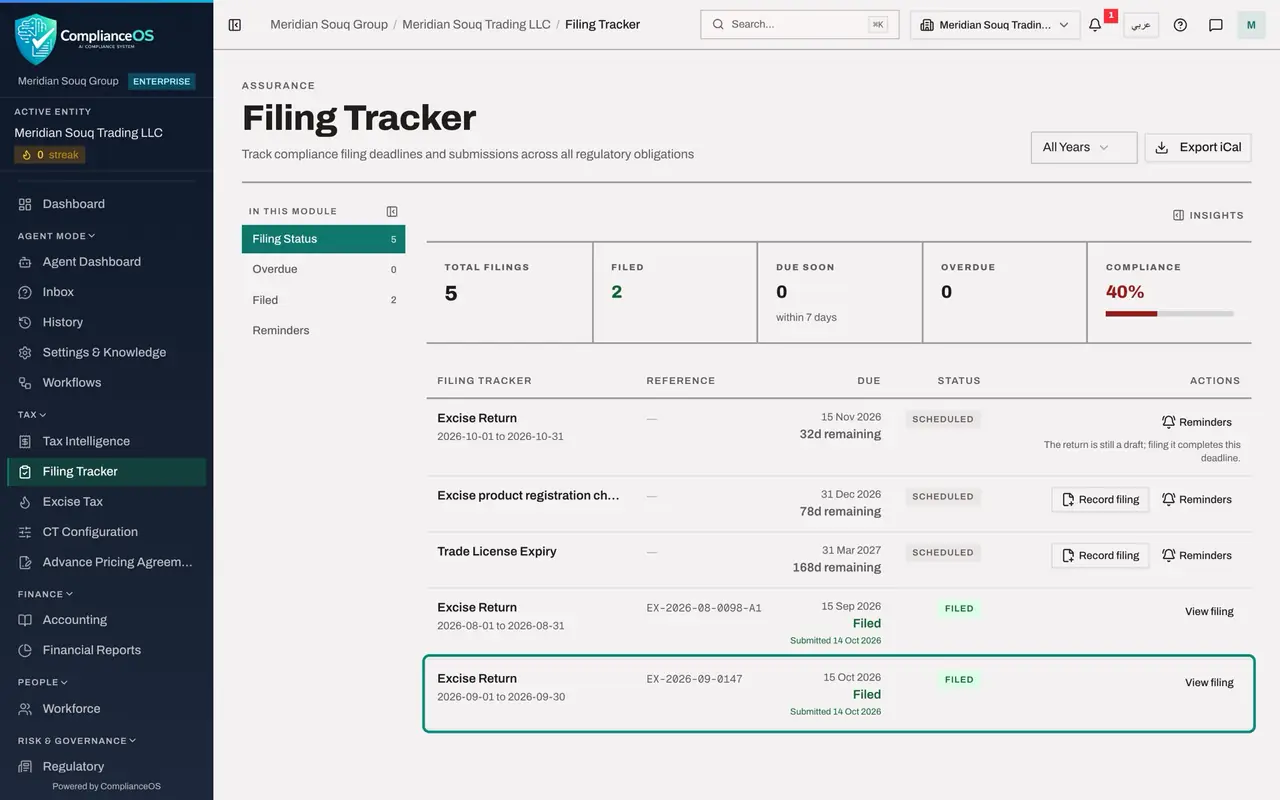
Close the window. In the left menu, under Tax, select Filing Tracker. The excise returns are listed with their due dates and follow their returns: September and August are marked Filed, with their filing references, and October is still to file.
- Select Close
- Select Filing Tracker
- 6
Open the audit log and filter to excise returns
In the left menu select Audit log. Open the box All Resource Types and choose Excise return. The list shows every computation, reopening and change of an excise return, newest first, with the date, the time and the person: the accountant who computed and reopened, and the tax manager whose filing appears as Approval request: Approved, followed by the change to Filed.
- Select Audit log
- Select Resource Type
- Choose Excise return
- 7
Open the details of one event
Select Details on the first line. It opens to show what changed: here the status of the return. The same filter box offers Excise product, Excise stock movement and Designated zone, so every record made in Excise Tax can be traced to a person and a time.
- Select Details
- 8
Filter to portal submissions
Change the filter to Portal submission. The two submissions recorded in Government Portals are listed with the tax manager's name. Adding, editing and disconnecting a portal are logged under Government portal settings.
- Select Resource Type
- Choose Portal submission
- 9
Filter to policy rules
Change the filter to Custom policy. Each rule created, changed or deleted in the Policy Engine is listed with the compliance officer's name.
- Select Resource Type
- Choose Custom policy
- 10
Check what is not connected
Last, open the Risk Register from the left menu. The register has no risk from excise returns, portal submissions or policy alerts: none of them creates a risk, an approval request or a notification. If one of them needs follow-up, add the risk or the task yourself. A workflow run is the exception: its trace lists anything it recorded.
- Select Risk Register
How to check it worked
The Compliance Calendar shows the September excise return on 15 October as Completed and the October return on 15 November as Pending. The Evidence Vault holds three sealed records named Excise Return Filed, one of them with the reference EX-2026-09-0147. The audit log, filtered to Excise return, lists each computation and each change with the name of the person who made it.
Common mistakes
- Waiting for the excise deadlines to appear in the calendar by themselves. Select Sync Deadlines on the calendar to pull them in.
- Recording the filing of an excise return a second time in the Filing Tracker. Filing it in Excise Tax already marks the tracker entry as filed.
- Expecting these tools to raise risks, approvals or notifications. Excise returns, portal submissions and policy alerts created nothing in the Risk Register or the Approvals inbox, and the policy alerts appear only inside the Policy Engine.
Check your understanding
1. What does filing an excise return create in the Evidence Vault?
- A.Nothing
- B.A sealed record of the filing, with the period, the excise due and the filing reference, kept for seven years
- C.A copy of the PDF only
- D.An approval request
Show answer
Answer: B. A sealed record of the filing, with the period, the excise due and the filing reference, kept for seven years
Each filing writes a sealed snapshot named Excise Return Filed, with the source type Excise Return and the retention Tax, seven years.
2. When is an excise return's deadline shown in the Compliance Calendar?
- A.15 days after the end of its period
- B.On the last day of its period
- C.28 days after the end of its period
- D.It is never shown
Show answer
Answer: A. 15 days after the end of its period
The September return, for the period ending 30 September, appears on 15 October, and the October return on 15 November.