Lesson 10 of 27
Reverse a stock movement recorded in error
What you will be able to do
This lesson is for the accountant. A stock movement cannot be edited or deleted, because returns are built on it. A movement recorded in error is cancelled with a reversal: a second movement on the same date with a negative quantity, value and excise. You will enter a sale twice by mistake, see that the app accepts it, and reverse the extra one with a reason.
Before you start
- You are signed in as the accountant, Ahmed Saleh. The September movements are recorded.
- The shops' sales report for the second week of September, POS-2026-09-W2, was already recorded in an earlier lesson. Here it is typed in a second time by mistake.
Steps
- 1
Open Stock Movements
In the left menu select Excise Tax, then Stock Movements. Each row shows the date, the product with its code, the type, the figures and the reference. At the end of each row is the button Reverse.
- Select Excise Tax
- Select Stock Movements
- 2
Record the same sale a second time
By mistake, the week's sales report is typed in again. Select Record Movement, choose ENR-250 and SALE, enter 12 September 2026, the quantity 600, the unit price 9.00 and the reference POS-2026-09-W2, and select Record Movement.
- Select Record Movement
- Select Product
- Choose ENR-250 — Souq Volt Energy Drink 250 ml
- Select Movement Type
- Choose SALE
- Type Date:
2026-09-12 - Type Quantity:
600 - Type Unit Price (AED):
9.00 - Type Reference Number:
POS-2026-09-W2 - Select Record Movement
- 3
See the duplicate
The app accepted it: it does not compare references. The list now has two identical sale rows for 12 September with the same reference.
- 4
Select Reverse on one of the two rows
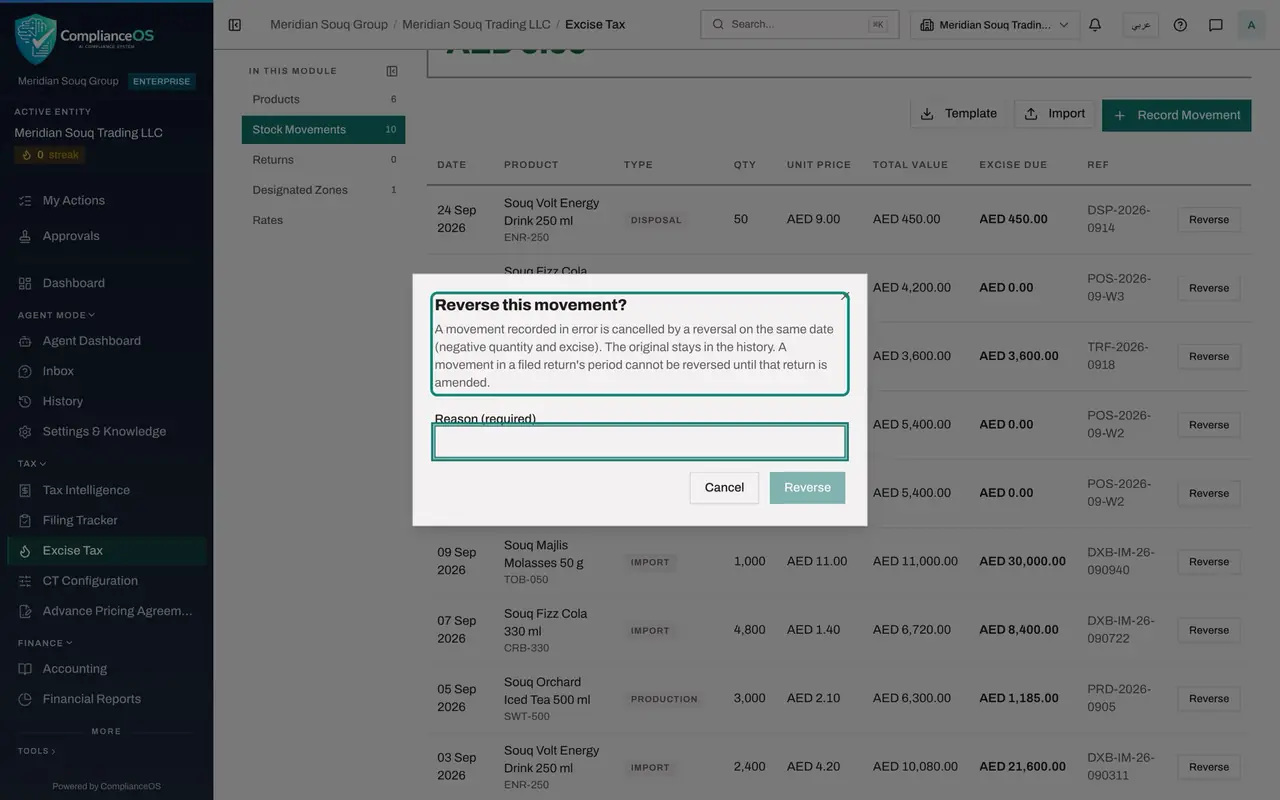
Select Reverse at the end of the first of the two rows. A window asks: Reverse this movement? It explains that a reversal on the same date cancels the movement with a negative quantity and excise, that the original stays in the history, and that a movement in a filed return's period cannot be reversed until that return is amended.
- Select Reverse
- 5
Type the reason and confirm
In Reason, which is required, type: Sales report for week 2 entered twice. Then select Reverse in the window. The message says the movement is reversed, and that stock and the returns of that period net it out.
- Type Reason (required):
Sales report for week 2 entered twice - Select Reverse
- Type Reason (required):
- 6
Read the two new rows
The duplicate is now marked Reversed, and above it is its reversal: the same date and product, the type marked Reversal, the quantity minus 600 and the value minus 5,400.00 dirhams. Neither can be reversed again.
- 7
Check the stock
Select Products. ENR-250 shows 1,350 under Stock, as before the mistake: the duplicate sale and its reversal cancel each other.
- Select Products
How to check it worked
The Stock Movements list shows the duplicate sale marked Reversed and, beside it, a reversal row with the quantity minus 600. In Products, ENR-250 shows a stock of 1,350, the same as before the mistake.
Common mistakes
- Expecting the app to stop a duplicate. It does not compare references, so a report entered twice is saved twice. Check the list before you record.
- Reversing the wrong one of two identical rows. Either cancels the duplicate, but only reverse one of them, and give the reason.
- Trying to reverse a movement in the period of a filed return. The app refuses until that return is reopened for amendment.
Check your understanding
1. What does Reverse do to a movement?
- A.Deletes it
- B.Adds a reversal on the same date with a negative quantity, value and excise, and marks the original as Reversed
- C.Edits its quantity
- D.Sends it for approval
Show answer
Answer: B. Adds a reversal on the same date with a negative quantity, value and excise, and marks the original as Reversed
The original stays in the history, marked Reversed, and the reversal row cancels it out in the stock and in the return of that period.
2. Which field must you fill to reverse a movement?
- A.The reference
- B.The reason
- C.The date
- D.Nothing
Show answer
Answer: B. The reason
The window marks the reason as required. It is kept with the reversal, so anyone reading the history later knows why.