Lesson 8 of 27
Record a sale, a transfer to a designated zone and a production run
What you will be able to do
This lesson is for the accountant. Different movement types are treated differently. You will record a sale, see the app refuse a sale of more stock than you hold, record a transfer into a designated zone, which asks for the zone, and record a production run of a drink taxed per litre. Then you will compare the excise the app shows on each row.
Before you start
- You are signed in as the accountant, Ahmed Saleh. The import of 2,400 cans of the energy drink is recorded, and the designated zone is on the list.
- In September 2026 the shops sold 600 cans, 400 cans were moved into Jebel Ali Bonded Warehouse 7, and 3,000 bottles of Souq Orchard Iced Tea 500 ml were produced.
Steps
- 1
Open Stock Movements and start a sale
In the left menu select Excise Tax, then Stock Movements, then Record Movement. Choose the product ENR-250 and the movement type SALE.
- Select Excise Tax
- Select Stock Movements
- Select Record Movement
- Select Product
- Choose ENR-250 — Souq Volt Energy Drink 250 ml
- Select Movement Type
- Choose SALE
- 2
Fill in the sale
Enter the date 12 September 2026, the quantity 600 and the unit price 9.00, the shop price. In Reference Number type POS-2026-09-W2, the reference of the shops' sales report for the week.
- Type Date:
2026-09-12 - Type Quantity:
600 - Type Unit Price (AED):
9.00 - Type Reference Number:
POS-2026-09-W2
- Type Date:
- 3
Select Record Movement and read the row
Select Record Movement. The sale joins the list. Its Total Value is 5,400.00 dirhams and its Excise Due is 0.00: the app charged the excise when the goods were imported, and does not charge it again on the sale.
- Select Record Movement
- 4
Try to sell more than the stock
Now see the stock check. Select Record Movement again, choose ENR-250 and SALE, enter the date 14 September 2026, the quantity 5000 and the unit price 9.00, and select Record Movement. A red message says Insufficient stock for SALE, available 1800, requested 5000. Nothing is saved.
- Select Record Movement
- Select Product
- Choose ENR-250 — Souq Volt Energy Drink 250 ml
- Select Movement Type
- Choose SALE
- Type Date:
2026-09-14 - Type Quantity:
5000 - Type Unit Price (AED):
9.00 - Select Record Movement
- 5
Change the form into a transfer
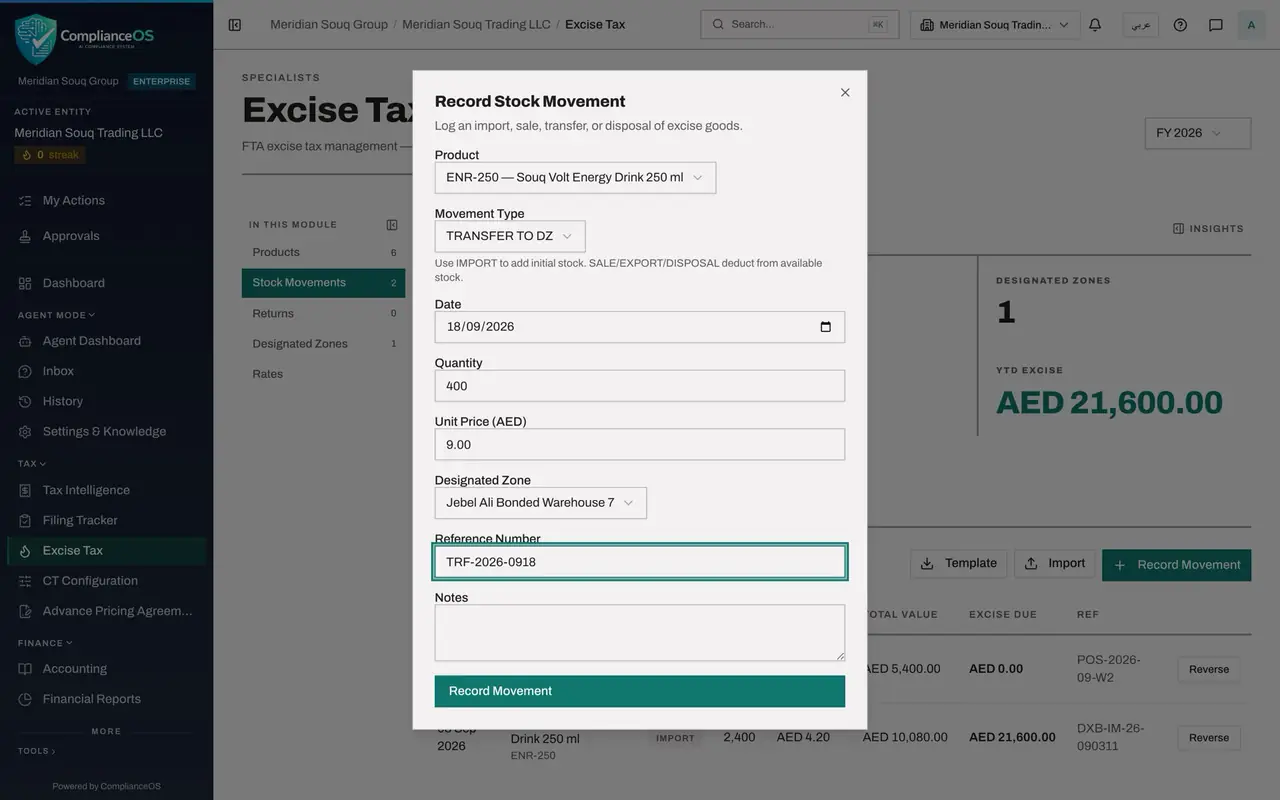
The form is still open, so reuse it. Open Movement Type and choose TRANSFER TO DZ. DZ is short for designated zone. A new field appears below the unit price: Designated Zone.
- Select Movement Type
- Choose TRANSFER TO DZ
- 6
Choose the zone and correct the figures
Open Designated Zone and choose Jebel Ali Bonded Warehouse 7. Change the date to 18 September 2026 and the quantity to 400. In Reference Number type TRF-2026-0918, the number of the transfer note.
- Select Designated Zone
- Choose Jebel Ali Bonded Warehouse 7
- Type Date:
2026-09-18 - Type Quantity:
400 - Type Reference Number:
TRF-2026-0918
- 7
Select Record Movement
Select Record Movement. The transfer is saved. Its row shows the type TRANSFER TO DZ and 3,600.00 dirhams under Excise Due: 400 cans at 9.00 dirhams and 100 percent. For this type the figure is excise to take off the return, which you will see when the return is computed.
- Select Record Movement
- 8
Record a production run
Select Record Movement once more. Choose SWT-500, the iced tea, and the movement type PRODUCTION, for goods made in the country. Enter the date 5 September 2026, the quantity 3000, the unit price 2.10, which is the cost of making one bottle, and the reference PRD-2026-0905.
- Select Record Movement
- Select Product
- Choose SWT-500 — Souq Orchard Iced Tea 500 ml
- Select Movement Type
- Choose PRODUCTION
- Type Date:
2026-09-05 - Type Quantity:
3000 - Type Unit Price (AED):
2.10 - Type Reference Number:
PRD-2026-0905
- 9
Select Record Movement and read the excise per litre
Select Record Movement. The row shows 1,185.00 dirhams under Excise Due. The iced tea is taxed by volume, so the price plays no part: 3,000 bottles of half a litre are 1,500 litres, and 1,500 litres at 0.79 dirhams is 1,185.00 dirhams.
- Select Record Movement
- 10
Read the whole list
The list shows the newest date first. Four movements are recorded: the transfer, the sale, the production run and the import. Compare the column Excise Due: an amount on the import, the production and the transfer, and zero on the sale.
- 11
Check the stock
Select Products. ENR-250 shows 1,400 under Stock: 2,400 imported, less 600 sold, less 400 moved to the zone. SWT-500 shows 3,000.
- Select Products
How to check it worked
The Stock Movements list has four rows. The sale shows 0.00 dirhams under Excise Due. The transfer to the designated zone shows 3,600.00 dirhams, and the production of iced tea shows 1,185.00 dirhams. In Products, ENR-250 shows a stock of 1,400.
Common mistakes
- Recording sales before the import that brought the goods in. The app refuses a sale, an export, a transfer to a zone or a disposal that is larger than the stock on hand.
- Reading the figure under Excise Due on a transfer to a designated zone as tax to pay. The return in a later lesson shows how each type is treated: imports and production are charged, and transfers to a zone, exports and disposals are taken off.
- Forgetting to choose the zone. The Designated Zone field appears only for the two transfer types, and the transfer cannot be saved without it.
Check your understanding
1. You try to record a sale of 5,000 cans with 1,800 in stock. What happens?
- A.The sale is saved and stock goes negative
- B.The app refuses and shows the stock available and the quantity requested
- C.The quantity is reduced to 1,800
- D.The sale is saved for approval
Show answer
Answer: B. The app refuses and shows the stock available and the quantity requested
The message reads Insufficient stock for SALE, available 1800, requested 5000. Nothing is saved.
2. Which extra field appears when the movement type is TRANSFER TO DZ?
- A.Sugar Tier
- B.Designated Zone
- C.Filing Reference
- D.Period End
Show answer
Answer: B. Designated Zone
DZ stands for designated zone. For a transfer to or from a zone, the form asks which zone, and lists the zones you have added.