Lesson 13 of 27
Correct a filed return: reopen it, reverse the wrong movement and recompute
What you will be able to do
This lesson is for the accountant. A mistake is found in a return that has already been filed. You will reopen the August return for amendment with a reason, reverse the movement that was wrong, record the correct one, and recompute the return, ready for the tax manager to file the amendment.
Before you start
- You are signed in as the accountant, Ahmed Saleh. The August 2026 return has been filed by the tax manager.
- The customs declaration DXB-IM-26-082719 has been checked again: 150 packs of Souq Majlis Molasses 50 g were imported on 27 August, not 200.
Steps
- 1
Open the Returns section
In the left menu select Excise Tax, then Returns. The August return is Filed, with the reference EX-2026-08-0098. Its buttons are Amend and PDF.
- Select Excise Tax
- Select Returns
- 2
Select Amend
Select Amend on the August card. A window asks: Amend this filed return? It explains that the return is reopened so it can be recomputed and filed again, that the version filed is kept in the return's history, and that the filing deadline stays met.
- Select Amend
- 3
Type the reason and reopen
In Reason for the amendment type: Import quantity corrected from 200 to 150. Then select Reopen for amendment. The message says the return is reopened, and to recompute it and then file the amendment.
- Type Reason for the amendment (optional):
Import quantity corrected from 200 to 150 - Select Reopen for amendment
- Type Reason for the amendment (optional):
- 4
Read the reopened return
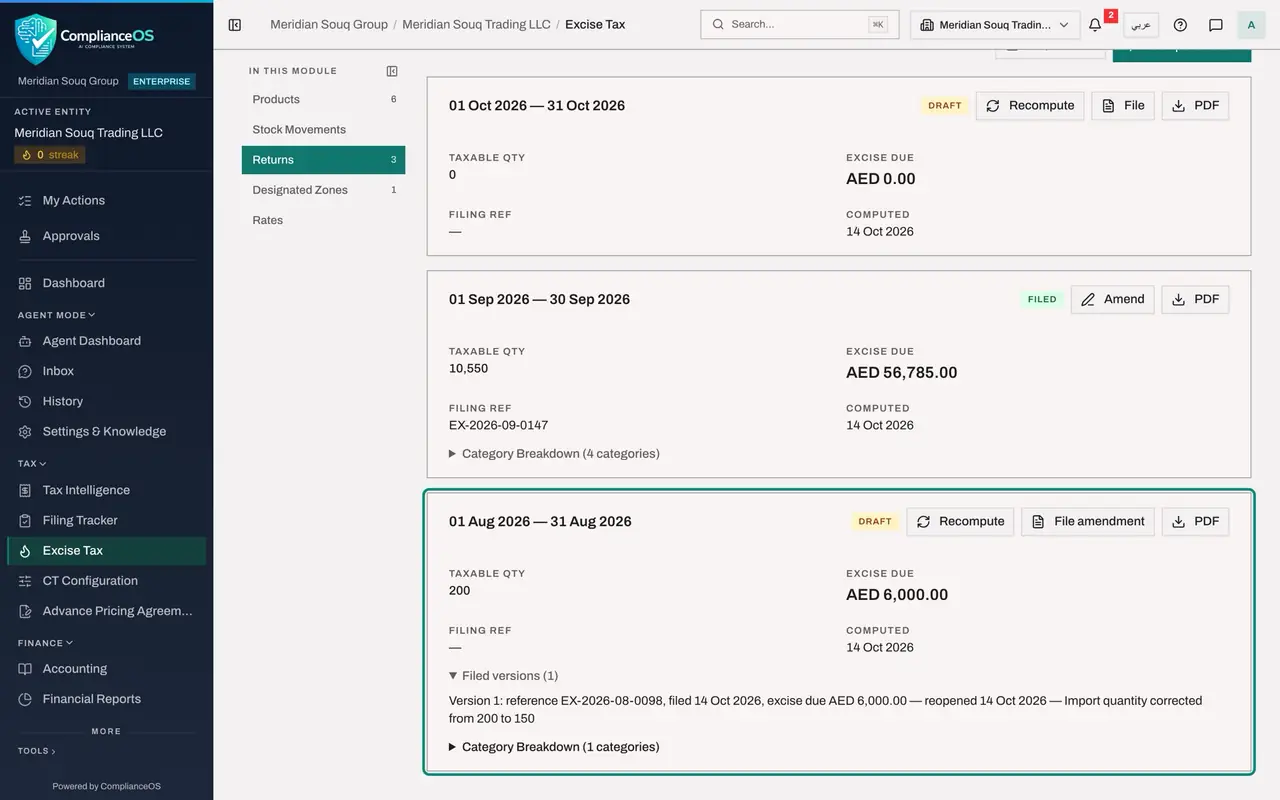
The August card is a Draft again. Its buttons are now Recompute, File amendment and PDF, Filing Ref is empty, and a new line reads Filed versions, 1. Select that line to see the version that was filed, with its reference, date, excise due and your reason.
- Select Filed versions (1)
- 5
Reverse the wrong import
Select Stock Movements. On the row of the molasses import DXB-IM-26-082719, dated 27 August, select Reverse. Type the reason Quantity was 150 not 200, as corrected by customs, and select Reverse in the window.
- Select Stock Movements
- Select Reverse
- Type Reason (required):
Quantity was 150 not 200, as corrected by customs - Select Reverse
- 6
Record the correct import
Select Record Movement. Choose TOB-050 and IMPORT, enter 27 August 2026, the quantity 150, the unit price 11.00 and the reference DXB-IM-26-082719-C, and select Record Movement.
- Select Record Movement
- Select Product
- Choose TOB-050 — Souq Majlis Molasses 50 g
- Select Movement Type
- Choose IMPORT
- Type Date:
2026-08-27 - Type Quantity:
150 - Type Unit Price (AED):
11.00 - Type Reference Number:
DXB-IM-26-082719-C - Select Record Movement
- 7
Read the August movements
At the bottom of the list are the three August rows: the original import marked Reversed, its reversal with minus 200, and the corrected import of 150 with excise due of 4,500.00 dirhams.
- 8
Recompute the August return
Select Returns and select Recompute on the August card. The quantity changes to 150 and the excise due to 4,500.00 dirhams. The return is ready for the tax manager to file the amendment.
- Select Returns
- Select Recompute
How to check it worked
The August return is a Draft again, with the buttons Recompute and File amendment, the line Filed versions (1), a quantity of 150 and excise due of 4,500.00 dirhams. The wrong import is marked Reversed and the corrected import DXB-IM-26-082719-C is in the list.
Common mistakes
- Reversing the movement before reopening the return. The app refuses a reversal in the period of a filed return until that return is reopened for amendment.
- Forgetting Recompute after the correction. The reopened return keeps the old figures until it is recomputed.
- Leaving the reason empty. It is optional, but it is what the filed-version history shows next to the version you replaced.
Check your understanding
1. What happens to the version that was filed when you reopen a return for amendment?
- A.It is deleted
- B.It is kept in the return's history, with its reference, date, excise due and the reason
- C.It becomes a draft and its reference is lost
- D.It is sent to the authority again
Show answer
Answer: B. It is kept in the return's history, with its reference, date, excise due and the reason
The window says the version filed is kept in the return's history and that the filing deadline stays met. The card shows Filed versions with the count.
2. Who files the amendment once it is recomputed?
- A.The accountant who recomputed it
- B.Someone else who holds the permission to approve excise returns
- C.Nobody: it files itself
- D.The auditor
Show answer
Answer: B. Someone else who holds the permission to approve excise returns
Filing an amendment is a filing like any other: the person who computed the figures cannot file them.