Lesson 24 of 27
The Contributors page: who can add documents, and where access is managed
What you will be able to do
This lesson is for administrators. The Tools group of the left menu has a page named Contributors. It lists the people who can add documents and evidence on this entity, apart from the administrators, with the documents they have uploaded and the comments they have written. You will read the page, open a person's documents, and follow its link to Access control, where that right is granted.
Before you start
- You are signed in as the organisation administrator, Layla Hassan.
- Granting roles is taught in the course on organisation, people and access. This lesson only shows where the Contributors page fits.
Steps
- 1
Open Contributors
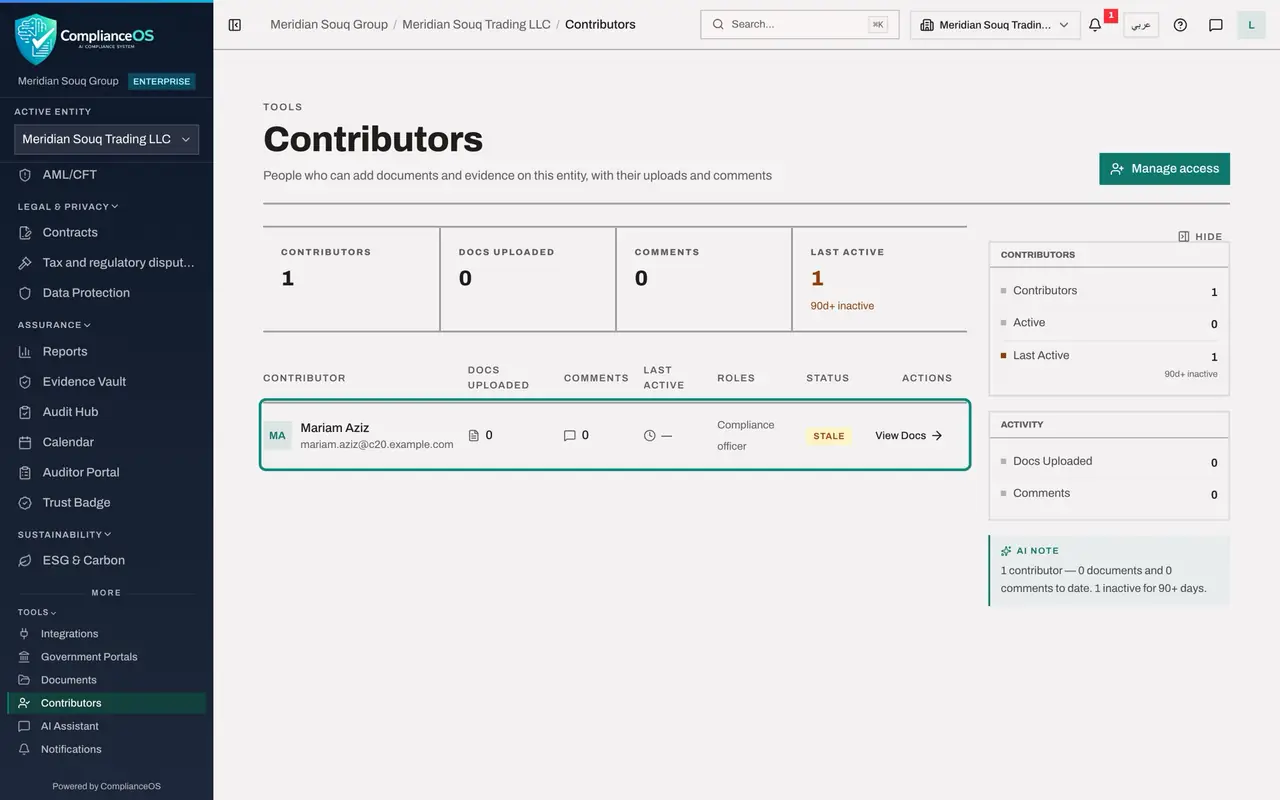
In the left menu, open the group Tools and select Contributors. The line under the title explains the page: people who can add documents and evidence on this entity, with their uploads and comments.
- Select Tools
- Select Contributors
- 2
Read the figures
Four figures head the page: Contributors, Docs Uploaded, Comments and Last Active. Here there is one contributor, with no documents and no comments yet.
- 3
Read the row
The list has one row: Mariam Aziz, the compliance officer, whose role lets her add documents and evidence. The administrators are not listed. Her row shows 0 documents and 0 comments, and the status Stale, because Last Active counts only uploads and comments.
- 4
Select View Docs
Select View Docs at the end of the row. It opens the Document Library of this entity, where documents are uploaded and commented on. The Document Library is taught in the course on approvals, evidence and the audit trail.
- Select View Docs
- 5
Go back and select Manage access
Go back to Contributors and select Manage access at the top right. It opens Access control in the organisation settings, on the tab People and assignments, where roles are granted, changed and revoked.
- Select Manage access
How to check it worked
The Contributors page lists Mariam Aziz with the role Compliance officer, 0 documents uploaded and 0 comments. Manage access opens Access control on the People and assignments tab.
Common mistakes
- Reading the list as everyone who has access to the entity. It lists only people whose role lets them add documents and evidence, and leaves out the administrators.
- Reading Stale and 90d+ inactive as a person who has not signed in. Last Active counts uploads and comments only: here Mariam has used the product every day of this course and still shows as stale.
- Looking for a way to add a person on the Contributors page. Access is granted in Access control.
Check your understanding
1. Who appears on the Contributors page?
- A.Everyone in the organisation
- B.People who can add documents and evidence on the entity, apart from the administrators
- C.External auditors
- D.People who filed returns
Show answer
Answer: B. People who can add documents and evidence on the entity, apart from the administrators
The line under the title says: people who can add documents and evidence on this entity, with their uploads and comments.
2. Where do you give someone the right to add documents?
- A.On the Contributors page
- B.In Access control, reached with Manage access
- C.In the Evidence Vault
- D.In the audit log
Show answer
Answer: B. In Access control, reached with Manage access
Manage access opens Access control on the People and assignments tab, where roles are granted.