Lesson 3 of 27
Register products taxed per litre and per unit
What you will be able to do
This lesson is for the accountant. Not every excise product is taxed as a percentage of its price. You will register a sweetened drink taxed by volume, with its pack size, sugar content and sugar tier, and then a product taxed at a fixed amount per unit, and see how the two appear in the Products list.
Before you start
- You are signed in as the accountant, Ahmed Saleh, and the energy drink from the previous lesson is registered.
- For the drink you need the pack size in millilitres and the sugar content in grams per 100 millilitres, from the label or a laboratory report. Here it is Souq Orchard Iced Tea 500 ml: 500 millilitres, 6.5 grams of sugar per 100 millilitres.
- Which rate type applies to your product is a tax decision. Confirm it with your tax manager or adviser before you register the product. The fixed amount per unit used in this lesson is an invented example.
Steps
- 1
Open Excise Tax and select Register Product
In the left menu select Excise Tax, then Register Product. The same form opens as in the previous lesson.
- Select Excise Tax
- Select Register Product
- 2
Type the code and the name
In Product Code type the code of the iced tea, and in Product Name type its name with the pack size, as shown on screen.
- Type Product Code:
SWT-500 - Type Product Name:
Souq Orchard Iced Tea 500 ml
- Type Product Code:
- 3
Choose the category and type the price
In Excise Category choose Sweetened Drinks. In Retail Sale Price type 5.00. This drink is bottled in the country, so leave Imported product unticked.
- Select Excise Category
- Choose Sweetened Drinks (50%)
- Type Retail Sale Price (AED):
5.00
- 4
Change the rate type to Volumetric
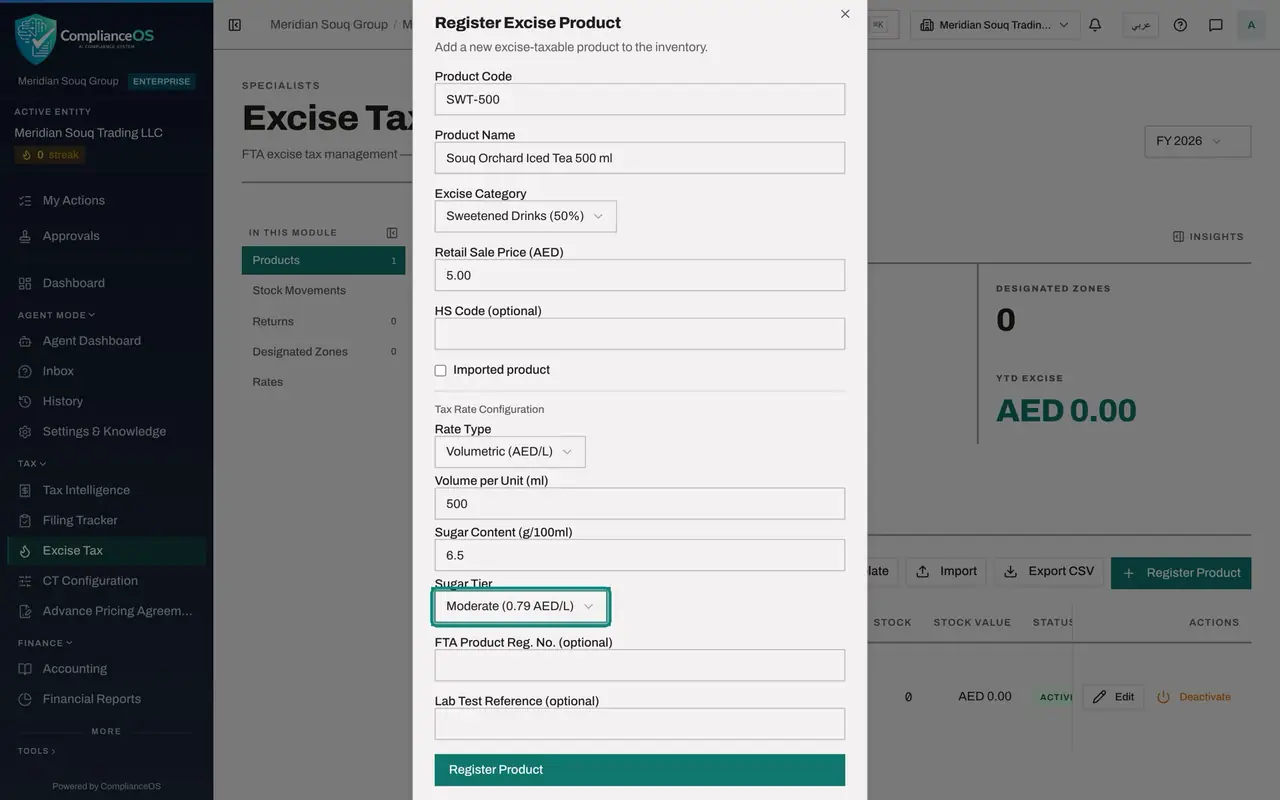
Open Rate Type and choose Volumetric, which is shown as dirhams per litre. Three more fields appear under it: Volume per Unit, Sugar Content and Sugar Tier.
- Select Rate Type
- Choose Volumetric (AED/L)
- 5
Type the volume and the sugar content
In Volume per Unit type the size of one bottle in millilitres: 500. This field is required. In Sugar Content type the grams of sugar in 100 millilitres, from the label or the laboratory report: 6.5.
- Type Volume per Unit (ml):
500 - Type Sugar Content (g/100ml):
6.5
- Type Volume per Unit (ml):
- 6
Choose the sugar tier
Open Sugar Tier. It starts on N/A, which carries no excise. The choices are Low at zero dirhams per litre, Moderate at 0.79 and High at 1.09. Choose Moderate for this drink.
- Select Sugar Tier
- Choose Moderate (0.79 AED/L)
- 7
Type the laboratory reference and register
In Lab Test Reference type the reference of the report that gives the sugar content, here LAB-TRAINING-0931. Then select Register Product. The message Product registered appears.
- Type Lab Test Reference (optional):
LAB-TRAINING-0931 - Select Register Product
- Type Lab Test Reference (optional):
- 8
Read the row of the iced tea
The new row shows the rate type Volumetric, and under Rate it shows 0.79 dirhams per litre instead of a percentage. That figure came from the Moderate tier.
- 9
Start a product taxed per unit
Select Register Product again. Type the Product Code ESL-030 and the Product Name Souq Mist Refill Liquid 30 ml. Choose the category E-Smoking Liquid, type the Retail Sale Price 40.00, and tick Imported product.
- Select Register Product
- Type Product Code:
ESL-030 - Type Product Name:
Souq Mist Refill Liquid 30 ml - Select Excise Category
- Choose E-Smoking Liquid (100%)
- Type Retail Sale Price (AED):
40.00 - Select Imported product
- 10
Change the rate type to Specific
Open Rate Type and choose Specific, which is shown as dirhams per unit. One more field appears: Specific Rate, with the note max 100. Type the fixed amount of excise for one unit. In this invented example it is 12.
- Select Rate Type
- Choose Specific (AED/unit)
- Type Specific Rate (AED/unit, max 100):
12
- 11
Select Register Product
Select Register Product. The form closes with the message Product registered.
- Select Register Product
- 12
Compare the three rows
The list now has three products, each taxed a different way. Under Rate, the energy drink shows 100 percent, the iced tea shows 0.79 dirhams per litre, and the refill liquid shows 12.00 dirhams per unit.
How to check it worked
The Products list has three rows. SWT-500 shows the rate type Volumetric and the rate 0.79 dirhams per litre. ESL-030 shows the rate type Specific and the rate 12.00 dirhams per unit. Products and Active at the top both read 3.
Common mistakes
- Choosing Volumetric and leaving both Sugar Content and Sugar Tier untouched. Sugar Tier starts on N/A, and the Rates section shows that N/A carries zero dirhams per litre.
- Typing the volume in litres. The field is in millilitres: a half litre bottle is 500.
- Typing a fixed amount above 100 dirhams in Specific Rate. The app does not accept more than 100 dirhams per unit.
Check your understanding
1. You chose Volumetric as the rate type. Which extra fields appear?
- A.Specific Rate only
- B.Volume per Unit, Sugar Content and Sugar Tier
- C.Period Start and Period End
- D.None
Show answer
Answer: B. Volume per Unit, Sugar Content and Sugar Tier
A rate per litre needs the size of one unit in millilitres and the sugar tier, which sets the dirhams per litre. Sugar Content records the measured figure the tier is based on.
2. The list shows 0.79 AED per L for the iced tea. Where does that figure come from?
- A.You typed it
- B.From the sugar tier Moderate
- C.From the retail sale price
- D.From the category percentage
Show answer
Answer: B. From the sugar tier Moderate
The Moderate sugar tier carries 0.79 dirhams per litre, as the Rates section shows. The app copies it onto the product.