Lesson 12 of 27
File the excise return as the second person
What you will be able to do
This lesson is for the tax manager. The app does not send anything to the tax authority: you submit the return on the authority's portal, then record here that it was filed, with the reference the portal gave you. Filing needs the permission to approve excise returns, and it must be done by someone other than the person who computed the figures. You will review and file the two returns the accountant prepared, and see why a return with nothing in it cannot be filed.
Before you start
- You are signed in as the tax manager, Fatima Noor. The accountant has computed two returns: September 2026, with 56,785.00 dirhams, and August 2026, with 6,000.00 dirhams.
- You have submitted both returns on the tax authority's portal and have their acknowledgements. The references used here are invented: EX-2026-09-0147 and EX-2026-08-0098.
Steps
- 1
Open Excise Tax and select Returns
In the left menu select Excise Tax, then Returns. The two returns prepared by the accountant are waiting with the status Draft: September at the top, then August.
- Select Excise Tax
- Select Returns
- 2
Review the figures before filing
Open Category Breakdown on the September card and check each line against your own working papers: quantity, value and excise for each category. The total, 56,785.00 dirhams, is the figure you entered on the authority's portal.
- Select Category Breakdown (4 categories)
- 3
Select File
Select File on the card. The Confirm Filing window opens. It warns that filing has regulatory implications and cannot easily be reversed, and that the return will be marked as officially filed with the Federal Tax Authority.
- Select File
- 4
Type the filing reference
In Filing Reference type the reference from the authority's acknowledgement, here EX-2026-09-0147. The field is required: Confirm and File stays greyed out until something is typed.
- Type e.g. EX-2025-001:
EX-2026-09-0147
- Type e.g. EX-2025-001:
- 5
Select Confirm and File
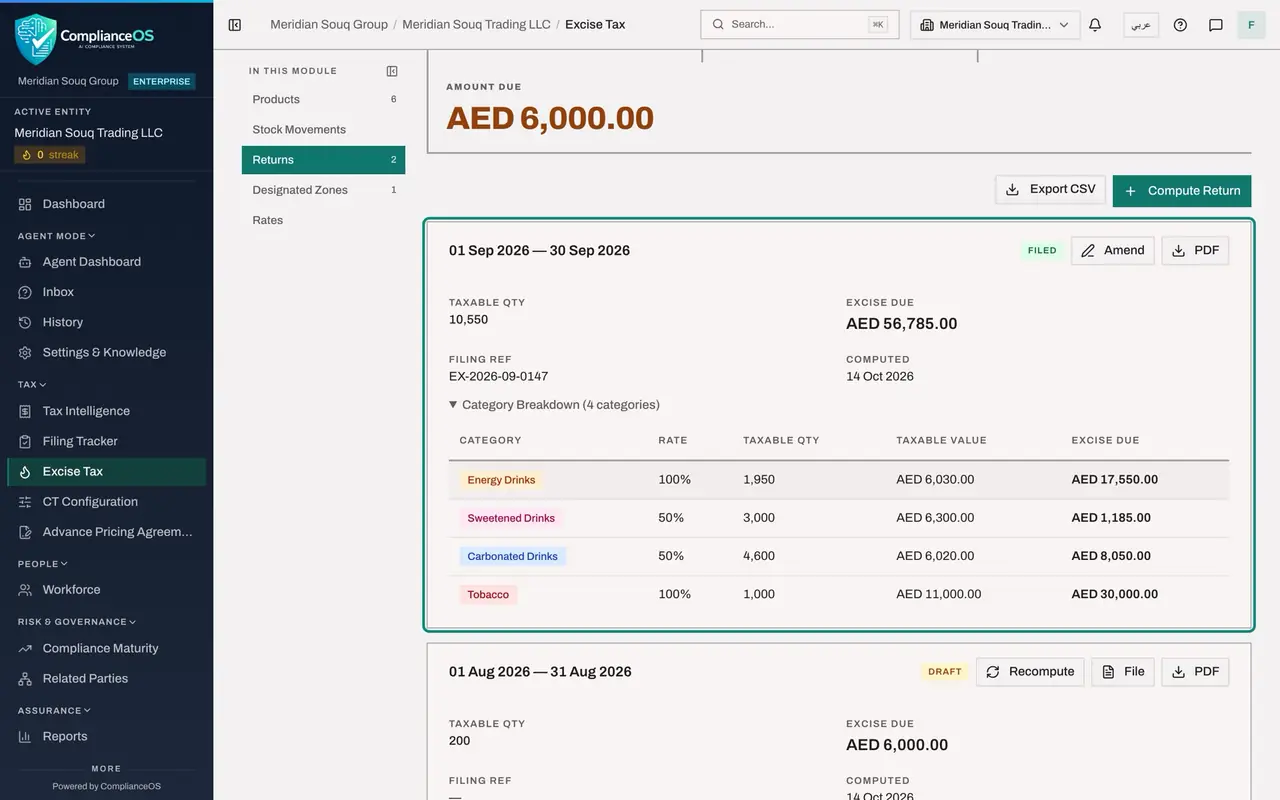
Select Confirm and File. You did not compute this return, so your filing is the second person's check, and the return is filed at once with the message Return updated. The card's status changes to Filed, Filing Ref shows your reference, and the buttons now read Amend and PDF.
- Select Confirm & File
- 6
File the August return
After submitting it on the authority's portal, select File on the August card, type the reference EX-2026-08-0098 and select Confirm and File. The August card changes to Filed in the same way.
- Select File
- Type e.g. EX-2025-001:
EX-2026-08-0098 - Select Confirm & File
- 7
Check the figures at the top
At the top of the page Filed now reads 2, Pending reads 0, and Amount Due is back to zero, because no computed return is waiting to be filed.
- 8
Start the October return
The next period can be started at any time. Select Compute Return, enter 1 October 2026 and 31 October 2026, and select Compute Return. A card appears for October. No October movements are recorded yet, so its quantity and its excise are zero.
- Select Compute Return
- Type Period Start:
2026-10-01 - Type Period End:
2026-10-31 - Select Compute Return
- 9
Try to file the empty return
Select File on the October card. This time the window carries a second warning: the return has zero taxable quantity and zero excise due, and movements must be recorded and the return computed again before filing. Confirm and File is greyed out.
- Select File
- 10
Select Cancel
Select Cancel. The October return stays as a Draft. It is recomputed at the end of the month, when its movements are recorded.
- Select Cancel
How to check it worked
The September return shows the status Filed and the reference EX-2026-09-0147. The August return shows Filed and EX-2026-08-0098. The October return is a Draft with zero excise. At the top of the page Filed reads 2.
Common mistakes
- Selecting Confirm and File before the return has been submitted on the authority's portal. Filing here only records what you did there.
- Filing a return you computed or recomputed yourself. The app refuses: someone else has to file it. Ask the accountant to compute, or ask a colleague who also holds the approve permission to file.
- Typing a made up reference to get past the form. The filing reference is what ties this record to the authority's acknowledgement.
Check your understanding
1. What does Confirm and File do?
- A.Sends the return to the tax authority
- B.Records here that the return was filed, with the reference you typed
- C.Pays the excise
- D.Deletes the draft
Show answer
Answer: B. Records here that the return was filed, with the reference you typed
Nothing leaves the app. The status changes to Filed and the filing reference is stored. You submit the return itself on the authority's portal.
2. You select File on a return with zero quantity and zero excise. What happens?
- A.It is filed as a nil return
- B.A warning explains that it cannot be filed, and Confirm and File stays greyed out
- C.It is deleted
- D.It is filed without a reference
Show answer
Answer: B. A warning explains that it cannot be filed, and Confirm and File stays greyed out
The window says the return has zero taxable quantity and zero excise due, and that movements must be recorded and the return computed again before filing.