Lesson 14 of 25
Reverse a posted journal entry
What you will be able to do
This lesson is for the finance manager. A posted entry is never edited or deleted. If it is wrong, or no longer needed, it is reversed: a second entry with the same lines the other way round. The marketplace has now sent its invoice, so the accrual for its fees must come out. You will reverse it, open the reversing entry, and see in the trial balance that the two net to nil. You will also learn what the Needs finance review notice means.
Before you start
- The accrual for online marketplace fees has been approved and posted, as in the previous lesson.
- You are signed in with the Finance manager role for the entity.
Steps
- 1
Open Journals and find the posted accrual
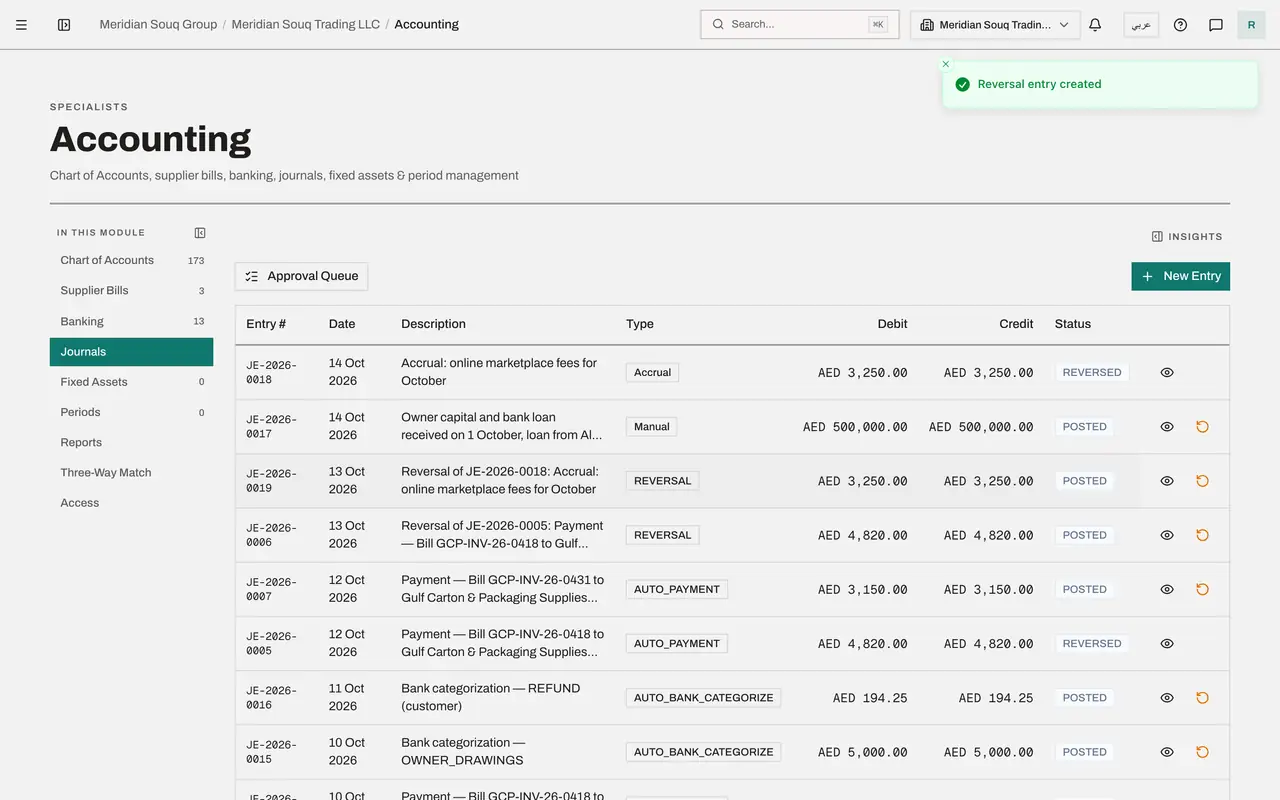
In the left menu select Accounting, then Journals, and select the Hide navigation icon. The accrual for online marketplace fees shows Posted. At the end of its row, beside the eye, is a curved arrow called Reverse entry.
- Select Accounting
- Select Journals
- Select Hide navigation
- 2
Know the Needs finance review notice
When the rule for an automatic posting is corrected in a later version, entries posted under the old rule are not changed. They are flagged Needs finance review, and a notice above this list counts them and offers to show only those entries, so that you can post a correcting entry or dismiss each flag with a reason. This is a new company with no such entries, so no notice is shown.
- 3
Select Reverse entry
Select the curved arrow on the accrual. The window names the entry and explains that a new entry will be created with the debits and credits swapped. Reversal Date is required.
- Select Reverse entry
- 4
Set the reversal date and create the reversal
Set Reversal Date to the day the reversal should take effect, here 13 October 2026. It must fall in an open accounting period. Select Create Reversal.
- Type Reversal Date *:
2026-10-13 - Select Create Reversal
- Type Reversal Date *:
- 5
Read the two entries
A new entry is at the top of the list, described as Reversal of the accrual, with the type Reversal and the same amount. The original entry now shows the status Reversed, and its Reverse button is gone, so it cannot be reversed twice.
- 6
Open the reversing entry
Select the eye on the reversing entry. Its lines mirror the accrual: accrued expenses is debited 3,250 and online marketplace fees is credited 3,250. Select Close.
- Select View
- 7
Check the trial balance
Open Financial Reports from the left menu. Trial Balance is selected, as of today. Select Generate. Find account 6315, online marketplace fees: 3,250 in debit, 3,250 in credit and a balance of zero. Accrued expenses, account 2100, shows the same. The entry and its reversal net to nil. Always generate the report afresh after posting; the quick Reports view inside Accounting can show figures loaded earlier in your session.
- Select Generate
How to check it worked
Journals lists the accrual with the status Reversed and, above it, an entry of the type Reversal for the same amount. In the trial balance, the online marketplace fees account and the accrued expenses account each show the same debit and credit, with a balance of zero.
Common mistakes
- Trying to fix a posted entry by asking for it to be deleted. Nothing in the ledger is deleted. Reverse it and, if needed, post a correct entry.
- Dating the reversal in a closed period. The reversal date must fall in an open accounting period.
- Reversing an entry that the system posted from a document, such as a supplier bill or its payment. Correct the document instead, with a supplier credit memo or a payment reversal, so that the document and the ledger stay in step.
Check your understanding
1. What does reversing a journal entry do?
- A.Deletes the entry from the ledger
- B.Posts a new entry with the same lines the other way round, and marks the original as reversed
- C.Returns the entry to draft
- D.Hides the entry from the reports
Show answer
Answer: B. Posts a new entry with the same lines the other way round, and marks the original as reversed
Both entries stay in the ledger. Together they net to nil, and the trail shows what was posted and that it was taken back.
2. After an entry and its reversal, what does the trial balance show for the accounts they touched?
- A.Nothing at all
- B.The same amount in debit and in credit, and a balance of zero
- C.Twice the original amount
- D.A red warning
Show answer
Answer: B. The same amount in debit and in credit, and a balance of zero
The debit of one entry is the credit of the other, so each account shows equal totals on both sides and no balance.