Lesson 21 of 25
Approve the tax postings and see the reports change
What you will be able to do
This lesson is for the finance manager. The accountant has sent two entries for approval that bring tax activity into the ledger. You will check and approve them, then run the trial balance and the profit and loss again and see that the panel about tax activity has cleared and the figures now include the sale and the cost.
Before you start
- The accountant used Post to ledger on two tax transactions, as in the previous lesson, so two entries described as Tax activity posted to ledger are waiting.
- You are signed in with the Finance manager role for the entity.
Steps
- 1
Open the Approval Queue
In the left menu select Accounting, then Journals, select the Hide navigation icon, and select Approval Queue. Two entries described as Tax activity posted to ledger are waiting: the market sale and the stall rental.
- Select Accounting
- Select Journals
- Select Hide navigation
- Select Approval Queue
- 2
Open one entry and check it
Select the eye on the sale. Accounts Receivable is debited 13,125, sales revenue is credited 12,500 and output VAT 625. The accountant chose Still owed by the customer, so the other side is the receivable, not the bank. Check that this matches what happened.
- Select View
- 3
Tick both entries
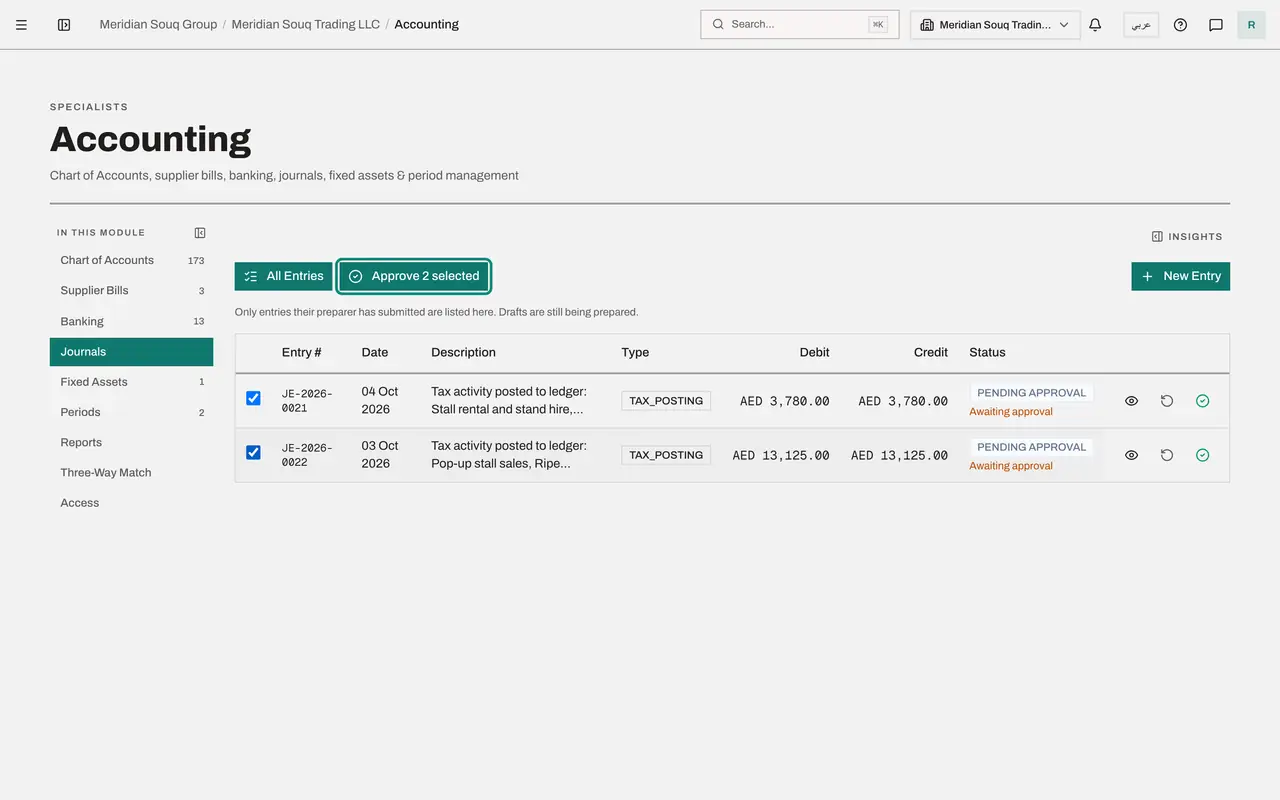
Close the entry. Tick the box at the start of each row. The button above the list now reads Approve 2 selected.
- Select Close
- Select Select entry JE-2026-0021
- Select Select entry JE-2026-0022
- 4
Approve them together
Select Approve 2 selected, add a comment if you wish, and select Approve 2 in the window. The summary reports two entries posted, each marked Approved and posted.
- Select Approve 2 selected
- Type Comment:
Agreed to the market organiser's statement. - Select Approve 2
- 5
Generate the trial balance again
Close the summary and open Financial Reports. Select Generate. The accounts now include the receivable, the revenue, the cost and the VAT from the two entries, and the totals still balance. The amber panel about tax activity no longer appears under the report, because nothing is left to post.
- Select Generate
- 6
Generate the profit and loss again
Select P and L, set Period Start to 1 January 2026 and select Generate. Revenue now includes the market sale on its own line, Sales Revenue for goods at the standard rate, and the stall rental appears among the costs. The statements and the tax records now tell the same story.
- Select P&L
- Type Period Start:
2026-01-01 - Select Generate
How to check it worked
The Approval Queue is empty, the amber panel about tax activity no longer appears under the trial balance, and the profit and loss shows the extra revenue of 12,500 dirhams.
Common mistakes
- Approving without asking what the other side should be. Check that Still owed, or Paid through the bank, matches what really happened to the money.
- Recording the same sale a second time, for example by also categorising its bank receipt as income. Once tax activity is posted to the ledger, the sale is in the books; match or categorise the later receipt against the customer's balance instead.
- Forgetting to generate the reports again. A report on screen shows the ledger as it was when you selected Generate.
Check your understanding
1. After you approve the entries, what happens to the panel under the trial balance?
- A.It still lists the same two transactions as not posted
- B.Nothing: with no tax activity left to post, the panel is no longer shown
- C.An error
- D.The transactions are deleted from Tax
Show answer
Answer: B. Nothing: with no tax activity left to post, the panel is no longer shown
A transaction leaves the panel once its entry is posted. It stays in Tax, where it still feeds the VAT return.
2. Who can approve an entry created by Post to ledger?
- A.The person who sent it
- B.Someone else who holds the right to approve journal entries
- C.Anyone in the company
- D.Nobody; it posts by itself after a day
Show answer
Answer: B. Someone else who holds the right to approve journal entries
These entries follow the same approval policy as manual journals: prepared by one person and approved by another.