Lesson 19 of 25
Run the payables aging and the cash flow statement
What you will be able to do
This lesson is for the finance manager. You will run the AP Aging report, which shows what the company owes suppliers by age, download it as a spreadsheet, and run the cash flow statement, which explains how the bank and cash balances moved through operating, investing and financing activities. You will also see the quick Reports view inside Accounting.
Before you start
- The earlier lessons have posted bills, payments, bank lines, journal entries and an asset.
- You are signed in with the Finance manager role for the entity.
Steps
- 1
Open Financial Reports and select AP Aging
In the left menu select Financial Reports, then AP Aging in the list. AP stands for accounts payable: what the company owes suppliers. As of Date is today. Select Generate.
- Select Financial Reports
- Select AP Aging
- Select Generate
- 2
Read the payables by age
The tiles show the total outstanding and the number of unpaid bills. The table groups the unpaid amounts by age: current, 31 to 60 days, 61 to 90, 91 to 120, and over 120 days, with each group's share of the total. Older groups are marked Overdue. Here it shows the supplier bill that is only partly paid.
- 3
Download the aging as a spreadsheet
Select CSV. The file opens in Excel, with Arabic and other characters shown correctly. Use it to plan the next payment run. Tick Compare to prior month before generating to see how the position has moved. The AR Aging report beside it has the same layout for amounts owed to the company; it is not covered in this course.
- Select CSV
- 4
Select Cash Flow and set the period
Select Cash Flow. Like the profit and loss it covers a span of time. Set Period Start to 1 January 2026 and leave Period End on today, then select Generate.
- Select Cash Flow
- Type Period Start:
2026-01-01 - Select Generate
- 5
Read operating activities
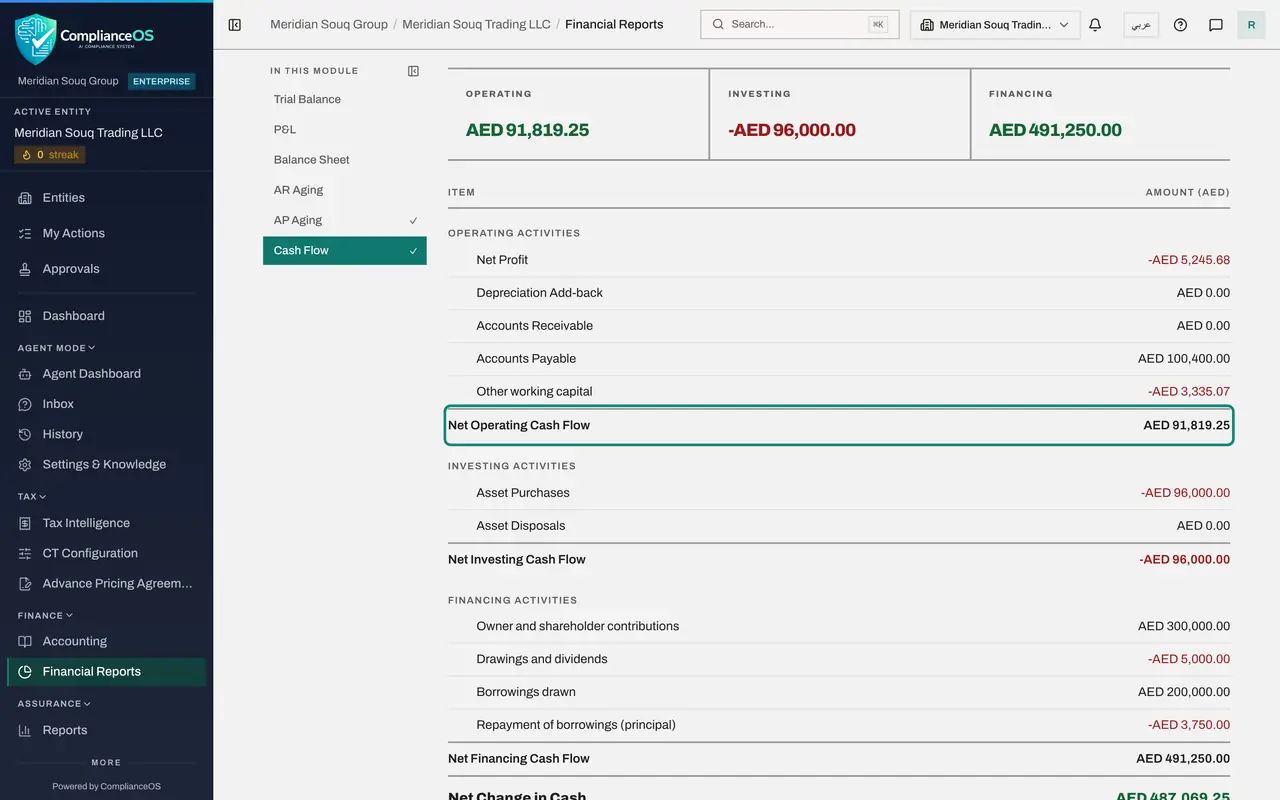
The statement uses the indirect method. Operating Activities starts from the net profit, adds back depreciation, which is a cost without a payment, and adjusts for the changes in receivables, payables and other working capital. The result is the net operating cash flow.
- 6
Read investing and financing activities
Investing Activities shows asset purchases and disposals. Financing Activities shows owner and shareholder contributions, drawings and dividends, borrowings drawn, and repayments of principal. Here the owner's capital and the bank loan came in, and the drawings and the loan instalment went out.
- 7
Check that the statement reconciles
The last block is the proof. Net Change in Cash is the sum of the three sections. Under Cash and bank accounts, the balance at the start of the period plus the movement taken from the ledger gives the balance at the end of the period. The movement equals the net change, so the statement reconciles to the bank and cash accounts.
- 8
Know the Ask the CFO button
At the top right of Financial Reports, Ask the CFO opens an assistant that answers questions about these figures in plain language. It is covered in the course on the assistant; the reports on this page are the source it reads from.
- 9
Open the quick Reports view in Accounting
In the left menu select Accounting, then Reports in its section list. This is a quick view of the same reports without leaving Accounting. Open Report Type to choose one. It has PDF and CSV buttons of its own. For figures you will rely on, use Financial Reports and Generate, which always reads the ledger afresh.
- Select Accounting
- Select Reports
- Select Report Type
How to check it worked
The cash flow statement ends with a balance at the end of the period that equals the bank and cash balance in the trial balance, and the three sections add up to the movement in the period.
Common mistakes
- Reading the aging report as if it came from the ledger. It is built from the supplier bills themselves and their recorded payments, so compare its total with Accounts Payable in the trial balance and investigate any difference, such as an asset bought on credit without a bill.
- Expecting the owner's capital to appear as operating cash. Money from owners and lenders is financing; buying an asset is investing; everything else is operating.
- Relying on the quick Reports view inside Accounting straight after posting. It can show figures loaded earlier in your session. Use Financial Reports and select Generate for a fresh report.
Check your understanding
1. In which section of the cash flow statement does a bank loan received appear?
- A.Operating activities
- B.Investing activities
- C.Financing activities
- D.It does not appear
Show answer
Answer: C. Financing activities
Financing covers money from and to owners and lenders: contributions, drawings, borrowings and repayments of principal.
2. What does the AP Aging report show?
- A.The bank balance by month
- B.What you owe suppliers, grouped by how long each bill has been outstanding
- C.The VAT due
- D.The value of fixed assets
Show answer
Answer: B. What you owe suppliers, grouped by how long each bill has been outstanding
AP stands for accounts payable: unpaid supplier bills, grouped by age, so that you can see what is current and what is overdue.