Lesson 10 of 25
Categorise bank lines that have no document
What you will be able to do
This lesson is for the accountant who reconciles the bank. Many statement lines have no bill behind them: card takings, utility payments, bank fees, transfers between your own accounts, money you cannot identify yet. You give each one a category, read the journal entry the category will post, and save. You will categorise five such lines and see where Other puts money that is not yet explained.
Before you start
- The October statement has been imported and the supplier payments have been matched, as in the previous lessons.
- You are signed in with the Accountant role for the entity.
Steps
- 1
Open the bank account
In the left menu select Accounting, then Banking, then the card for Al Waha Commercial Bank. Select the Hide navigation icon at the top left to give the list more room. The lines still marked Unmatched have no bill behind them.
- Select Accounting
- Select Banking
- Select Al Waha Commercial Bank
- Select Hide navigation
- 2
Select Categorize on the electricity and water line
On the line for DEWA electricity and water select the second icon, the tag, called Categorize. The window shows the transaction, its amount and its date. Open Category to see the thirteen choices, from Salary or Payroll to Other.
- Select Categorize
- Select Category
- 3
Choose Utilities and read the preview
Choose Utilities. The panel called What will be posted to the ledger shows the entry before anything is saved: the electricity and water account is debited 1,776.43, the input VAT account is debited 88.82, and the bank account is credited 1,865.25. The category assumes the amount includes five percent VAT.
- Choose Utilities
- 4
Add a note and select Categorize
Note is optional; use it for what a reviewer would ask, here the billing month. Select Categorize. A message gives the journal entry number, the line's status changes to Categorized, and the category is shown beside it.
- Type e.g., Monthly office rent payment:
September electricity and water bill - Select Categorize
- Type e.g., Monthly office rent payment:
- 5
Categorise the bank fee
On the Monthly account maintenance fee select Categorize and choose Bank Charges and Fees. The preview debits the bank charges account 25 dirhams and input VAT 1.25, and credits the bank account 26.25. Select Categorize.
- Select Categorize
- Select Category
- Choose Bank Charges / Fees
- Select Categorize
- 6
Categorise the card takings as income
The card company paid over a week of online store sales, 8,925 dirhams. No document for it exists in Accounting, so select Categorize on that line and choose Revenue or Income. The preview debits the bank account 8,925, and credits sales revenue 8,500 and output VAT 425: the category treats the receipt as a sale that includes five percent VAT. Select Categorize.
- Select Categorize
- Select Category
- Choose Revenue / Income
- Select Categorize
- 7
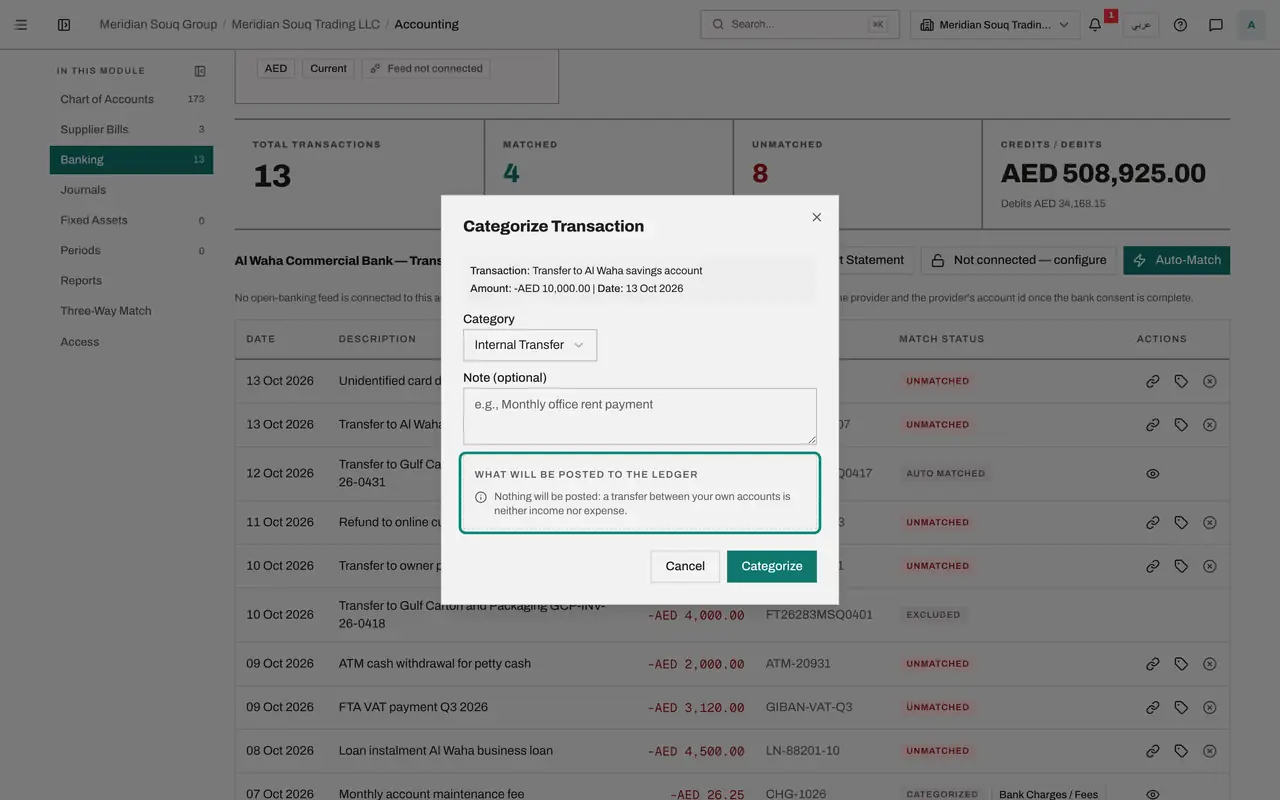
Categorise the transfer to savings
The company moved 10,000 dirhams to its own savings account. Select Categorize on that line and choose Internal Transfer. The preview says nothing will be posted: a transfer between your own accounts is neither income nor expense.
- Select Categorize
- Select Category
- Choose Internal Transfer
- 8
Save the transfer
Select Categorize. A message confirms that the transaction was categorised and that nothing was posted to the ledger. The line is dealt with for reconciliation. To show the money in the savings account in the books, post a journal entry between the two bank accounts.
- Select Categorize
- 9
Put unexplained money in suspense
On 1 October 500,000 dirhams arrived. It is the owner's capital and a bank loan, but the split is not confirmed yet. Select Categorize on that line and choose Other. A note explains that Other is held in the suspense account until someone identifies it, and is not treated as income. The preview debits the bank account and credits the suspense account.
- Select Categorize
- Select Category
- Choose Other
- 10
Save, with a note for whoever clears it
In Note type what is known, so that the person who clears the suspense account knows what to ask. Select Categorize. The next lesson but one clears this amount to share capital and the loan with a journal entry.
- Type e.g., Monthly office rent payment:
Owner capital and Al Waha loan, split to be confirmed - Select Categorize
- Type e.g., Monthly office rent payment:
- 11
Open a categorised line's details
A categorised line has an eye icon, View details. Select it on the electricity and water line. The line opens to show its category and the journal entry it posted, as a link you can follow.
- Select View details
- 12
Filter the list to what is left
Open the status filter above the list and choose Unmatched. Only the lines that still need attention remain. The next lesson deals with the ones whose category asks a question first: the loan instalment, the tax payment, the cash withdrawal, the transfer to the owner and the refund.
- Select All statuses
- Choose Unmatched
- 13
See the entries in Journals
Select Journals in the section list. Each category that posted has an entry described as Bank categorization, with the status Posted. Bank lines are posted straight away, without approval, because the bank statement itself is the evidence.
- Select Journals
How to check it worked
The lines for electricity and water, the account fee, the card takings, the transfer to savings and the capital received show Categorized, each with its category beside the status. Journals holds an entry for four of them; the transfer to savings posted nothing.
Common mistakes
- Choosing Other for a cost you simply have not looked up. Other is not an expense: the money waits in the suspense account, and suspense must be cleared to the right account with a journal entry before the period is closed.
- Saving without reading the preview. The preview shows the accounts and whether VAT is taken out of the amount. For utilities, rent, insurance and bank charges the entry splits out five percent input VAT; make sure you hold a tax invoice that supports it.
- Categorising a transfer between your own accounts as an expense. Internal Transfer posts nothing, because moving money between your own accounts is neither income nor cost.
Check your understanding
1. A receipt arrives on the statement and you do not yet know what it is. Which category do you use?
- A.Revenue or Income, at once
- B.Other, which holds it in the suspense account until it is identified
- C.Owner Drawings
- D.Refund
Show answer
Answer: B. Other, which holds it in the suspense account until it is identified
Other keeps unexplained money out of income and expense. It sits in suspense, visible on the balance sheet, until someone moves it to the right account.
2. What does the category Internal Transfer post?
- A.A cost in the profit and loss
- B.Nothing: a transfer between your own accounts is neither income nor expense
- C.Revenue
- D.A loan
Show answer
Answer: B. Nothing: a transfer between your own accounts is neither income nor expense
The preview says so before you save. The line is marked as dealt with, and no journal entry is created by the category.