Lesson 7 of 25
Approve a payment reversal
What you will be able to do
This lesson is for the finance manager, the second person on a payment reversal. The accountant has asked for the cheque payment on a supplier bill to be reversed, because the bank returned the cheque. You will find the request in the Approvals inbox, open the record, check the request and approve it. The reversal posts a mirror journal entry, puts the amount back on the bill and keeps the original payment on record.
Before you start
- The accountant has requested the reversal of the cheque payment on bill GCP-INV-26-0418, as in the previous lesson.
- You are signed in with the Finance manager role, which can approve journal entries. The person who requested the reversal cannot approve it.
Steps
- 1
Open the Approvals inbox
In the left menu select Approvals. Under To decide, the request is listed: Reverse a recorded bill payment, with the amount, the supplier and the bill number, who submitted it and when, the approval policy, here strict maker and checker, and the step it is waiting on.
- Select Approvals
- 2
Select Open record
Select Open record. Accounting opens on Supplier Bills with the bill's details. Select the Hide navigation icon for more room. Under Payments, the cheque shows Reversal requested, the name of the person who asked and the reason, with two buttons: Approve and reverse, and Reject.
- Select Open record
- Select Hide navigation
- 3
Select Approve and reverse
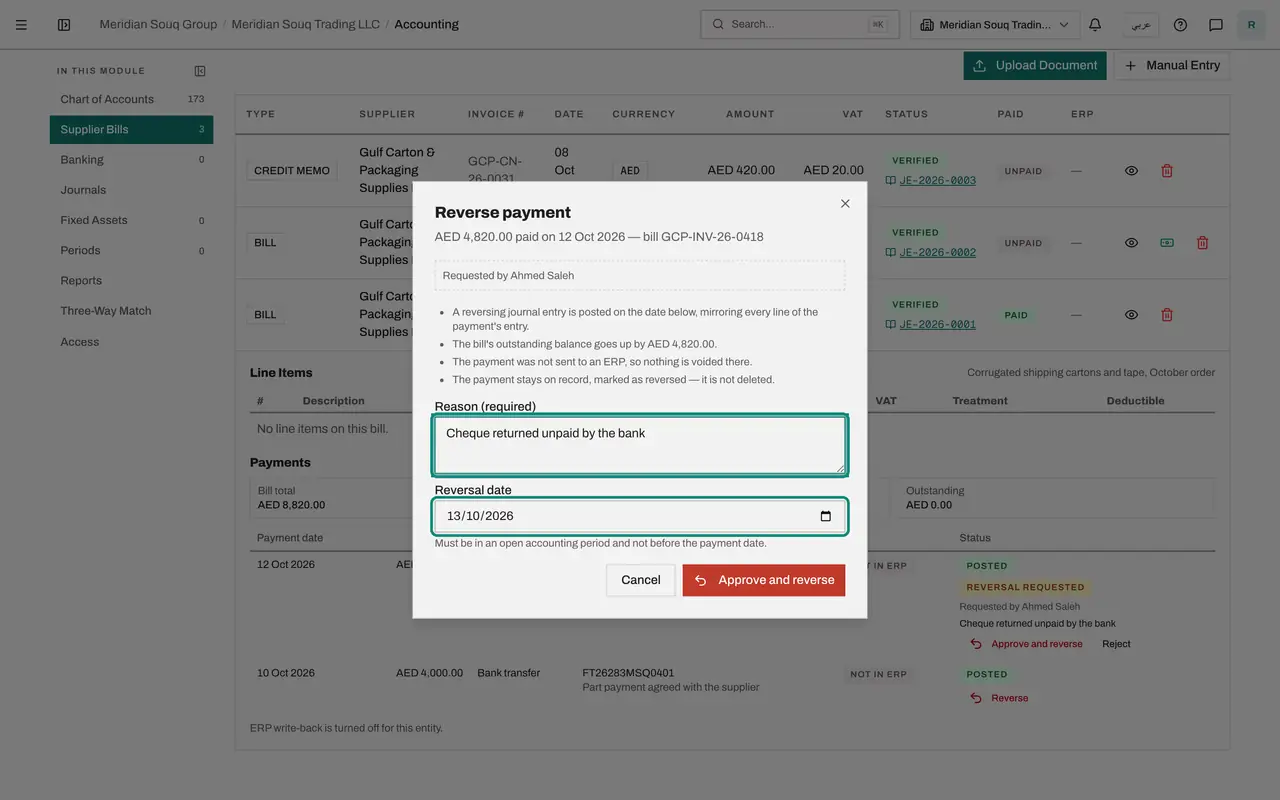
Select Approve and reverse. The window repeats the payment, who requested the reversal and the effects, with the reason and the reversal date filled in from the request. Check both.
- Select Approve and reverse
- 4
Confirm the reversal
Select Approve and reverse in the window. The cheque is still listed, now marked Reversed with the date and reason. The panel shows 4,000 paid and 4,820 outstanding again, and the bill's row is back to Partially paid.
- Select Approve and reverse
- 5
See the reversal in Journals
Select Journals in the section list. The cheque payment and its reversal are both there, each Posted, for the same amount in opposite directions. Together they cancel out, so the bank account and Accounts Payable are left with the 4,000 dirham transfer only.
- Select Journals
How to check it worked
The bill's payment panel shows 4,000 paid and 4,820 outstanding. The cheque is still listed, marked Reversed, and the bill shows Partially paid. The Approvals inbox no longer lists the request.
Common mistakes
- Approving without reading the reason and the date. The reason is kept in the audit log, and the reversal date must fall in an open period and not before the payment.
- Rejecting by simply ignoring the request. Use Reject, so that the accountant knows the payment stands.
- Recording a second, negative payment by journal instead. The reversal keeps the bill, the payment list and the ledger in step; a manual journal would not update the bill.
Check your understanding
1. Who can approve a payment reversal that the accountant requested?
- A.The accountant who requested it
- B.A second person who holds the approval right, such as the finance manager
- C.Anyone in the company
- D.Nobody; it happens automatically
Show answer
Answer: B. A second person who holds the approval right, such as the finance manager
Reversing posts a journal entry, so it follows strict maker and checker: the requester cannot approve their own request.
2. What happens to a payment after its reversal is approved?
- A.It is deleted
- B.It stays in the list, marked Reversed, and a mirror journal entry is posted
- C.It becomes a draft
- D.It moves to another bill
Show answer
Answer: B. It stays in the list, marked Reversed, and a mirror journal entry is posted
Nothing is erased. The original entry and its reversal both stay in the ledger, and the bill's outstanding balance goes up by the reversed amount.