Lesson 6 of 25
Record payments on a supplier bill and request a reversal
What you will be able to do
This lesson is for the accountant who pays suppliers. You will record a part payment on a verified bill by bank transfer, then pay the balance by cheque. Each payment posts its own journal entry and moves the bill from Unpaid to Partially paid to Paid. When the cheque is returned, you request its reversal, which the finance manager approves in the next lesson.
Before you start
- The bill GCP-INV-26-0418 for 8,820 dirhams has been verified. Payments can only be recorded on a verified bill.
- You are signed in with the Accountant role for the entity.
Steps
- 1
Open the bill's payment panel
In Accounting select Supplier Bills, and select the Hide navigation icon for more room. On the first bill from Gulf Carton, number ending 0418, select the eye to open its details. Under Payments you see the bill total of 8,820 dirhams, nothing paid and 8,820 outstanding.
- Select Accounting
- Select Supplier Bills
- Select Hide navigation
- Select View line items
- 2
Select Record payment
Select Record payment, the banknote icon on the bill's row. The window is headed with the supplier's name and shows the bill number. Amount is what you paid, in the bill's currency, and Pay full balance fills in everything still outstanding.
- Select Record payment
- 3
Enter a part payment
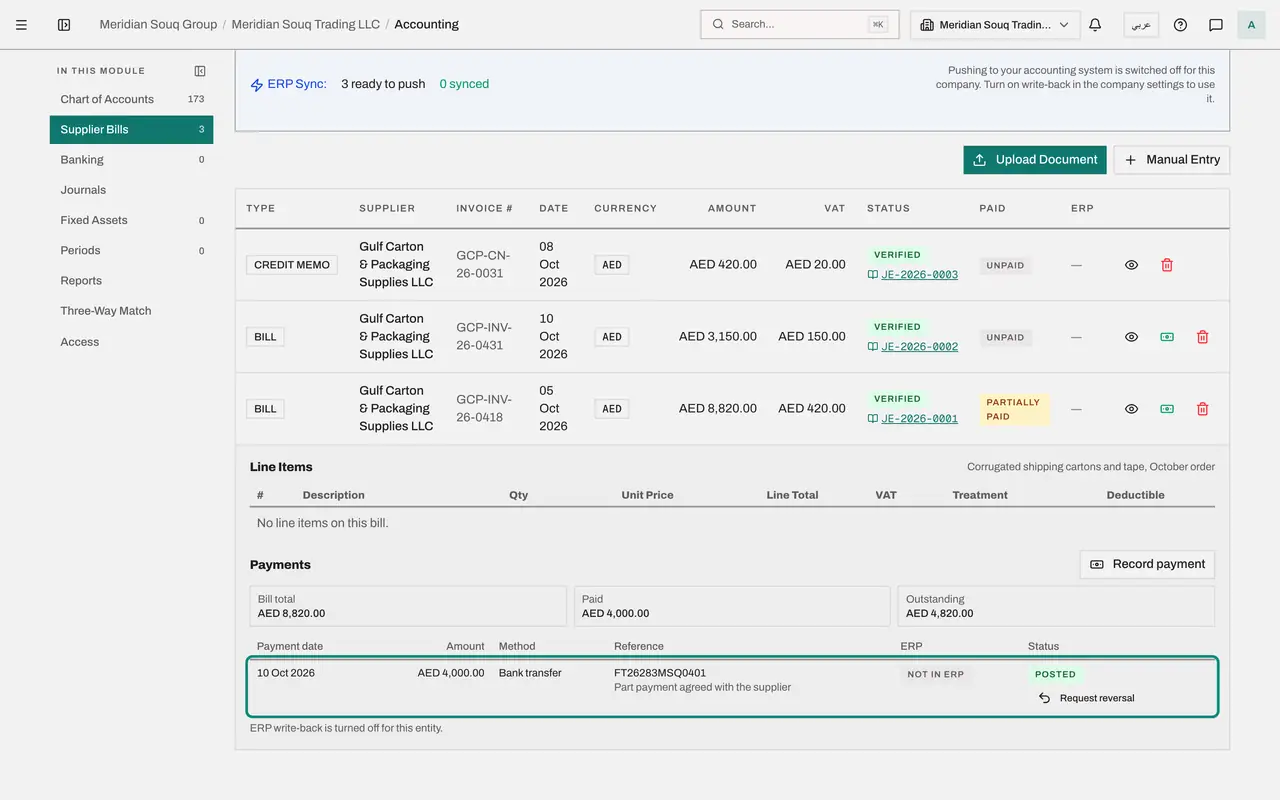
You paid 4,000 dirhams on account. Type 4000 in Amount and set Payment date to the day the money left the bank, 10 October 2026. Leave Method on Bank transfer; the other methods are Cash, Cheque and Card. In Reference type the bank's reference for the transfer.
- Type Amount:
4000 - Type Payment date:
2026-10-10 - Type Reference:
FT26283MSQ0401
- Type Amount:
- 4
Check the account and add a note
Paid from account is optional. Left empty, the payment comes out of account 1100, the current bank account, or out of 1000, cash on hand, for a cash payment. Type another bank or cash account code only if the money left from there. Notes is for anything a colleague should know.
- Type Notes:
Part payment agreed with the supplier
- Type Notes:
- 5
Save the payment
Select Record payment at the bottom of the window. A message confirms the payment and gives its journal entry number. The panel now lists the payment, and shows 4,000 paid and 4,820 outstanding. The bill's row reads Partially paid.
- Select Record payment
- 6
Pay the balance by cheque
Two days later you send a cheque for the rest. Select Record payment again, then Pay full balance: Amount becomes 4,820. Set the date to 12 October 2026, open Method and choose Cheque, and type the cheque number in Reference.
- Select Record payment
- Select Pay full balance
- Type Payment date:
2026-10-12 - Select Method
- Choose Cheque
- Type Reference:
Cheque 000218
- 7
Save the cheque payment
Select Record payment. The bill is now fully paid: outstanding is zero, the row reads Paid, and the Record payment icon is gone.
- Select Record payment
- 8
Select Request reversal on the cheque
The next day the bank returns the cheque unpaid, so the payment must be undone. A payment is never deleted; it is reversed, and reversing posts a journal entry, so a second person approves it. On the cheque's line select Request reversal. The window lists the effects: a reversing journal entry mirroring the payment's entry, the bill's outstanding balance going up by 4,820, and the payment staying on record, marked as reversed.
- Select Request reversal
- 9
Give the reason and send it for approval
Type the reason, which is kept in the audit log: the cheque was returned unpaid by the bank. Set Reversal date to 13 October 2026; it must be in an open period and not before the payment. Select Send for approval. Nothing changes yet: the line shows Reversal requested, with your name, and waits for an approver.
- Type Reason (required):
Cheque returned unpaid by the bank - Type Reversal date:
2026-10-13 - Select Send for approval
- Type Reason (required):
- 10
See the entries in Journals
Select Journals in the section list. Two entries were posted for you, one for the transfer and one for the cheque. Each debits Accounts Payable and credits the bank account. Their type is AUTO_PAYMENT and their status is Posted.
- Select Journals
How to check it worked
The bill's payment panel lists a bank transfer of 4,000 and a cheque of 4,820, and the cheque shows Reversal requested with your name.
Common mistakes
- Looking for a way to delete a payment that went wrong. A payment is never deleted. You request a reversal with a reason, and a second person approves it, so that the books show both what happened and why it was undone.
- Recording a bank transfer here and then also matching the same line on the bank statement to the bill. That would pay the bill twice in the books. Record each payment once.
- Leaving Paid from account empty when the money came from somewhere else. It defaults to the main bank account, or to cash on hand for a cash payment. Type another bank or cash account code only when that is where the money left from.
Check your understanding
1. What does Pay full balance do in the payment window?
- A.It pays the supplier through the bank
- B.It fills Amount with everything still outstanding on the bill
- C.It deletes earlier payments
- D.It closes the accounting period
Show answer
Answer: B. It fills Amount with everything still outstanding on the bill
It is a shortcut for the amount only. You still set the date, the method and the reference, and nothing leaves the bank: the entry records a payment you made.
2. What does recording a payment on a bill post?
- A.A debit to the cost account
- B.A debit to Accounts Payable and a credit to the bank or cash account
- C.A credit to Sales Revenue
- D.Nothing
Show answer
Answer: B. A debit to Accounts Payable and a credit to the bank or cash account
Paying reduces what you owe the supplier and reduces the bank balance by the same amount. The cost was already recorded when the bill was verified.