Lesson 11 of 25
Bank categories that ask a question first
What you will be able to do
This lesson is for the accountant who reconciles the bank. Some bank lines cannot be posted from the line alone: a loan instalment mixes principal and interest, a tax payment could be VAT or corporate tax, a refund could be a customer's or a supplier's. For these the category asks what it needs, and the posting follows your answer. None of them is treated as an expense by default. You will categorise five such lines.
Before you start
- The October statement has been imported, the supplier payments matched and the everyday lines categorised, as in the previous lessons.
- You know, from the loan statement, how much of the instalment was interest.
- You are signed in with the Accountant role for the entity.
Steps
- 1
Open the bank account
In the left menu select Accounting, then Banking, then the card for Al Waha Commercial Bank, and select the Hide navigation icon for more room. Six lines are still Unmatched.
- Select Accounting
- Select Banking
- Select Al Waha Commercial Bank
- Select Hide navigation
- 2
Categorise the loan instalment
On the Loan instalment line select Categorize and choose Loan Repayment. A question appears: Interest included in this repayment. Left empty, the whole amount would repay the loan. The loan statement shows 750 dirhams of interest in this instalment, so type 750.
- Select Categorize
- Select Category
- Choose Loan Repayment
- Type Interest included in this repayment (AED):
750
- 3
Read the preview and save
The preview follows your answer: the loan account is debited 3,750, which reduces what the company owes; the interest expense account is debited 750; and the bank account is credited 4,500. Select Categorize.
- Select Categorize
- 4
Categorise the tax payment
On the FTA VAT payment line select Categorize and choose Tax Payment. The question is Which tax was paid? Until you answer, the preview says Answer the question above to see the journal entry, and the Categorize button stays grey.
- Select Categorize
- Select Category
- Choose Tax Payment
- 5
Answer VAT and save
Open the list and choose VAT; the other choice is Corporate tax. The preview debits the account VAT Payable to FTA 3,120 and credits the bank account. The payment clears the liability for that tax; it is not an expense. Select Categorize.
- Select Choose the tax
- Choose VAT
- Select Categorize
- 6
Categorise the cash withdrawal
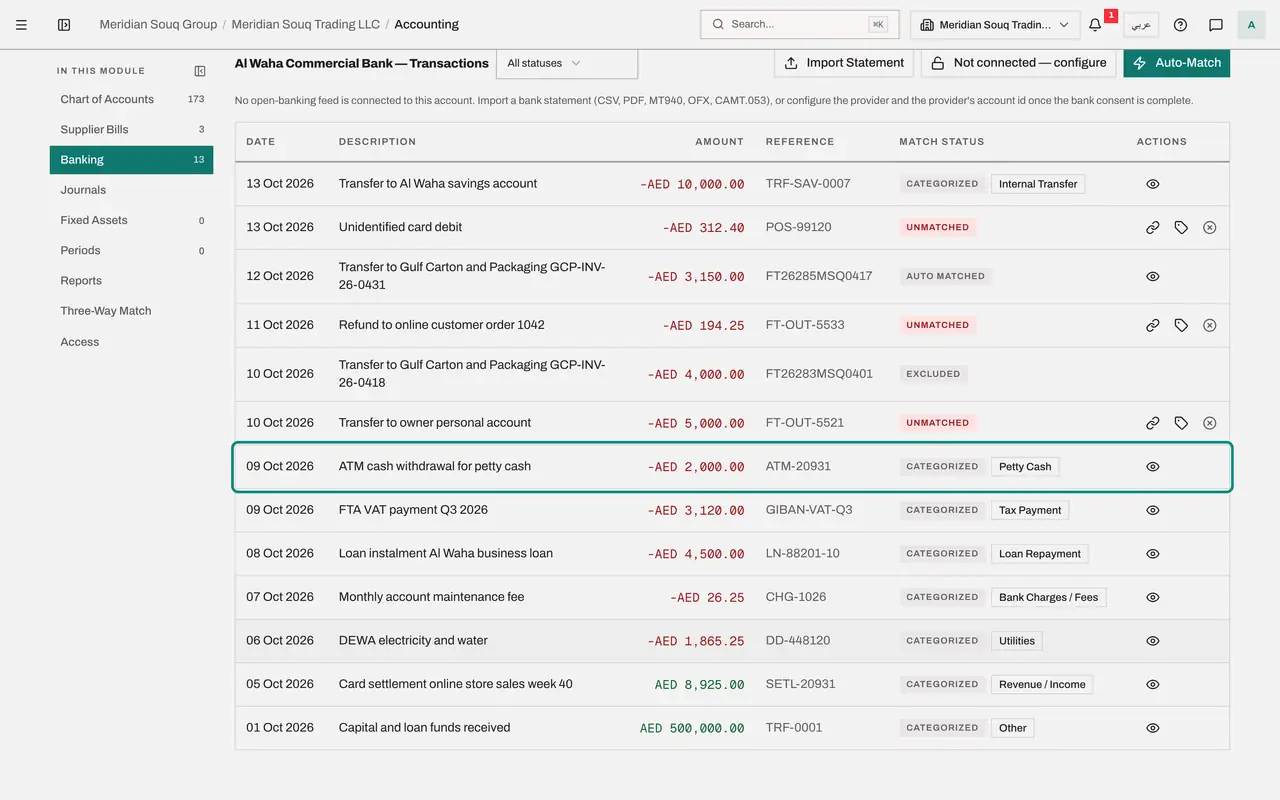
The cash taken from the machine went into the office float. Select Categorize on the ATM line and choose Petty Cash. The preview debits the petty cash account 2,000 and credits the bank account: the money has moved from one asset to another, and nothing is a cost yet. Select Categorize.
- Select Categorize
- Select Category
- Choose Petty Cash
- Select Categorize
- 7
Categorise the transfer to the owner
Money the owner takes out for personal use is not a business cost. Select Categorize on the transfer to the owner and choose Owner Drawings. The preview debits the owner drawings account, in equity, 5,000 and credits the bank account. Select Categorize.
- Select Categorize
- Select Category
- Choose Owner Drawings
- Select Categorize
- 8
Start the refund
The company refunded an online customer for a returned order. Select Categorize on the refund line and choose Refund. Two questions appear. Whose refund is it? is already answered from the direction of the money: money going out is a refund paid to a customer. You can change it to a refund received from a supplier.
- Select Categorize
- Select Category
- Choose Refund
- 9
Choose what the refund is set against
Open Set it against. The customer's balance is right when a credit note exists, because the credit note already reduced revenue and VAT. Revenue is for a refund with no credit note, and it adjusts no VAT. This sale was recorded from the card takings and no credit note exists, so choose Revenue, no credit note was issued.
- Select The customer's balance (receivable)
- Choose Revenue (no credit note was issued)
- 10
Read the preview and save the refund
The preview debits sales revenue 194.25 and credits the bank account. The sale recorded earlier is reduced by the amount paid back. Because this route adjusts no VAT, tell the tax manager about the refund. Select Categorize.
- Select Categorize
- 11
Look at the remaining categories
One line is left, an unidentified card debit. Select Categorize on it and open Category. The choices not used so far are Salary or Payroll, Rent or Lease and Insurance, which post to their cost accounts, and Revenue or Income for money received without an invoice. Do not guess: select Cancel and leave this line Unmatched until the cardholder explains it.
- Select Categorize
- Select Category
- Select Cancel
- 12
Read the tiles
The tiles above the list show where the reconciliation stands: one line unmatched, with its value, and the rest of the statement matched, categorised or excluded. An unmatched line at month end is a question to answer before the period is closed.
How to check it worked
The loan instalment, the VAT payment, the cash withdrawal, the transfer to the owner and the refund all show Categorized. Only the unidentified card debit is left Unmatched.
Common mistakes
- Leaving the interest box empty on a loan instalment that includes interest. The whole amount would then reduce the loan, the interest cost would be missing from the profit and loss, and the loan balance would be wrong.
- Treating a tax payment as a cost. Paying VAT or corporate tax clears the amount you owed the Federal Tax Authority, the FTA; it is not an expense, and the category posts it to the liability account.
- Setting a refund against revenue when a credit note was issued. The credit note already reduced revenue and VAT. In that case set the refund against the customer's balance, or the sale is reduced twice.
Check your understanding
1. A loan instalment of 4,500 dirhams includes 750 of interest. What does the category Loan Repayment post?
- A.4,500 to interest expense
- B.3,750 against the loan and 750 to interest expense, with 4,500 out of the bank
- C.4,500 against the loan
- D.Nothing
Show answer
Answer: B. 3,750 against the loan and 750 to interest expense, with 4,500 out of the bank
The interest you enter is posted as an expense, and the rest reduces the loan. With the box left empty, the whole amount would reduce the loan.
2. You refund a customer for goods that are covered by a credit note. What do you set the refund against?
- A.Revenue
- B.The customer's balance, the receivable
- C.The suspense account
- D.Owner drawings
Show answer
Answer: B. The customer's balance, the receivable
The credit note already reduced revenue and VAT and left the customer in credit. Paying the refund clears that credit balance.