Lesson 15 of 25
Register a fixed asset and read its depreciation schedule
What you will be able to do
This lesson is for the accountant who keeps the asset register. A fixed asset is something bought to use for several years, such as a vehicle or equipment. You will register a delivery van, choose how it was acquired so that the right journal entry is posted, read the depreciation schedule, look at the window for editing an asset, and open the journal entry behind it.
Before you start
- The chart of accounts has been set up; it holds an asset account for vehicles and an expense account for depreciation.
- You have the purchase invoice: the date, the cost before VAT, and whether it has been paid.
- You are signed in with the Accountant role for the entity.
Steps
- 1
Open Fixed Assets
In the left menu select Accounting, then Fixed Assets, and select the Hide navigation icon for more room. The tiles show the number of assets, their total cost, the depreciation accumulated so far, the net book value, which is cost less depreciation, and how many assets are carried at a revalued amount. Select Register Asset.
- Select Accounting
- Select Fixed Assets
- Select Hide navigation
- Select Register Asset
- 2
Name the asset and choose its category
In Asset Name type a name that identifies this one item. Asset Code is your own tag number, the one on the sticker. Open Category: Land, Building, Vehicle, Equipment, Furniture, IT or Other. Choose Vehicle.
- Type Asset Name *:
Delivery van, Toyota Hiace panel van - Type Asset Code:
MSQ-VEH-014 - Select Category *
- Choose VEHICLE
- Type Asset Name *:
- 3
Enter the date, the cost and the life
Set Purchase Date to the date on the purchase invoice, 1 October 2026. In Purchase Cost type the cost before VAT: 96000. Residual Value is what the van should be worth when you stop using it: 12000. Useful Life is in months: 60 for five years.
- Type Purchase Date *:
2026-10-01 - Type Purchase Cost (AED) *:
96000 - Type Residual Value (AED):
12000 - Type Useful Life (months) *:
60
- Type Purchase Date *:
- 4
Check the method and the valuation model
Depreciation Method is Straight Line, the same amount every month; the other choice, Declining Balance, charges more in the early years. Valuation Model on Auto keeps the asset at cost; only land defaults to revaluation. Leave both.
- 5
Choose the two accounts
Asset Account Code is where the cost sits on the balance sheet: choose 1520, Vehicles. Depreciation Account Code is the expense account that takes the monthly charge: choose 6100, Depreciation Expense. Both are chosen from your chart of accounts.
- Select Choose an account
- Type Search by code or name…:
1520 - Choose 1520 — Vehicles
- Select Choose an account
- Type Search by code or name…:
6100 - Choose 6100 — Depreciation Expense
- 6
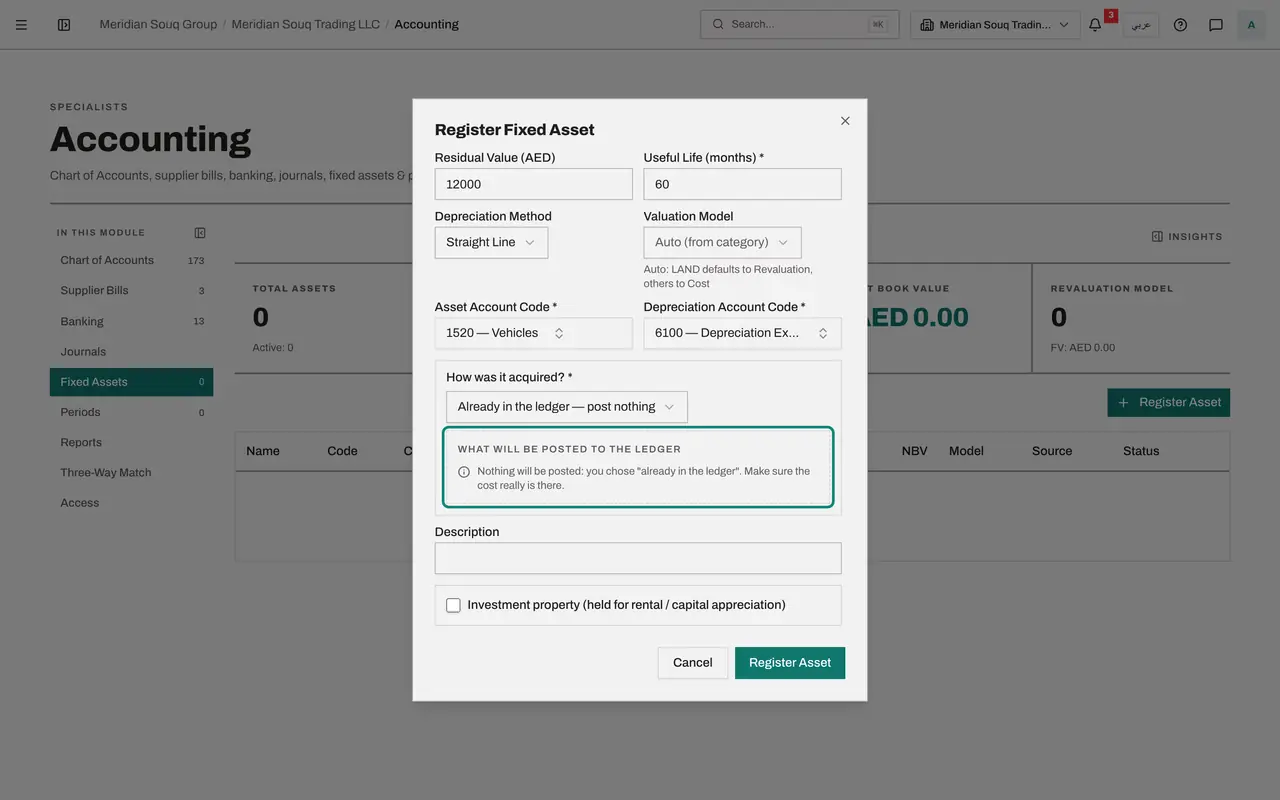
Choose how it was acquired: already in the ledger
How was it acquired? decides the journal entry, so it is required. Open it and choose Already in the ledger. The preview says nothing will be posted, and reminds you to make sure the cost really is there. Use this when the supplier's bill or the bank payment has already put the cost in the books.
- Select How was it acquired?
- Choose Already in the ledger — post nothing
- 7
Compare: paid from a bank account
Now choose Paid from a bank account. A box called Paid from appears, with the bank account, and the preview shows the entry: the vehicles account is debited 96,000 and the bank account is credited 96,000. Use this when the money has left the bank and no bill was recorded.
- Select How was it acquired?
- Choose Paid from a bank account
- 8
Choose on credit, which is the case here
The dealer's invoice for the van is not paid yet, and no bill has been recorded. Choose On credit, still owed to the supplier. The preview debits the vehicles account 96,000 and credits Accounts Payable 96,000.
- Select How was it acquired?
- Choose On credit — still owed to the supplier
- 9
Describe the asset and select Register Asset
In Description add what helps to identify the asset later, such as the registration plate. Leave Investment property unticked; it is for property held to rent out. Select Register Asset. The van is listed with its cost, a net book value equal to the cost, and the number of the journal entry that was posted.
- Type Description:
White panel van, plate Dubai R 48213, bought from Al Rihla Motors - Select Register Asset
- Type Description:
- 10
Open the Depreciation Schedule
At the end of the row select the first icon, Depreciation Schedule. It shows the method, the life and the monthly amount, 1,400 dirhams, and lists every month of the asset's life with the opening value, that month's depreciation, the running total and the closing value. Select Close.
- Select Depreciation Schedule
- 11
Open Edit asset
Select the pencil, Edit asset. You can correct the name, the code and the description, and, while no depreciation has been posted, the cost, date, category, method and accounts. Saving a change to the cost reverses the acquisition entry and posts a new one. Once depreciation has been posted, only the useful life and the residual value can change, with a reason.
- Select Close
- Select Edit asset
- 12
Close without changes and open the journal entry
Select Cancel. Then select the journal entry number on the van's row. Accounting moves to Journals and shows the acquisition entry: vehicles debited and Accounts Payable credited, 96,000 dirhams.
- Select Cancel
- Select JE-2026-0020
How to check it worked
Fixed Assets lists the delivery van with a cost of 96,000 dirhams, a net book value of 96,000 and a journal entry number, and its depreciation schedule shows 1,400 dirhams a month for 60 months.
Common mistakes
- Choosing how the asset was acquired without thinking about what is already in the books. If the supplier's bill was already verified, or the bank payment already categorised, the cost is in the ledger: choose Already in the ledger, or the van would be counted twice.
- Typing the cost including VAT. Purchase Cost is the cost before VAT; recoverable VAT is not part of an asset's cost.
- Giving the useful life in years. Useful Life is in months: 60 for five years.
Check your understanding
1. A van costs 96,000 dirhams, is expected to be worth 12,000 after five years, and is depreciated on a straight line. What is the monthly depreciation?
- A.1,600
- B.1,400
- C.1,920
- D.200
Show answer
Answer: B. 1,400
Straight line spreads the cost less the residual value evenly over the life: 96,000 less 12,000 is 84,000, divided by 60 months is 1,400.
2. You register an asset whose supplier bill has not been entered and is still unpaid. Which choice posts the right entry?
- A.Already in the ledger, post nothing
- B.On credit, still owed to the supplier
- C.Paid from a bank account
- D.Any of them
Show answer
Answer: B. On credit, still owed to the supplier
On credit debits the asset account and credits Accounts Payable, so the books show both the van and the amount owed for it.