Lesson 24 of 25
How this connects: from the supplier bill to the VAT return
What you will be able to do
This lesson is for the finance team and the tax manager together. Nothing was typed into Tax during the lessons on bills and banking, yet Tax already holds a transaction for every verified bill and credit memo and for the bank lines categorised with VAT. You will find them as the tax manager, read how they were classified, see the bank lines that arrived for review, and compute the VAT return for the quarter to see the VAT that follows the documents.
Before you start
- The supplier bills, the credit memo and the bank statement from the earlier lessons exist.
- You are signed in with the Tax manager role for the entity.
Steps
- 1
Open Tax Intelligence
In the left menu, under Tax, select Tax Intelligence, and select the Hide navigation icon so that the list fits. The Transactions tab lists every transaction that Tax knows about. Apart from the two that the tax manager added for the lesson on posting to the ledger, none was typed here: they came from Supplier Bills and Banking.
- Select Tax Intelligence
- Select Hide navigation
- 2
Find the supplier's transactions
In the box labelled Vendor or Customer type Gulf Carton. Three rows remain: the two supplier bills, listed as expenses for their amounts before VAT, and the supplier's credit memo, with a negative amount. Each was created when its document was verified in Accounting.
- Type Vendor/Customer...:
Gulf Carton
- Type Vendor/Customer...:
- 3
Read how the bill was classified
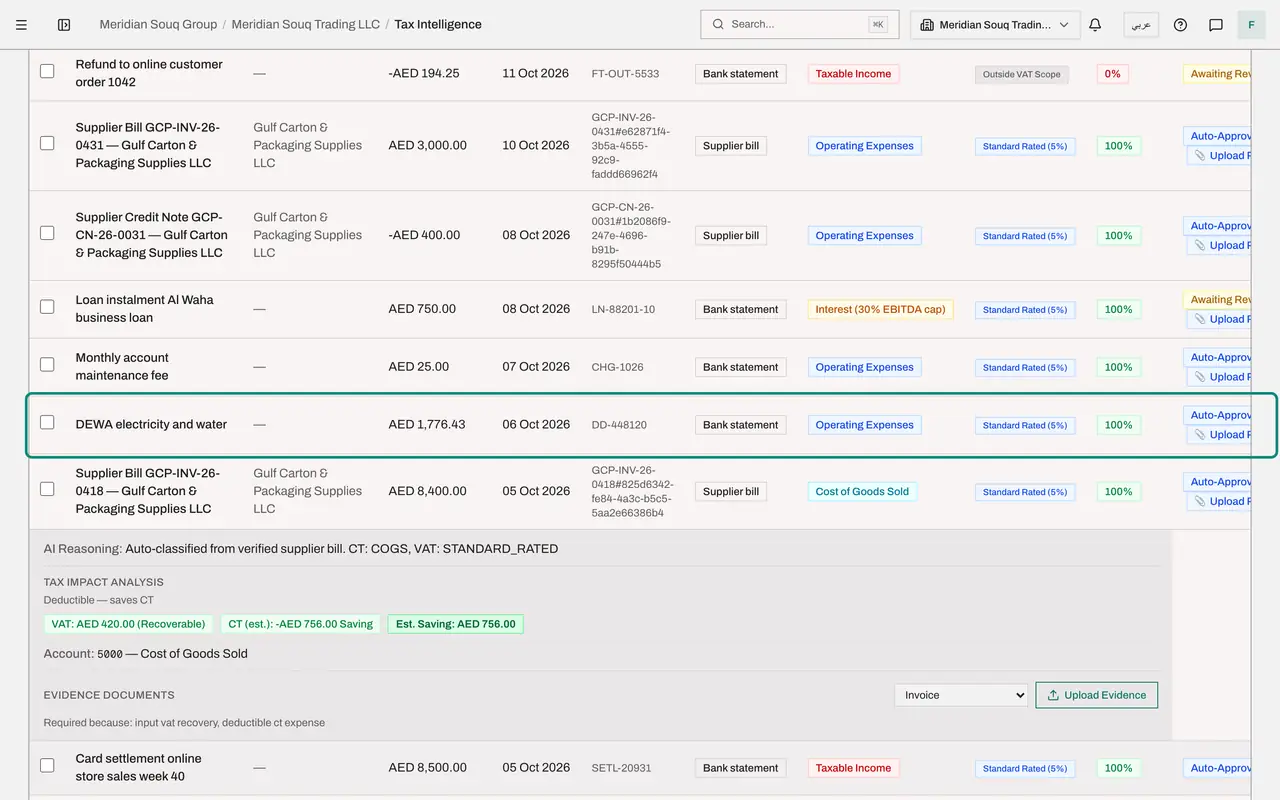
Look along the row of the first bill. Its classification is the category the accountant chose on the bill, Cost of Goods Sold, and its VAT treatment is Standard Rated at five percent. Under the confidence it carries the badge Recorded from a posting: the row was classified when the bill was posted in Accounting, not suggested by the AI, so it is approved without waiting in the review queue. An expense needs its invoice on file before the return is filed, which is why the row offers Upload Proof. Select the row to read the reasoning underneath.
- 4
See the bank lines
Replace the filter with nothing and look further down the list. The bank lines that the accountant categorised with VAT, such as the electricity bill, have their own classified rows for their amounts before VAT. They reached Tax from Banking when they were categorised.
- 5
Select Compute VAT return and choose the quarter
Now follow the VAT. On the strip at the top select Compute VAT return. Choose the year 2026 and select Q4 under Quick select. The period runs from 1 October to 31 December 2026, the quarter the bills are dated in.
- Select Compute VAT return
- Choose Year:
2026 - Select Q4
- 6
Compute the return
Select Compute VAT Return. The return is worked out from the transactions you have just seen: the purchases carry the input VAT from the verified bills, less the credit memo, and the sales carry the output VAT from the income recorded in Banking and posted from Tax. A red box at the top lists anything that must be resolved before filing. Preparing and filing the return is covered in the VAT course.
- Select Compute VAT Return
- 7
Find the sales and the purchases in the return
Scroll down the return. The Box 1 totals show the standard rated sales and their output VAT. Further down, the box for standard rated expenses shows the purchases and the input VAT that can be recovered. The accountant typed none of these figures into Tax.
How to check it worked
Tax Intelligence lists a transaction for supplier bill GCP-INV-26-0418, classified from the bill, and the VAT return for the fourth quarter of 2026 has been computed from the transactions.
Common mistakes
- Typing a purchase into Tax when its bill will be verified in Accounting. Verifying the bill creates the tax transaction itself, so the purchase would be counted twice in the VAT return.
- Changing the VAT treatment in Tax to correct a bill. Correct the document in Accounting, for example with the supplier's credit memo, and Tax follows.
- Filing before the red box at the top of the return is empty. It lists what must be resolved first, such as transactions that are not classified or reviewed.
Check your understanding
1. When does a supplier bill reach the Tax module?
- A.When it is saved
- B.When it is verified
- C.When it is paid
- D.Only if someone imports it
Show answer
Answer: B. When it is verified
Verifying posts the journal entry and creates the tax transaction in the same step, with the category and VAT treatment chosen on the bill.
2. How does a supplier credit memo appear in Tax?
- A.It does not appear
- B.As a transaction with a negative amount, which reduces the input VAT claimed
- C.As income
- D.As a new bill
Show answer
Answer: B. As a transaction with a negative amount, which reduces the input VAT claimed
The credit memo's transaction is negative, so the purchases and the recoverable VAT in the return go down by the credited amounts.