Lesson 16 of 25
Change a fixed asset and know how a disposal is recorded
What you will be able to do
This lesson is for the accountant who keeps the asset register. After an asset is registered, its details can still be corrected, and one day it will be sold or scrapped. You will correct the van's description with Edit asset, and open the disposal window to see what it asks for, without disposing of the van.
Before you start
- The delivery van has been registered, as in the previous lesson.
- You are signed in with the Accountant role for the entity.
Steps
- 1
Open Fixed Assets
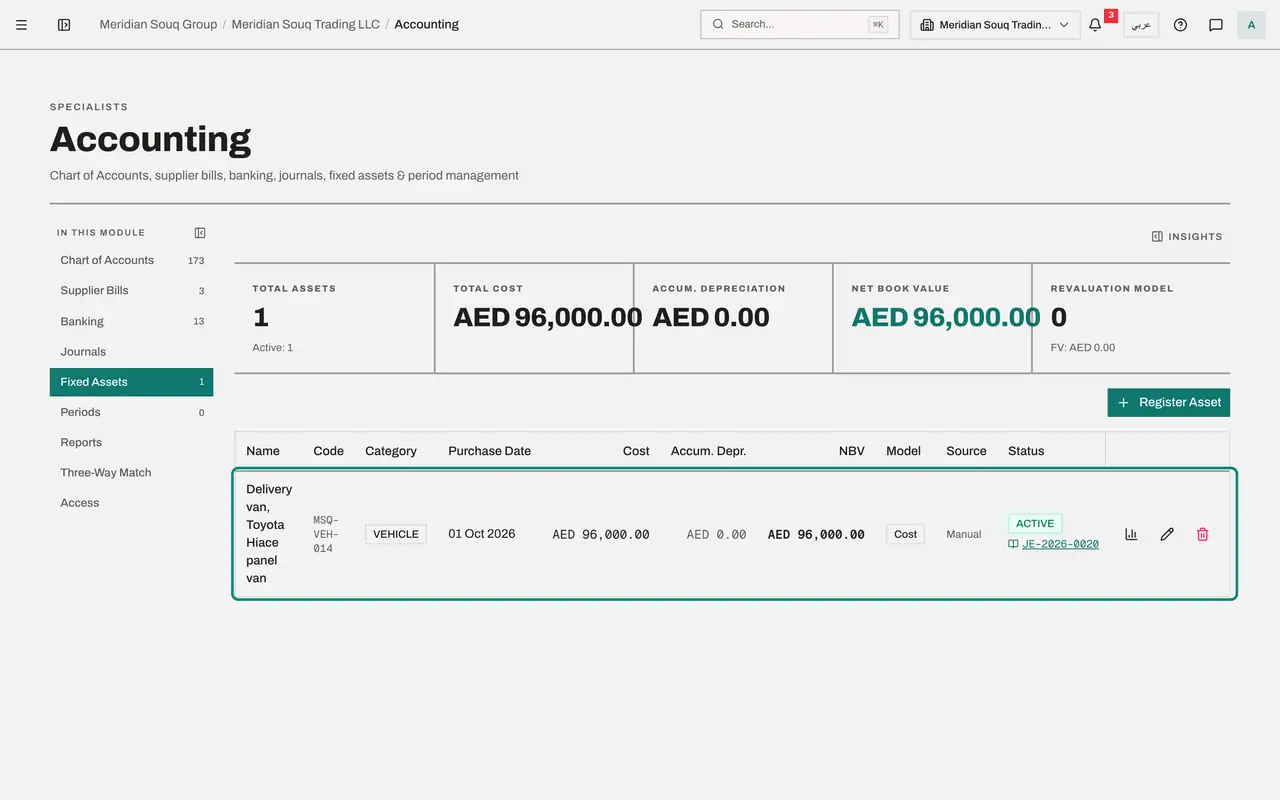
In the left menu select Accounting, then Fixed Assets, and select the Hide navigation icon for more room. The van is listed as Active. At the end of its row are three icons: Depreciation Schedule, Edit asset and a red bin, which records a disposal.
- Select Accounting
- Select Fixed Assets
- Select Hide navigation
- 2
Select Edit asset and correct the description
Select the pencil, Edit asset. Add the insurance policy number to Description. The fields under Cost basis and accounts can still be changed because no depreciation has been posted; leave them as they are.
- Select Edit asset
- Type Description:
White panel van, plate Dubai R 48213, bought from Al Rihla Motors. Ins…
- 3
Select Save
Select Save. The window closes and the register shows the van unchanged in cost and value. The change of description is recorded in the audit log.
- Select Save
- 4
Open the disposal window
Select the red bin at the end of the row. The window is headed Dispose Asset and shows the van's net book value. It asks for the disposal date and the amount received. A sale is a standard-rated supply, so the VAT inside the proceeds is reported on the VAT return. The van is not being sold: select Cancel.
- 5
Cancel and read the tiles
Select Cancel. The tiles above the register still show one active asset, a total cost of 96,000 dirhams, no accumulated depreciation and a net book value of 96,000. The last tile counts assets carried at a revalued amount, which applies to land and buildings on the revaluation model.
- Select Cancel
How to check it worked
The van is still listed as Active with a cost of 96,000 dirhams, and its description now mentions the insurance policy.
Common mistakes
- Recording a disposal to remove an asset that was registered by mistake. A disposal is a sale or a scrapping, and it reports VAT on the proceeds. To remove a mistake, use Delete asset inside the Edit window, which reverses the acquisition entry.
- Changing the cost after depreciation has been posted. From then on the cost, date, category, method and accounts are locked; only the useful life and the residual value can change, with a reason.
- Typing the disposal amount without VAT. The amount received is treated as including VAT at five percent, and the VAT inside it is reported on the VAT return.
Check your understanding
1. Depreciation has already been posted for an asset. What can you still change?
- A.The purchase cost
- B.The useful life and the residual value, with a reason
- C.The asset account
- D.Nothing at all
Show answer
Answer: B. The useful life and the residual value, with a reason
A change of life or residual value is a change in accounting estimate. It applies from now on and is recorded in the audit log with your reason.
2. What does the disposal window ask for?
- A.The buyer's bank account
- B.The disposal date and the amount received
- C.A new asset code
- D.The supplier's TRN
Show answer
Answer: B. The disposal date and the amount received
With the date and the proceeds, the system can compare the amount received with the net book value and report the VAT on the sale.