Lesson 24 of 26
What a person without Audit Hub access sees
What you will be able to do
This lesson is for everyone who does not run audits. As Aisha Farouk, an employee with the self-service role, you will see that the Audit Hub is not in your menu, what happens if you follow a link to it, who can give you access, and where your own audit requests would appear.
Before you start
- You are signed in with a role that does not include the Audit Hub. Most roles do not: only the compliance officer, the auditor role and administrators have it.
Steps
- 1
Look at the left menu
Sign in and look at the left menu. It shows only the modules your role includes. For an employee with the self-service role there is no Audit Hub and no Evidence Vault.
- 2
Follow a link to the Audit Hub
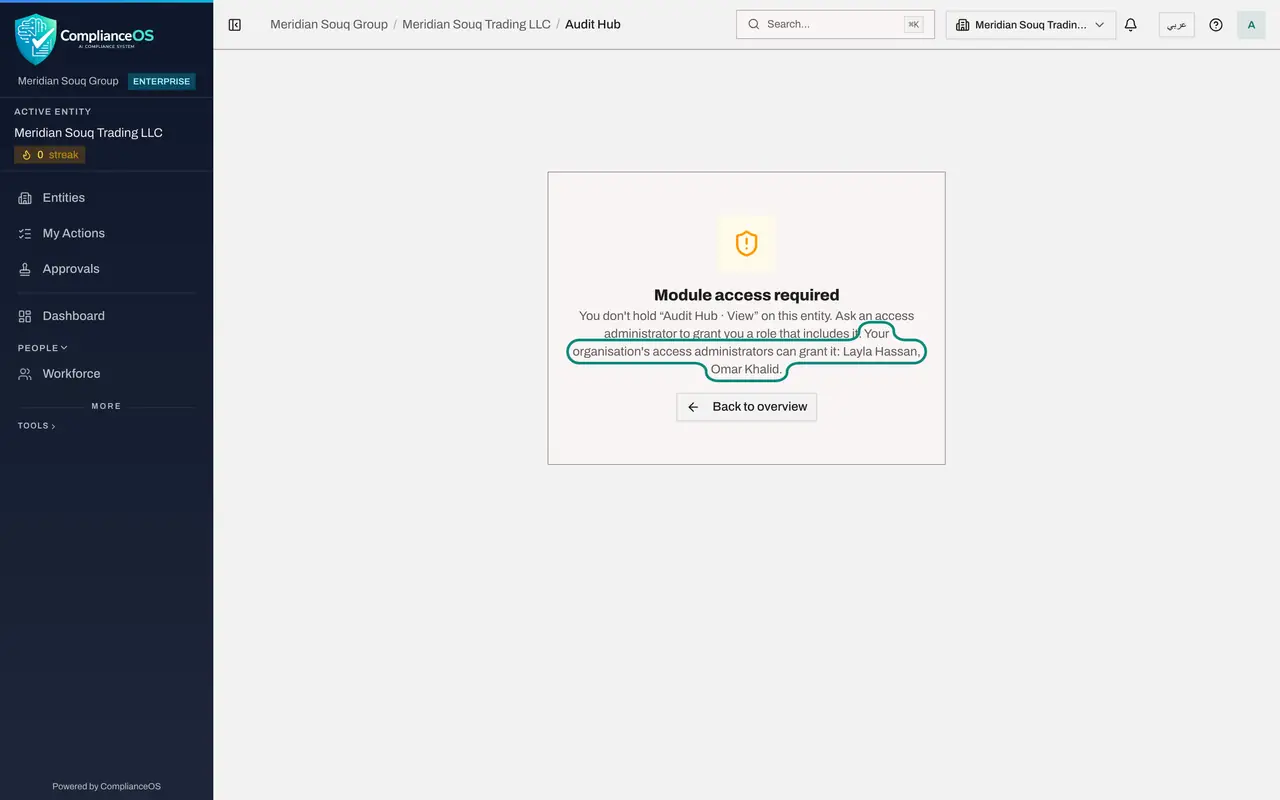
Suppose a colleague sends you the address of the Audit Hub. Opening it shows Module access required. The text names what is missing: you do not hold Audit Hub, View, on this entity.
- 3
Read who can grant access
The same message tells you whom to ask. It names your organisation's access administrators, here Layla Hassan and Omar Khalid. Ask one of them for a role that includes the Audit Hub if your work needs it.
- 4
Select Back to overview
Select Back to overview. You return to the entity's dashboard. Nothing was changed, and nothing from the audit was shown to you.
- Select Back to overview
- 5
Open My audit requests
Audit requests do not need that access. If a request is ever assigned to you, an entry named My audit requests appears in the left menu. Its page opens for everyone. Right now it says Nothing assigned to you.
How to check it worked
You saw the message Module access required on the Audit Hub address, and the page My audit requests told you that nothing is assigned to you.
Common mistakes
- Asking for the compliance officer role just to answer one audit request. You do not need it: requests assigned to you appear in My Actions and under My audit requests.
- Thinking the page is broken. Module access required is the normal answer when your role does not include a module.
- Sharing someone else's sign-in to look at an audit. Ask the access administrator named on the page instead.
Check your understanding
1. Aisha follows a link to the Audit Hub. What does she see?
- A.The list of audits
- B.An empty page
- C.The message Module access required, with the names of the administrators who can grant access
- D.She is signed out
Show answer
Answer: C. The message Module access required, with the names of the administrators who can grant access
The page names the permission that is missing and the access administrators who can grant it.
2. Aisha is later assigned an audit request. Does she need Audit Hub access to answer it?
- A.Yes
- B.No, she answers it from My audit requests
- C.Only for requests with files
- D.Only if she is an administrator
Show answer
Answer: B. No, she answers it from My audit requests
My audit requests is open to every assignee and shows only the person's own requests.