Lesson 7 of 26
Assign each request to a person and send the requests out
What you will be able to do
This lesson is for the person who runs the audit. You will give each request for proof to the person who holds the evidence, across finance, human resources and compliance, set due dates, assign the rest in one go, and dispatch the requests so that everyone is notified and the audit starts.
Before you start
- The checklist was confirmed in the previous lesson, so the audit is at step 4, Assign, with one request for each check.
- You know who holds the proof for each check. The people do not need an Audit Hub role: anyone who can open this entity can be assigned a request.
Steps
- 1
Open the audit at the Assign step
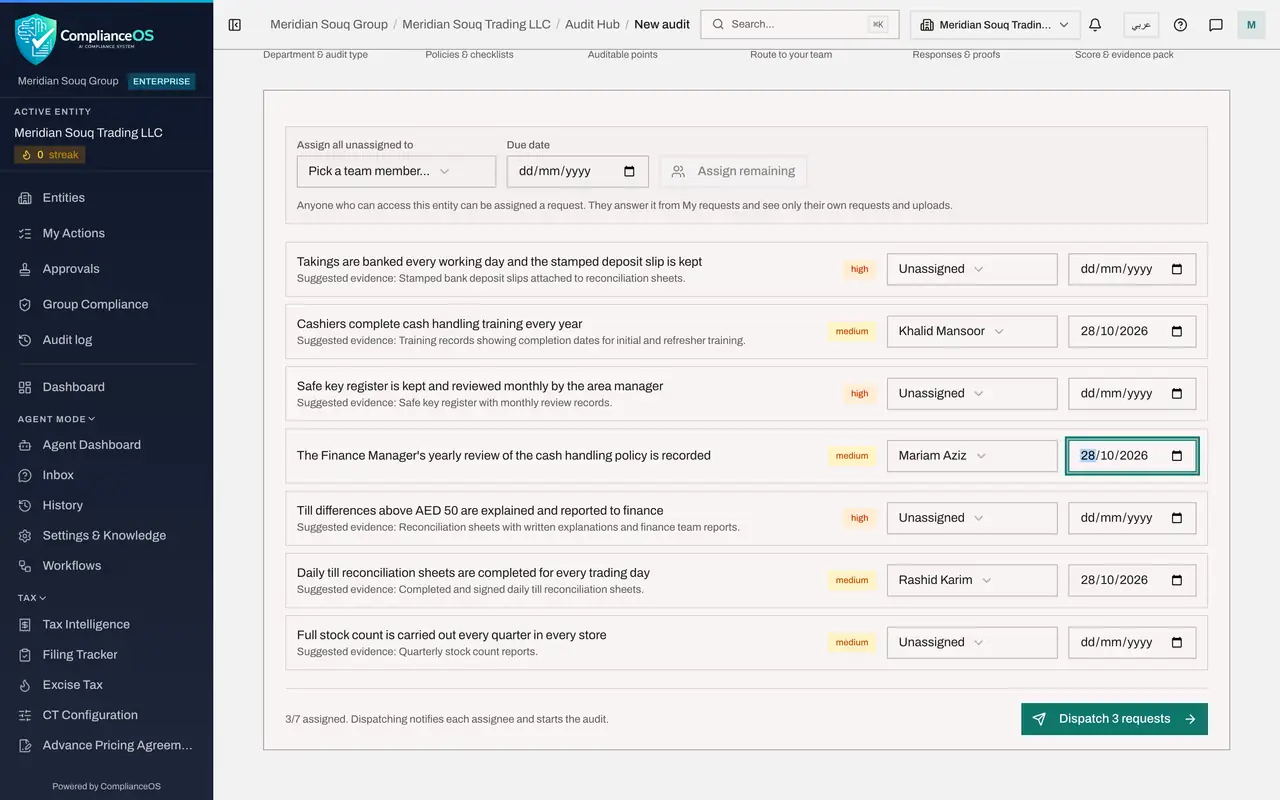
Open the audit from the Audit Hub. It resumes at step 4, Assign. Each line is one request for proof: the question from the checklist, the evidence suggested for it, a priority taken from the risk level, the person and the due date.
- 2
Assign the first request to the finance manager
On the request about daily till reconciliation sheets, open the list that says Unassigned and choose Rashid Karim, the finance manager. The list holds everyone who can open this entity, whatever their role.
- Select Unassigned
- Choose Rashid Karim
- 3
Set its due date
In the date box on the same line, enter the day the answer is due, here two weeks from today. The assignee sees this date on the request, and after it has passed the request is shown as overdue.
- 4
Assign the training request to the HR director
Evidence often sits outside finance. Give the request about cashier training to Khalid Mansoor, the human resources director, and set the same due date.
- Select Unassigned
- Choose Khalid Mansoor
- 5
Assign one request to yourself
You can also be an assignee. Give the request about the yearly policy review to yourself, Mariam Aziz, with the same due date, because you already hold that record.
- Select Unassigned
- Choose Mariam Aziz
- 6
Choose a person for all the remaining requests
The bar at the top assigns everything that is still unassigned in one go. Open Assign all unassigned to and choose Ahmed Saleh, the accountant.
- Select Pick a team member
- Choose Ahmed Saleh
- 7
Set a due date for them and select Assign remaining
In Due date on the same bar, enter a date a few days later than the others, then select Assign remaining. A message confirms how many requests were assigned, and every line now shows a name.
- Select Assign remaining
- 8
Check the summary
At the bottom, the summary shows how many requests are assigned, and the button shows how many will be dispatched. Dispatching notifies each assignee and starts the audit.
- 9
Select Dispatch
Select the Dispatch button. A message confirms that the requests were sent and the assignees notified. The audit changes to In progress and the setup moves to step 5, Validate, where the answers will arrive.
- Select Dispatch 7 requests
- 10
Look back at the Assign step
Select Assign in the bar at the top. Each line now carries the label sent, and its person and date are locked. A request that was not assigned before dispatch can still be assigned here and dispatched later.
How to check it worked
After dispatching, the setup shows step 5, Validate, every request has a person's name and a due date, and on the Assign step each line carries the label sent.
Common mistakes
- Dispatching before every request has a person. Only assigned requests are sent. The rest stay unassigned until you assign and dispatch them.
- Selecting Assign remaining straight after assigning single requests. Wait until each name shows on its line, so that the remaining list is up to date.
- Forgetting the due date. A request without one shows No due date to the assignee and is never flagged as overdue.
Check your understanding
1. Who can be assigned an audit request?
- A.Only people with an Audit Hub role
- B.Only administrators
- C.Anyone who can access this entity
- D.Only the compliance officer
Show answer
Answer: C. Anyone who can access this entity
The note on the Assign step says it: anyone who can access the entity can be assigned. They answer from My audit requests and see only their own requests and uploads.
2. What does Dispatch do?
- A.It deletes unassigned requests
- B.It notifies each assignee and starts the audit, and the sent requests can no longer be reassigned on this step
- C.It completes the audit
- D.It emails the external auditor
Show answer
Answer: B. It notifies each assignee and starts the audit, and the sent requests can no longer be reassigned on this step
Dispatching sends a notification to every assignee, changes the audit to In progress and locks the person and date on each sent line.