Lesson 15 of 26
As the owner of a finding: record what you did and mark it resolved
What you will be able to do
This lesson is for anyone who is made the owner of an audit finding. As Ahmed Saleh, the accountant, you will find the finding in My Actions, open it, record the corrective action, save it, and mark the finding resolved.
Before you start
- A finding has been raised and you are its owner. Here it is about bank deposit slips missing for three days in March.
- You have done the work, or at least started it, and can describe it.
Steps
- 1
Select My Actions
Select My Actions in the left menu. Besides your audit requests there is a line with the type Audit finding. Its title starts with Insufficient evidence, followed by the check that failed.
- Select My Actions
- 2
Select Open on the finding
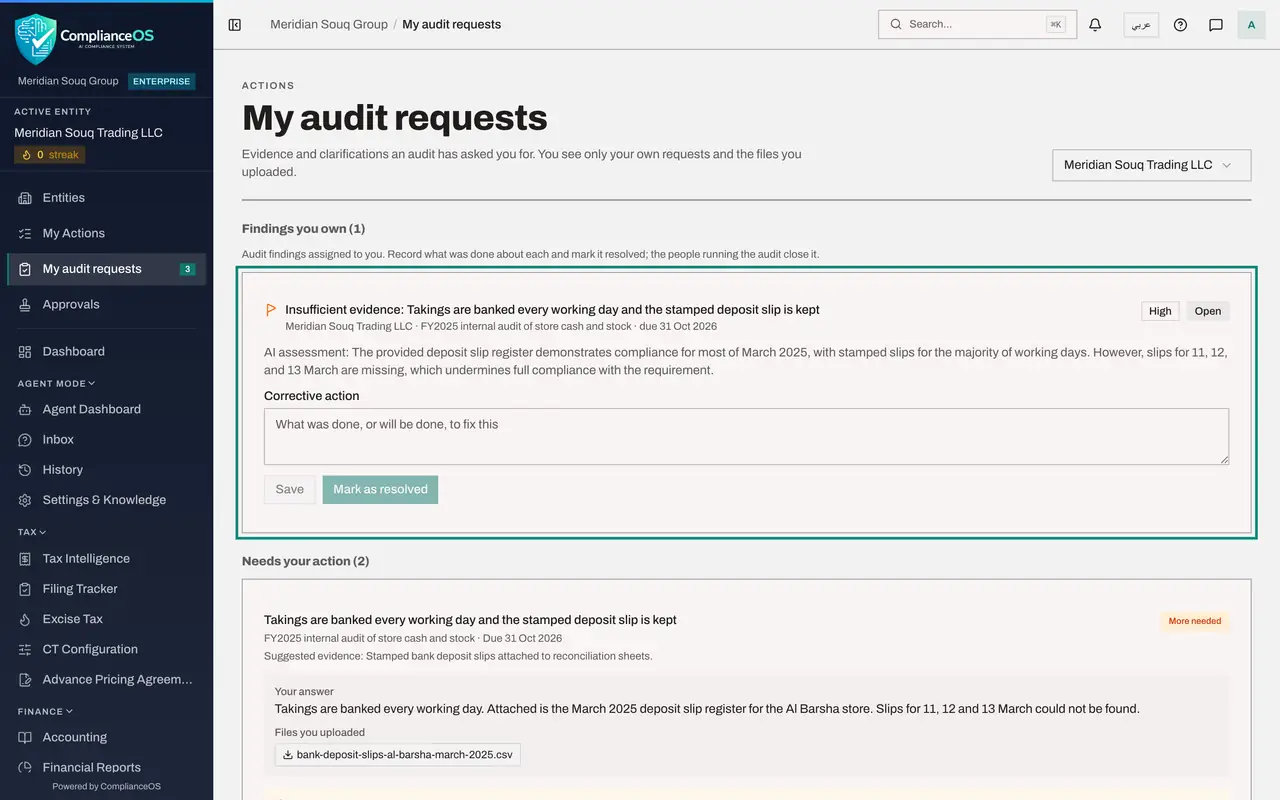
Select Open at the end of that line. My audit requests opens, and at the top there is a section named Findings you own, with this finding outlined.
- Select Open
- 3
Read the finding
The finding shows its title, the entity and the audit, the date it is due, its severity and its status, Open. The text below is the AI assessment of your answer, which explains why the finding was raised.
- 4
Record the corrective action
In Corrective action, write what was done or will be done, by whom and by when.
- Type Corrective action:
The bank confirmed all three deposits on 14 March and issued duplicate…
- Type Corrective action:
- 5
Select Save
Select Save. A message confirms it, and the status changes from Open to In remediation, which tells the audit team that work is under way.
- Select Save
- 6
Select Mark as resolved
When the work is finished, select Mark as resolved. The status becomes Resolved and the finding leaves your open work in My Actions. The person running the audit checks it and closes it.
- Select Mark as resolved
How to check it worked
Under Findings you own, the finding shows your corrective action and the status Resolved. The people running the audit now decide whether to close it.
Common mistakes
- Selecting Mark as resolved with an empty Corrective action box. The button stays switched off until you have written what was done.
- Expecting to close the finding yourself. The owner resolves it. Closing stays with the people who run the audit.
- Looking in the Audit Hub. Without an Audit Hub role you cannot open it. Your findings are on the page My audit requests.
Check your understanding
1. Where does the owner of a finding see it?
- A.Only in an email
- B.In My Actions as an Audit finding, and under Findings you own on My audit requests
- C.Only in the Risk Register
- D.Nowhere, unless they have an Audit Hub role
Show answer
Answer: B. In My Actions as an Audit finding, and under Findings you own on My audit requests
The finding is listed in My Actions with the type Audit finding. Open leads to My audit requests, where Findings you own shows it.
2. What happens to the status when you first save a corrective action on an open finding?
- A.It stays Open
- B.It changes to In remediation
- C.It changes to Closed
- D.The finding is deleted
Show answer
Answer: B. It changes to In remediation
Saving the first note on an open finding moves it to In remediation. Mark as resolved then moves it to Resolved.