Lesson 3 of 26
Put evidence you already hold into the Evidence Vault
What you will be able to do
This lesson is for the person who prepares the audit. Before the audit starts, you will store two documents you already hold in the Evidence Vault, so that they are sealed, dated and ready to be reused when the audit asks for them.
Before you start
- You have the documents as files. Here they are two invented documents: the record of the yearly review of the cash handling policy, and the cash in transit insurance certificate.
- Your role can add evidence. The compliance officer can.
Steps
- 1
Select Evidence Vault in the left menu
In the left menu, under Assurance, select Evidence Vault. The vault is where ComplianceOS keeps proof so that it cannot be changed afterwards. It is empty for now: No evidence records found.
- Select Evidence Vault
- 2
Select Upload
Select Upload at the top right. The Upload Evidence box opens. It accepts PDF, Word, Excel, PowerPoint and CSV files and PNG or JPG images, up to 50 megabytes each.
- Select Upload
- 3
Choose the file
Under File, select Click to browse and choose the document from your computer. Here it is cash-handling-policy-annual-review-2025.pdf, the signed record of this year's review of the cash handling policy. The file name appears in the box.
- Upload File:
cash-handling-policy-annual-review-2025.pdf
- Upload File:
- 4
Choose the source type
Open Source Type and choose what kind of record this is. The list covers tax returns, invoices, contracts, regulatory filings and more. For a governance document like this one, choose Compliance Report. If you leave it on Other, the record is harder to find later.
- Select Source Type
- Choose Compliance Report
- 5
Choose how long to keep it
Open Retention and choose the period. Tax records are kept seven years, anti-money-laundering records five years and corporate records ten years. Choose Corporate (10 years) for this policy review. If you leave it, the default of three years applies.
- Select Retention
- Choose Corporate (10 years)
- 6
Select Upload & Vault
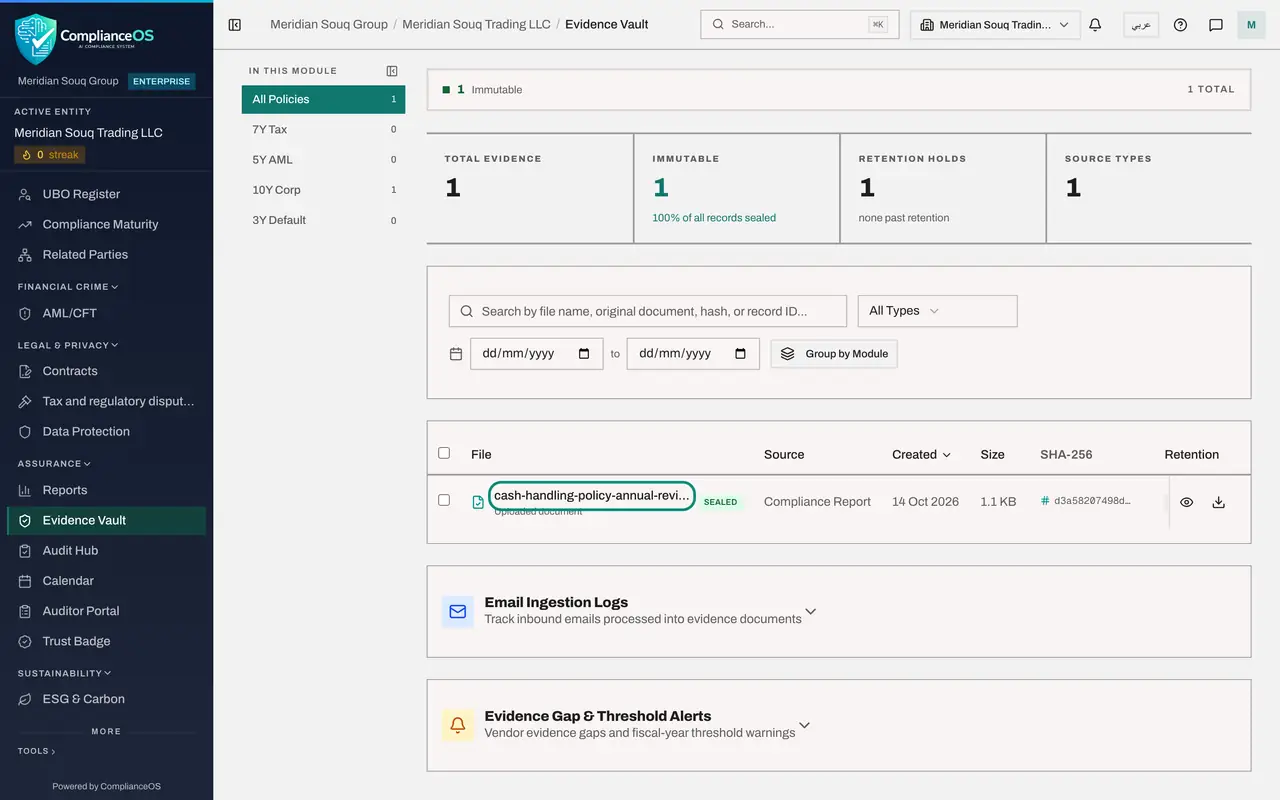
Linked record is optional and can stay empty. Select Upload and Vault. ComplianceOS calculates the file's fingerprint, stores the file and closes the box. The record appears in the list with the label Sealed.
- Select Upload & Vault
- 7
Upload the second document
Select Upload again and choose cash-in-transit-insurance-certificate-2025.pdf. Set Source Type to Regulatory Filing and Retention to Corporate (10 years).
- Select Upload
- Upload File:
cash-in-transit-insurance-certificate-2025.pdf - Select Source Type
- Choose Regulatory Filing
- Select Retention
- Choose Corporate (10 years)
- 8
Select Upload & Vault again
Select Upload and Vault. The vault now lists two sealed records, and the counters at the top show two records, both immutable, which means they cannot be changed.
- Select Upload & Vault
- 9
Open a record
Select the name of the policy review file. The record opens on Overview, which shows the source type, when it was stored, who stored it, and the retention period with the date it expires.
- 10
Check the fingerprint on the Integrity tab
Select the Integrity tab. It shows the SHA-256 hash, the fingerprint of the file. Select Verify Integrity: ComplianceOS reads the stored file again, recalculates the fingerprint and confirms that it still matches. An auditor can do the same check at any time.
- Select Integrity
- Select Verify Integrity
- 11
Close the record
Select Close. Both documents are now in the vault. Later in this course the audit asks for the policy review, and you will attach this sealed record instead of uploading the file again.
- Select Close
How to check it worked
The Evidence Vault lists both files with the label Sealed, and the Integrity tab of the review record says the stored file matches its recorded hash.
Common mistakes
- Leaving Retention on Default (3 years) for corporate records. Choose the period your records policy requires, because it decides when the record may be removed.
- Uploading a draft. A vaulted file is sealed and cannot be edited. If you upload the wrong version, you must upload the right one as a new record.
- Leaving Source Type on Other. The source type is how people find the record later, so pick the closest match.
Check your understanding
1. What does the label Sealed on a vault record mean?
- A.The file is hidden from auditors
- B.The file has been stored with a fingerprint and can no longer be changed
- C.The file is waiting for approval
- D.The file will be deleted soon
Show answer
Answer: B. The file has been stored with a fingerprint and can no longer be changed
When a file is vaulted, ComplianceOS records a SHA-256 hash, a fingerprint of its exact contents, and stores the file so it cannot be altered.
2. What does Retention decide?
- A.Who may download the file
- B.How large the file may be
- C.How long the record must be kept before it may be removed
- D.Which audit the file belongs to
Show answer
Answer: C. How long the record must be kept before it may be removed
Retention sets the period the record is kept: seven years for tax, five for anti-money-laundering, ten for corporate records, or the three year default.