Lesson 13 of 26
Test a control on a sample and record the results
What you will be able to do
This lesson is for the person who tests controls. On the Samples tab of the Validate step you will draw a random sample from a list of records, linked to the check it tests, and record for each item whether it passed, failed or does not apply.
Before you start
- The audit is in progress and you have the list of records to test, called the population. Here it is eight till reconciliation sheets from March 2025.
- You know how many items you will test. Here it is three of the eight.
Steps
- 1
Select the Samples tab
On the Validate step, select the Samples tab beside Requests. No sample has been drawn yet. Sampling is how an auditor tests a control in practice: pick some records and look at each one.
- Select Samples
- 2
Select Draw a sample
Select Draw a sample. A form opens with the control, the population, the sample size, the method, the seed and the source.
- Select Draw a sample
- 3
Choose the control being tested
Open Control being tested and choose the check this sample belongs to, here the daily till reconciliation sheets. If you leave it on Not attached to a control, the sample stands alone.
- Select Not attached to a control
- 4
Enter the population
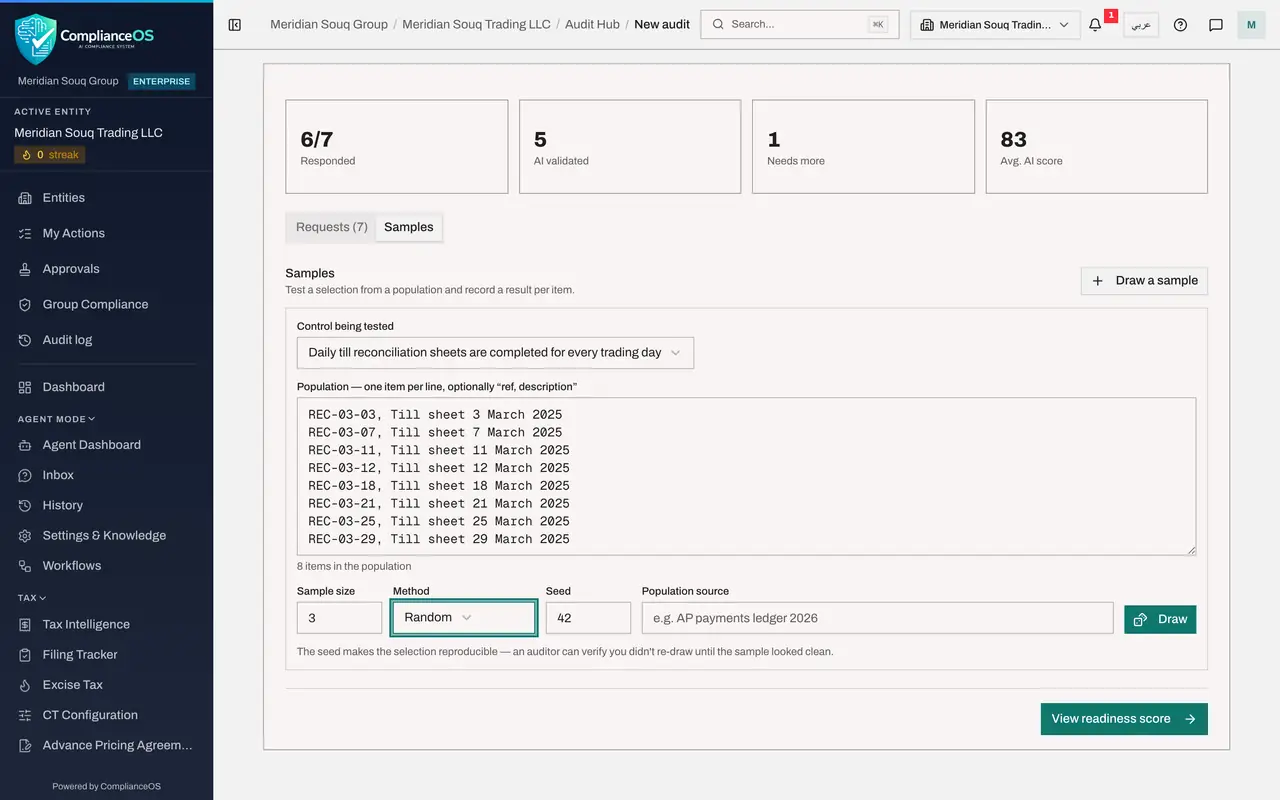
In Population, enter the records you could test, one per line. Each line may be a reference, a comma and a description. Here we enter eight till sheets. The count under the box shows 8 items in the population.
- Type PAY-0001, Supplier A AED 62,000 PAY-0002, Supplier B AED 51,400:
REC-03-03, Till sheet 3 March 2025 REC-03-07, Till sheet 7 March 2025…
- Type PAY-0001, Supplier A AED 62,000 PAY-0002, Supplier B AED 51,400:
- 5
Set the sample size and the method
In Sample size enter 3. Open Method: Random picks by chance, Systematic takes every so-manyth item, and Judgemental records a selection you chose yourself. Choose Random.
- Select Random
- Choose Random
- 6
Enter a seed and the source
In Seed type a number, here 2025. The seed makes the selection reproducible. In Population source, say where the list came from, so that someone else can find it.
- Type 42:
2025 - Type e.g. AP payments ledger 2026:
Al Barsha till sheet register, March 2025
- Type 42:
- 7
Select Draw
Select Draw. A message says how many items were drawn and that the selection is reproducible from the seed. The sample appears with the three selected items.
- Select Draw
- 8
Record a pass
Look at each selected record, then record the result on its line. The tick means pass, the cross means fail and the dash means not applicable. Select the tick on the first two items.
- Select pass
- Select pass
- 9
Record a fail
The third sheet was not signed by the store manager, so select the cross on its line. The sample now shows three of three tested and a red label, 1 failed. A failed item is a reason to raise a finding, which the next lesson shows.
- Select fail
How to check it worked
The sample is listed with three of eight, the check it tests, the method Random with its seed, three of three tested, and a red label that counts the failed item.
Common mistakes
- Drawing again until the sample looks clean. The seed makes the selection reproducible, so an auditor can see whether you kept the first draw.
- Leaving the control unlinked. Choose the check under Control being tested, or nobody can tell what the sample proves.
- Asking for more items than the population holds. The sample size cannot be larger than the list.
Check your understanding
1. What is the seed for?
- A.It is the number of items
- B.It makes the random selection reproducible, so the same list and seed always give the same sample
- C.It is a password
- D.It sets the due date
Show answer
Answer: B. It makes the random selection reproducible, so the same list and seed always give the same sample
With the same population, size and seed, the draw gives the same items again. An auditor can repeat it and confirm you did not re-draw.
2. How do you record that one sampled item did not meet the control?
- A.Delete the item
- B.Select the cross beside the item, which records fail
- C.Waive the request
- D.Draw a new sample
Show answer
Answer: B. Select the cross beside the item, which records fail
Each item has three buttons: the tick for pass, the cross for fail and the dash for not applicable. The sample then counts the failed items.