Lesson 23 of 26
Roll an audit forward, cancel an audit and delete it
What you will be able to do
This lesson is for the person who runs audits. You will roll the completed audit forward to start next year's cycle from this year's checklist, then cancel that new audit with a reason, read how a cancelled audit looks, and delete it.
Before you start
- The audit from the previous lessons is completed. Only completed or archived audits can be rolled forward.
- Your role can create, approve and delete in the Audit Hub. Rolling forward needs create, cancelling needs approve, deleting needs delete.
Steps
- 1
Find Roll forward on the completed audit
In the Audit Hub, a completed audit has two buttons at the end of its line. The first invites an external auditor. The second, two overlapping squares, is Roll forward to the next cycle.
- 2
Select Roll forward to the next cycle
Select it. A message says Rolled forward, and a new audit opens with the same name followed by next cycle. It opens at step 4, Assign. The auditable points and the checklist are carried over from the completed audit, and each request already has last year's assignee. Only the due dates are empty.
- Select Roll forward to the next cycle
- 3
Return to the Audit Hub
Select Audit Hub in the left menu. There are now two audits: the completed one, and the new one with the status In review and no period yet. You would set the new period on its Scope step.
- Select Audit Hub
- 4
Select Cancel audit
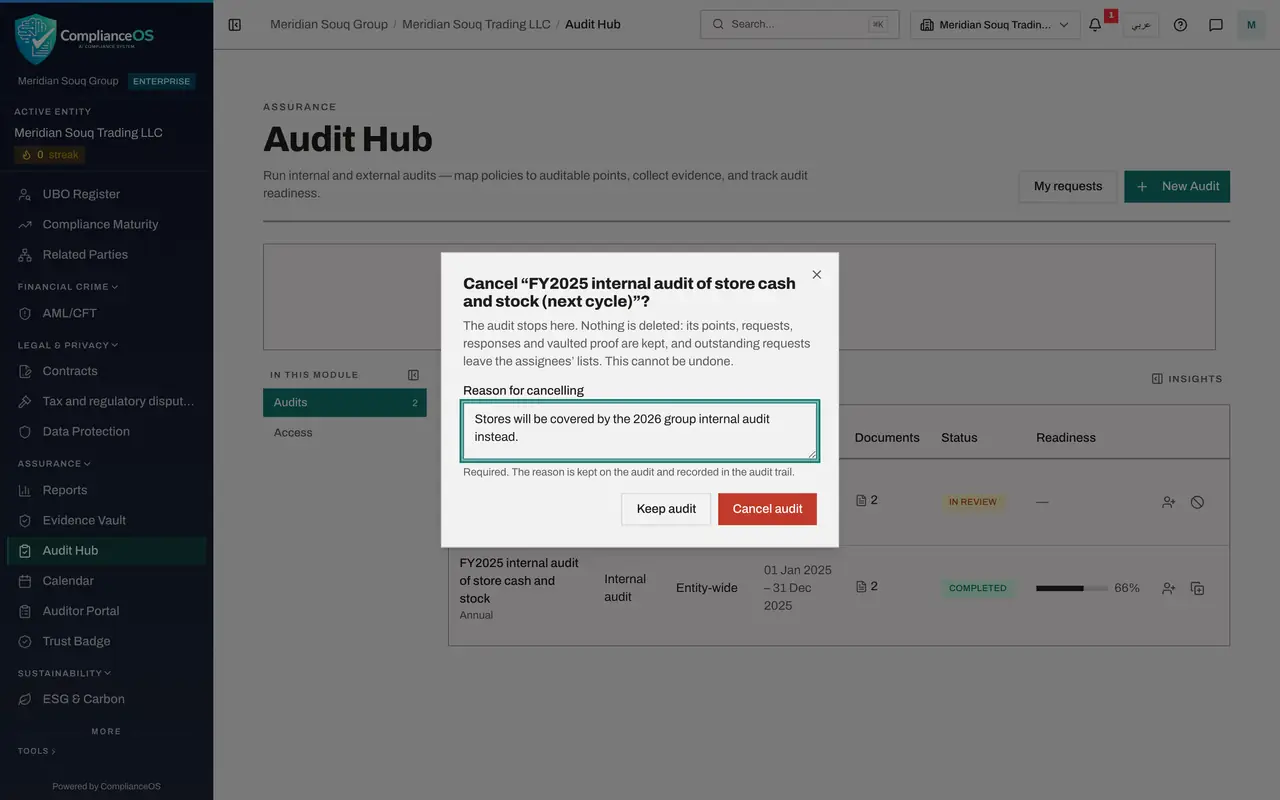
Now suppose the plan changes and this audit will not happen. Select the circle with a line through it at the end of the new audit's line, Cancel audit. A box explains what cancelling does: the audit stops, nothing is deleted, outstanding requests leave the assignees' lists, and it cannot be undone.
- Select Cancel audit
- 5
Give the reason
Reason for cancelling is required. The Cancel audit button stays switched off until you have typed one. The reason is kept on the audit and recorded in the audit trail. Keep audit closes the box without cancelling.
- Type Reason for cancelling:
Stores will be covered by the 2026 group internal audit instead.
- Type Reason for cancelling:
- 6
Select Cancel audit to confirm
Select Cancel audit. A message says Audit cancelled. In the list, the audit now has the red status Cancelled with the reason under it.
- Select Cancel audit
- 7
Open the cancelled audit
Select the cancelled audit. A red banner at the top says This audit was cancelled, with the date and the reason. Its content can still be read.
- 8
Select Delete audit
Go back to the Audit Hub. A cancelled audit, like a draft, has a bin at the end of its line, Delete audit. Select it. A box asks you to confirm and says what is removed: the audit's points, requests and responses. Proof already in the Evidence Vault stays there.
- Select Audit Hub
- Select Delete audit
- 9
Select Confirm
Select Confirm. A message says Audit deleted, and the list shows only the completed audit again. A draft that you started by mistake is deleted the same way.
- Select Confirm
How to check it worked
The Audit Hub lists only the completed audit again. The next-cycle audit you created, cancelled and deleted is gone.
Common mistakes
- Trying to delete an audit that is under way. Only a draft or a cancelled audit can be deleted. An audit under way is cancelled with a reason first.
- Cancelling without a clear reason. The reason is kept on the audit and in the audit trail, and it is shown in the list.
- Cancelling when you meant to pause. Cancelling cannot be undone, and outstanding requests leave the assignees' lists.
Check your understanding
1. What does Roll forward to the next cycle create?
- A.A copy of the evidence
- B.A new audit that starts from the completed audit's auditable points, checklist and assignees
- C.A report
- D.A duplicate of every answer
Show answer
Answer: B. A new audit that starts from the completed audit's auditable points, checklist and assignees
The new audit carries the mapping and the assignees forward, so next year starts at the Assign step, not at an empty setup.
2. What happens to proof already in the Evidence Vault when a cancelled audit is deleted?
- A.It is deleted too
- B.It stays in the vault
- C.It is sent to the auditor
- D.It is unsealed
Show answer
Answer: B. It stays in the vault
The confirmation says it: the audit's points, requests and responses are removed, and proof already in the Evidence Vault stays there.