Lesson 22 of 26
Complete the audit
What you will be able to do
This lesson is for the person who runs the audit. When the fieldwork is over you will recompute the score one last time, complete the audit, and see what completion leaves behind: the final score on the list, the wizard in a finished state, and a sealed record of the completed audit in the Evidence Vault.
Before you start
- The answers you intend to accept are accepted, and findings have owners. Two requests are not accepted: the one about banking the takings still needs more evidence, and the one about the safe key register was never answered. The finding about the safe key register is in remediation.
- Your role can approve in the Audit Hub. Completing needs that right.
Steps
- 1
Recompute the score
Open the audit at the Readiness step and select Recompute, so that the score reflects every answer accepted since the last snapshot.
- Select Recompute
- 2
Check what is still open
Before you complete, read Needs attention and the findings once more. Here the request about banking the takings still needs more evidence, and the finding about the safe key register is in remediation with the finance manager. Both stay visible after completion.
- 3
Select Complete audit
Scroll to the bottom and select Complete audit. A box asks you to confirm: Complete this audit? The final readiness score is snapshotted and open requests stay flagged.
- Select Complete audit
- 4
Select Confirm
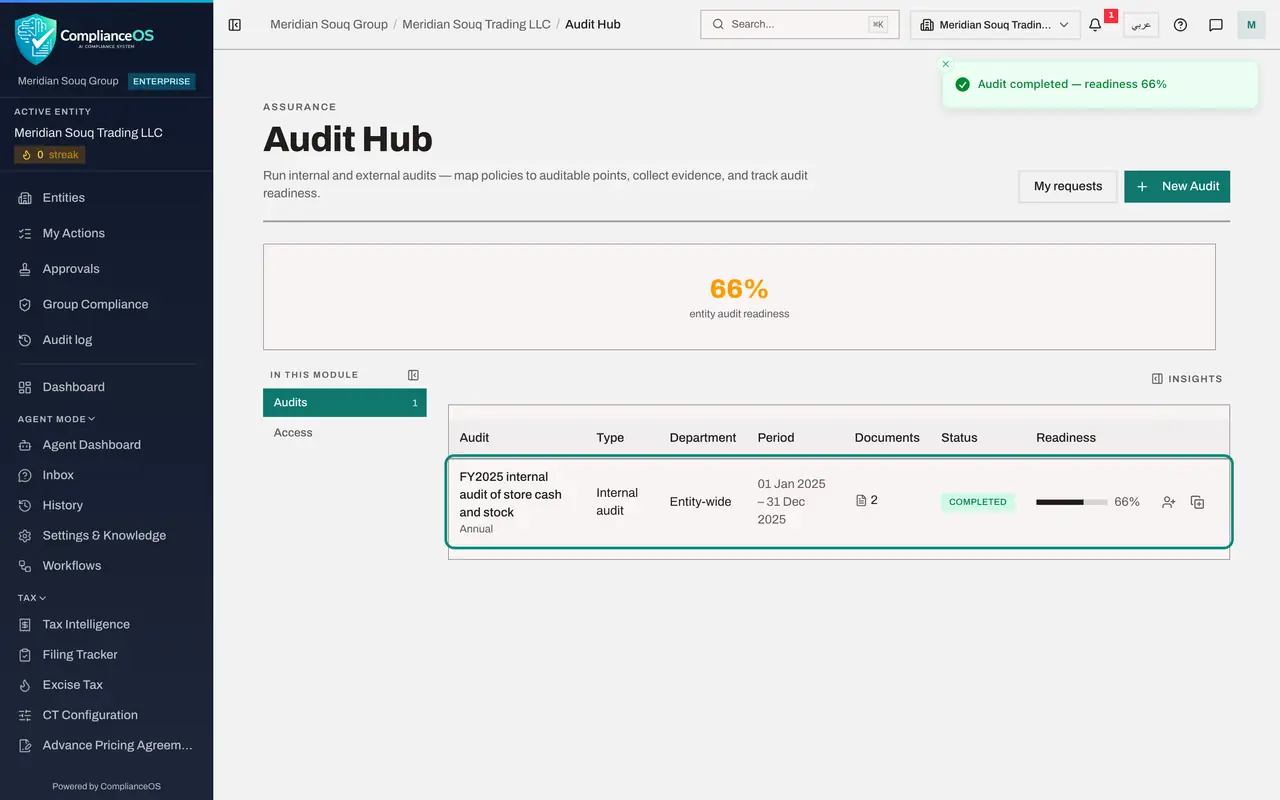
Select Confirm. A message says Audit completed with the readiness score, and you are taken back to the Audit Hub. The audit's status is now Completed and the score is shown beside it. The summary at the top no longer counts it as active.
- Select Confirm
- 5
Open the completed audit
Select the audit again. It opens at the Readiness step. Everything can still be read: the answers, the findings and the score.
- 6
See the completed state
At the bottom, the green label Audit completed has taken the place of the Complete audit button. Download ZIP still gives you the evidence pack with the frozen policy documents and the accepted proofs.
- 7
Findings stay open for follow-up
Completing the audit does not close its findings. Scroll up to Findings and corrective actions: the finding about the safe key register is still In remediation, and you can still change its status here when the owner has finished.
- 8
Find the completed audit in the Evidence Vault
At the bottom of the step, select open the Evidence Vault. At the top of the vault there is a new sealed record named after the audit, with Completed audit cycle written underneath. It was stored at the moment you confirmed, and it is kept for ten years.
- Select open the Evidence Vault
How to check it worked
In the Audit Hub the audit shows the status Completed with its final readiness score, and on the Readiness step the green label Audit completed replaces the Complete audit button.
Common mistakes
- Waiting for a perfect score. An audit can be completed with open requests: they stay flagged, and the findings stay open for their owners.
- Completing before you recompute. The final score is the snapshot taken at completion, so recompute first.
- Expecting to reopen a completed audit. Completion is final. Next year's work starts by rolling the audit forward.
Check your understanding
1. What happens to requests that are still open when you complete the audit?
- A.They are deleted
- B.They stay flagged
- C.They are accepted automatically
- D.The audit cannot be completed
Show answer
Answer: B. They stay flagged
The confirmation says it: the final readiness score is snapshotted and open requests stay flagged.
2. What does completing the audit add to the Evidence Vault?
- A.Nothing
- B.A sealed record of the completed audit, named after the audit
- C.A copy of the audit log
- D.The auditor's invitation
Show answer
Answer: B. A sealed record of the completed audit, named after the audit
At the moment you confirm, ComplianceOS seals a record of the finished audit in the vault, beside the frozen policies and the accepted proofs.