Lesson 12 of 26
Answer a request with evidence that is already in the Evidence Vault
What you will be able to do
This lesson is for an assignee who can also open the Audit Hub, such as the compliance officer. One request is assigned to you, and the proof is already sealed in the Evidence Vault. You will write your answer, then attach the vault record to the request instead of uploading the file a second time. Finally you will accept the request on the Validate step, which, because you wrote the answer yourself, the approval policy allows only with a written reason.
Before you start
- The request about the yearly policy review is assigned to you.
- The policy review record, cash-handling-policy-annual-review-2025.pdf, was stored in the Evidence Vault in an earlier lesson.
- Reuse existing evidence is offered only to assignees who hold an Audit Hub role. Other assignees attach a file.
- Accepting an answer into the vault is an approval. By default the person who wrote an answer cannot accept it: a colleague who holds the Audit Hub approve right does. For this entity the administrator has saved an approval policy for the action Accept an audit answer into the evidence vault that lets the person who answered accept it with a written reason. Administrators set it in the Approval policies tab of the Audit Hub's Access section.
Steps
- 1
Open your own requests
In the Audit Hub, select My requests at the top right. Your request about the yearly policy review is under Needs your action, with the label To answer.
- Select My requests
- 2
Write your answer
Write a short answer that says what the record shows and where it is kept.
- Type Your answer:
The Finance Manager reviewed and approved the policy on 12 January 202…
- Type Your answer:
- 3
Select Submit answer
Select Submit answer. The request is checked automatically, like any other answer.
- Select Submit answer
- 4
Read the result
The automatic check has read your answer. Nothing is linked to the request yet, so it may ask for the signed record as proof. That is expected: the next step attaches the record from the vault, and the reviewer sees the answer and the record together.
- 5
Select Reuse existing evidence
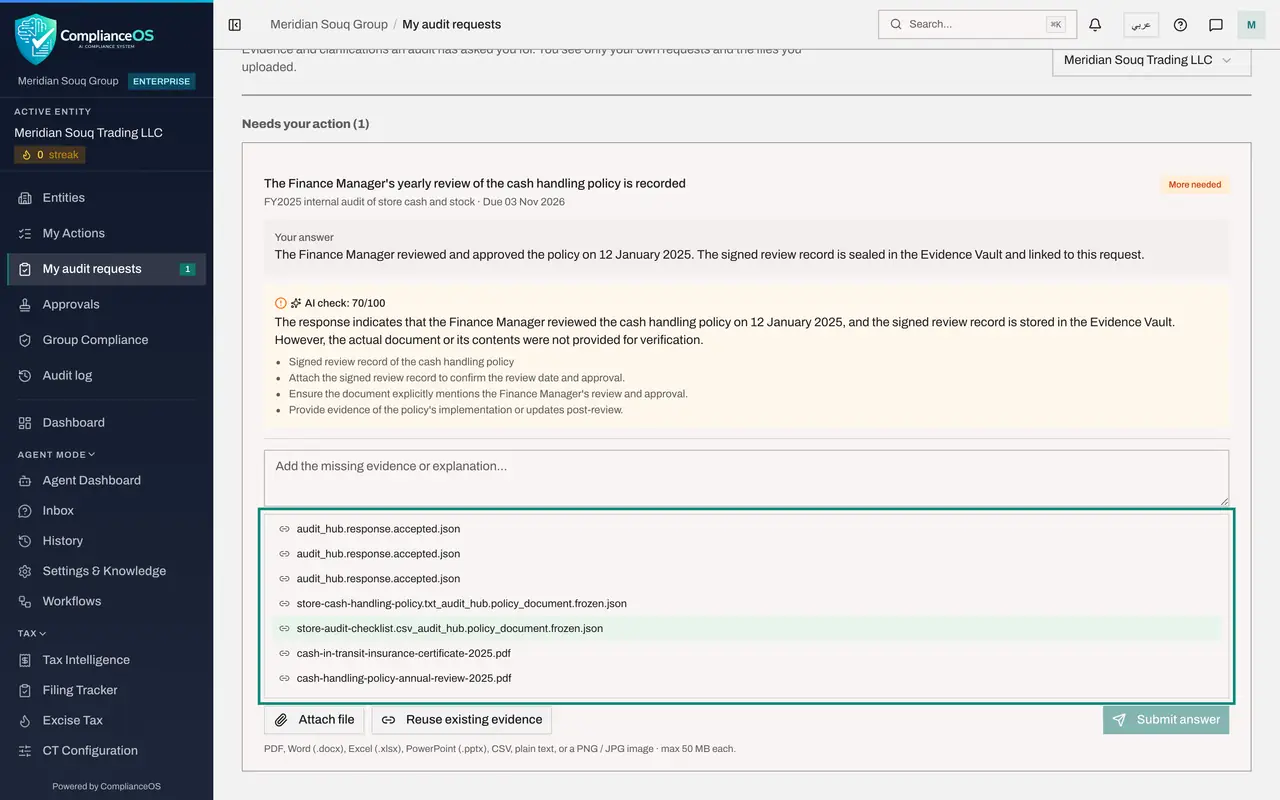
Select Reuse existing evidence, the button beside Attach file. A list of sealed records from the Evidence Vault opens. The note above the list says whether you see every record of the entity or audit proof only.
- Select Reuse existing evidence
- 6
Choose the vault record
Select cash-handling-policy-annual-review-2025.pdf, the policy review record you vaulted before the audit. A message confirms that existing evidence was attached. The record is now listed on the request under Evidence you attached from the vault.
- Select cash-handling-policy-annual-review-2025.pdf
- 7
Return to the audit
Select Audit Hub in the left menu and open the audit, FY2025 internal audit of store cash and stock. It resumes at the Validate step.
- Select Audit Hub
- 8
Open the request as the reviewer
Open the request about the policy review. Below the response, Reused vault evidence names the sealed record that supports it.
- 9
Select Accept & vault
Select Accept and vault. Accepting an answer is an approval, and you wrote this answer yourself. A box opens: the approval policy lets you accept your own answer only with a written reason, and asks why you are accepting it yourself. Without such a policy, ComplianceOS refuses and says that someone else has to approve it.
- Select Accept & vault
- 10
Give your reason and confirm
Type the reason, for example that you hold the signed record yourself and the other reviewer is away for the audit, then confirm. The request becomes Accepted, its proof is sealed in the Evidence Vault, and your reason is kept with the approval.
- Type Your answer:
I hold the signed policy review record myself and the second reviewer… - Select Confirm
- Type Your answer:
How to check it worked
On the Validate step the request shows the vault record under Reused vault evidence and the status Accepted, and your reason for accepting your own answer is kept with the approval.
Common mistakes
- Attaching the vault record before you have written an answer. Submit your written answer first. A request with a linked record but no answer cannot be accepted.
- Judging the request by the first automatic check alone. The check runs when you submit the answer, before the vault record is linked. It reads linked vault records too, but the reviewer, who sees the answer and the linked record together, makes the decision.
- Uploading the same file again. A second upload creates a second copy with its own history. Linking keeps one sealed record.
- Accepting your own answer without a real reason. Where the policy does not allow it, Accept & vault is refused with the message that someone else has to approve it. Where it does, the reason you give is kept with the approval and can be read later, so write why no one else could accept it.
Check your understanding
1. What is the benefit of Reuse existing evidence?
- A.It deletes the old record
- B.The same sealed vault record supports the request without being uploaded a second time
- C.It skips the review
- D.It hides the request from the auditor
Show answer
Answer: B. The same sealed vault record supports the request without being uploaded a second time
The request is linked to the record already sealed in the Evidence Vault, so there is one copy with one fingerprint and one custody history.
2. Who is offered the button Reuse existing evidence on a request?
- A.Every assignee
- B.Assignees who can also open the Audit Hub
- C.Only external auditors
- D.Nobody
Show answer
Answer: B. Assignees who can also open the Audit Hub
Reusing vault evidence is an Audit Hub feature. Assignees without an Audit Hub role see only Attach file.
3. You answered a request yourself. What happens when you select Accept & vault?
- A.It is accepted straight away, like any other answer
- B.By default it is refused and a colleague must accept it; only where the approval policy allows it can you accept it, with a written reason
- C.The auditor accepts it for you
- D.The answer is deleted
Show answer
Answer: B. By default it is refused and a colleague must accept it; only where the approval policy allows it can you accept it, with a written reason
Accepting an answer is an approval, and the person who made a record does not approve it. An administrator can save a policy that allows self-acceptance with a written reason.