Lesson 16 of 26
Read the readiness score, close a finding and download the evidence pack
What you will be able to do
This lesson is for the person who runs the audit. On the Readiness step you will read the score and what it is made of, recompute it, see what still needs attention, close a finding its owner has resolved, and download the evidence pack, the ZIP file you hand to the auditor.
Before you start
- Several answers have been accepted and two findings exist. The accountant has marked his finding resolved.
- Your role can export from the Audit Hub. The evidence pack needs that right.
Steps
- 1
Open the Readiness step
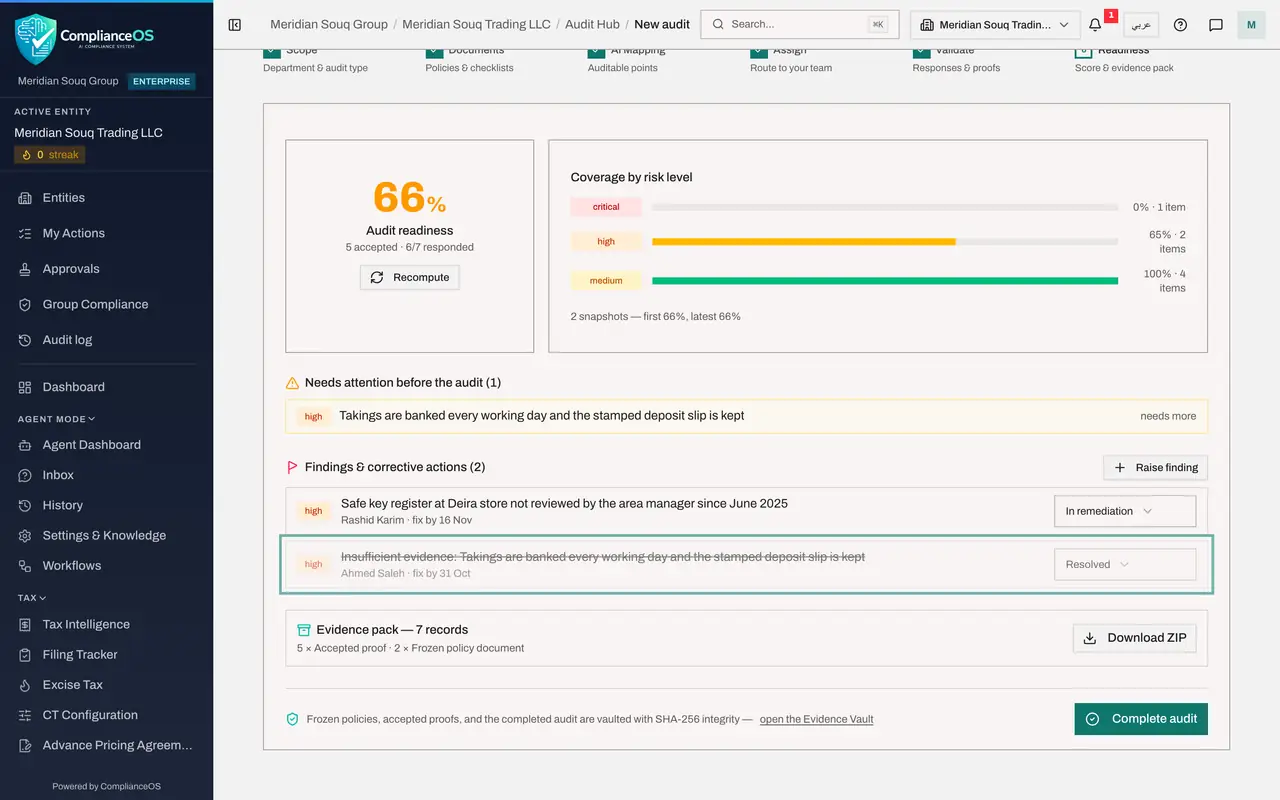
Open the audit and select Readiness, the last step in the bar. The large number is the audit readiness score. Under it you see how many requests are accepted and how many have been answered out of the total.
- 2
Select Recompute
The score is a snapshot. Select Recompute to calculate it again from the current state of the requests. Do this after you accept answers or waive requests.
- Select Recompute
- 3
Read the coverage by risk level
Coverage by risk level shows one bar for each risk level with the share that is covered and the number of items. A gap in critical or high matters more than a gap in low. The line below counts the snapshots taken so far, with the first and the latest score.
- 4
Read what needs attention
Needs attention before the audit lists the requests that still hold the score down, each with its risk level and its state, such as open, needs more or overdue. These are the requests to chase.
- 5
Check the resolved finding
Under Findings and corrective actions, the finding about the bank deposit slips now shows Resolved: its owner has recorded the corrective action and marked it done.
- 6
Close the finding
You have checked the duplicate slips, so open the status list on that finding and choose Closed. The title is struck through. Risk accepted is the other way to end a finding, when the company decides to live with it.
- Select Resolved
- Choose Closed
- 7
Read the evidence pack summary
Evidence pack counts the sealed records this audit has produced: the frozen policy documents from the day you confirmed the checklist, and one accepted proof for each answer you accepted.
- 8
Select Download ZIP
Select Download ZIP. A file whose name starts with audit-evidence-pack is saved to your downloads folder. It holds the sealed records, ready to hand to the auditor.
- Select Download ZIP
- 9
Open the Evidence Vault from here
At the bottom, a note says that frozen policies, accepted proofs and the completed audit are vaulted. Select open the Evidence Vault. The vault lists the audit's records beside the two documents you uploaded: each accepted answer, named after its request followed by the words accepted answer, with Accepted audit response underneath, and each frozen policy document under the policy's own name, with Frozen policy document underneath. All are labelled Sealed.
- Select open the Evidence Vault
How to check it worked
The finding about the bank deposit slips shows the status Closed with a line through its title, and a ZIP file whose name starts with audit-evidence-pack is in your downloads folder.
Common mistakes
- Reading the score as a pass mark. It is the share of the checklist that is covered by accepted evidence, weighted by risk. Open requests and requests that need more pull it down.
- Closing a finding without checking the owner's corrective action. Closed means you are satisfied.
- Sending the auditor loose files by email. The evidence pack holds the sealed records with their fingerprints, so the auditor can verify nothing was changed.
Check your understanding
1. What does the evidence pack contain?
- A.Every file in the Evidence Vault
- B.The sealed records of this audit: the frozen policy documents and the accepted proofs
- C.Only the checklist
- D.The audit log
Show answer
Answer: B. The sealed records of this audit: the frozen policy documents and the accepted proofs
The pack is built from what this audit vaulted. The line under its title counts each kind of record.
2. Which requests appear under Needs attention before the audit?
- A.Accepted requests
- B.Requests that still lack accepted evidence, such as those that need more or are overdue
- C.Waived requests only
- D.Findings
Show answer
Answer: B. Requests that still lack accepted evidence, such as those that need more or are overdue
The list flags the requests that hold the score down, each with its risk level and its state.